3 Specifications of the Devices
Page 73
3.14.4 Starting Up
3.14.4.1 Network Connection
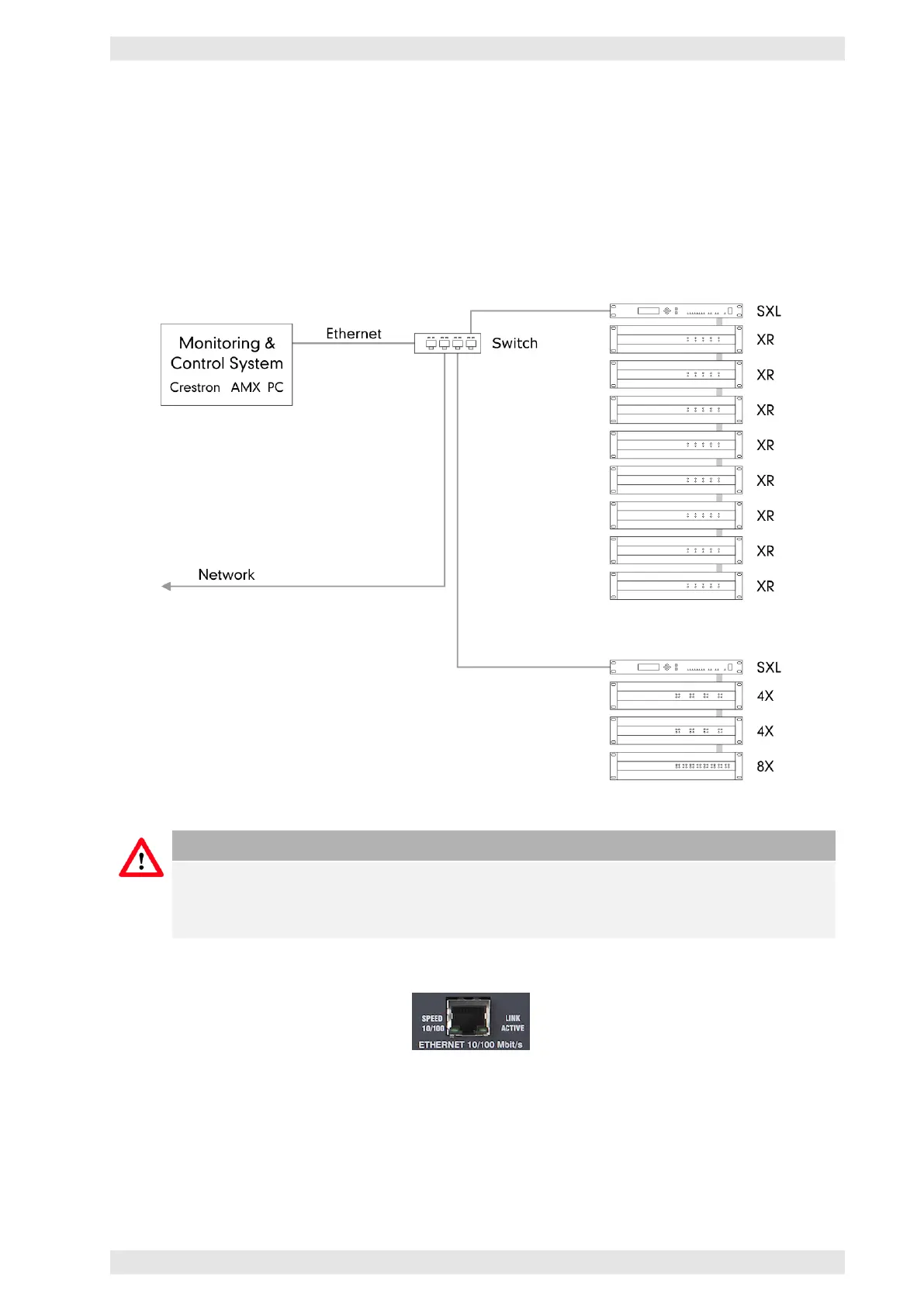
The SXL II communicates via Ethernet. An unlimited number of SXL II units may be connected to an Ethernet
network. The SXL II establishes the communication with local devices (amplifiers, backup switches, etc.). It
communicates via the LAN with the control computer or media control system. A standard RJ–45 connector
(CAT5), located on the back panel of the device, interfaces with the Ethernet network.
Figure 3.56: SXL II - Integration in an Ethernet network
Caution
The SXL unit works with 10/100 Mbps (you might have to reconfigure your PC). In the case your
computer does not support 10/100 Mbps, it is recommended to connect to an Ethernet switch
that supports both data rates.
Figure 3.57: SXL II - Ethernet Connector
3.14.4.2 Connection of the Amplifiers and the AX16
The AX16 can be conncted via I
2
C or RS–485, depending on the available amplifier interface (refer to Data
Port section 2.11).
c
2016 Bittner Audio Int. GmbH



 To Next Page