3 Specifications of the Devices
Page 93
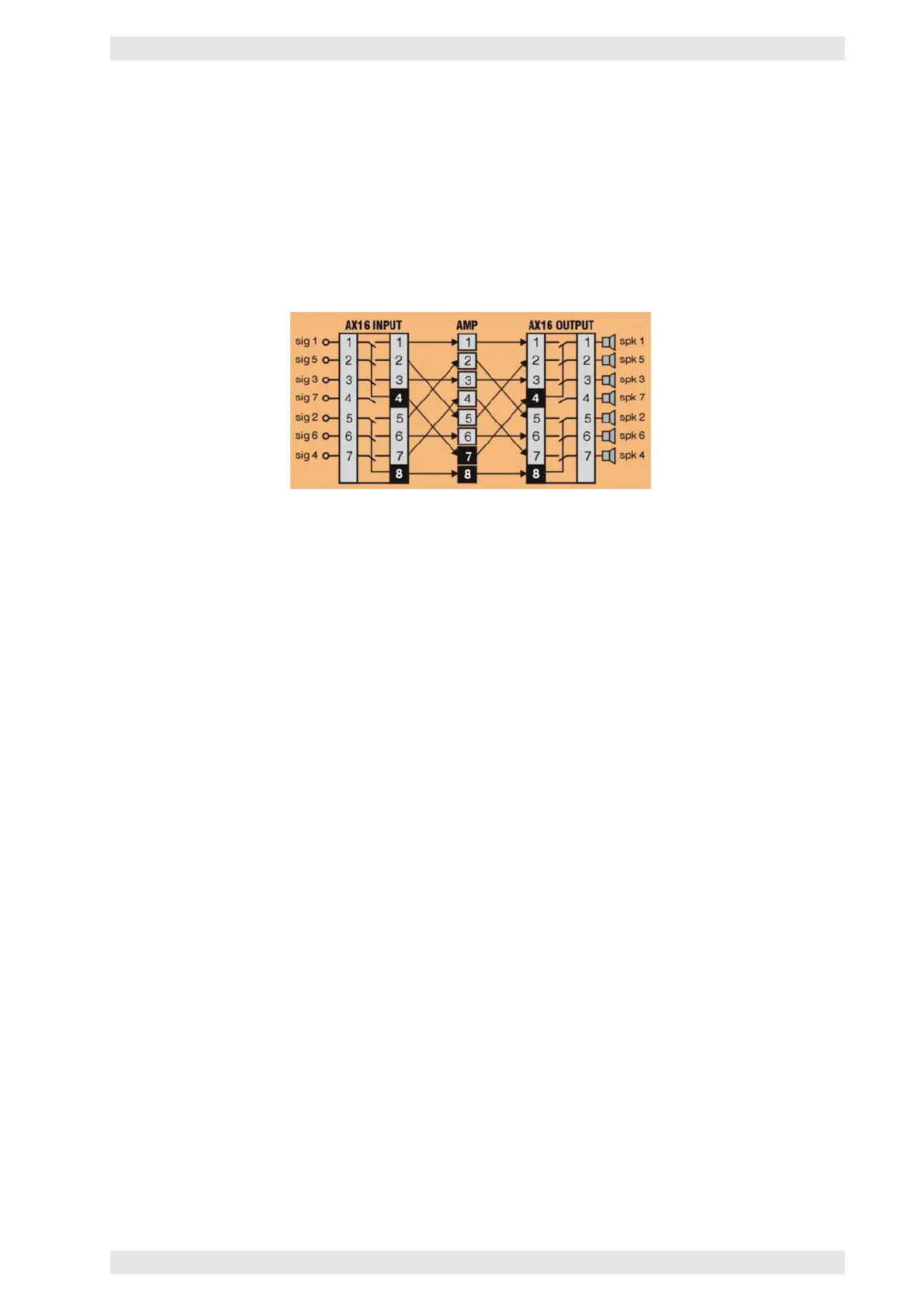
4X/8X Cross Routing
If 4- and 8-channel amplifiers are to be connected to an AX16, it is necessary to bear in mind that these
amplifiers have only one power supply per 4 channels. In case of a defect it may be therefore necessary to
replace not only 2 but 4 channels.
Cross cabling ensures that the defective module (2 channels) is not connected to the same power supply.
If a complete replacement of defective 4- or 8channel is required, the AX16 has to be set to the 3+1 or 1+1
mode. This ensures the availability of at least 4 replacement channels.
Figure 3.76: SXL II - Cross Routing for 4X/8X Operation
3.14.9.6 Permanent Backup of Operation Modes
After powering up and its initialization, the SXL II configures all connected amplifiers. Thereby, it recalls the
stored files of a configuration. There are three different possibilities:
A. A certain configuration is recalled
B. The last active configuration is recalled
C. All last active settings are restored
In case A, the appropriate number 1 to 16 of the configuration is set in the SXL II. The factory default is
number 1.
In case B, the configuration 0 is set, as it always contains a copy of the last active configuration (refer to
section 3.14.8.6).
C is an extension of B, as possible changes (e.g. via the Ethernet) may also be restored after recalling a
configuration. It needs to be explicitly activated.
The necessary parameter KeepActCfg is accessible via Service Mode Level 1 (refer to section 3.14.7.2). It
may be accessed under the CONFIG menu. When activated (set value to ON), the value of the parameter
DefaultCfg is automatically set to 0 at the same time.
To test this function, it is recommended to set the USER LED in such a way that it indicates the writing of
data to the internal flash disk. Set the parameter LedScr in the DIAG menu to the KeepActWr value. Now,
if any other parameter is being changed, it will be stored after at least 3 seconds on the internal flash disk.
The USER LED will indicate this activity by a short illumination.
c
2016 Bittner Audio Int. GmbH



 To Next Page