Page 86
3 Specifications of the Devices
AX16 shows a double arrow on its right side. It is being used to extend the main part of the display of the
parameters.
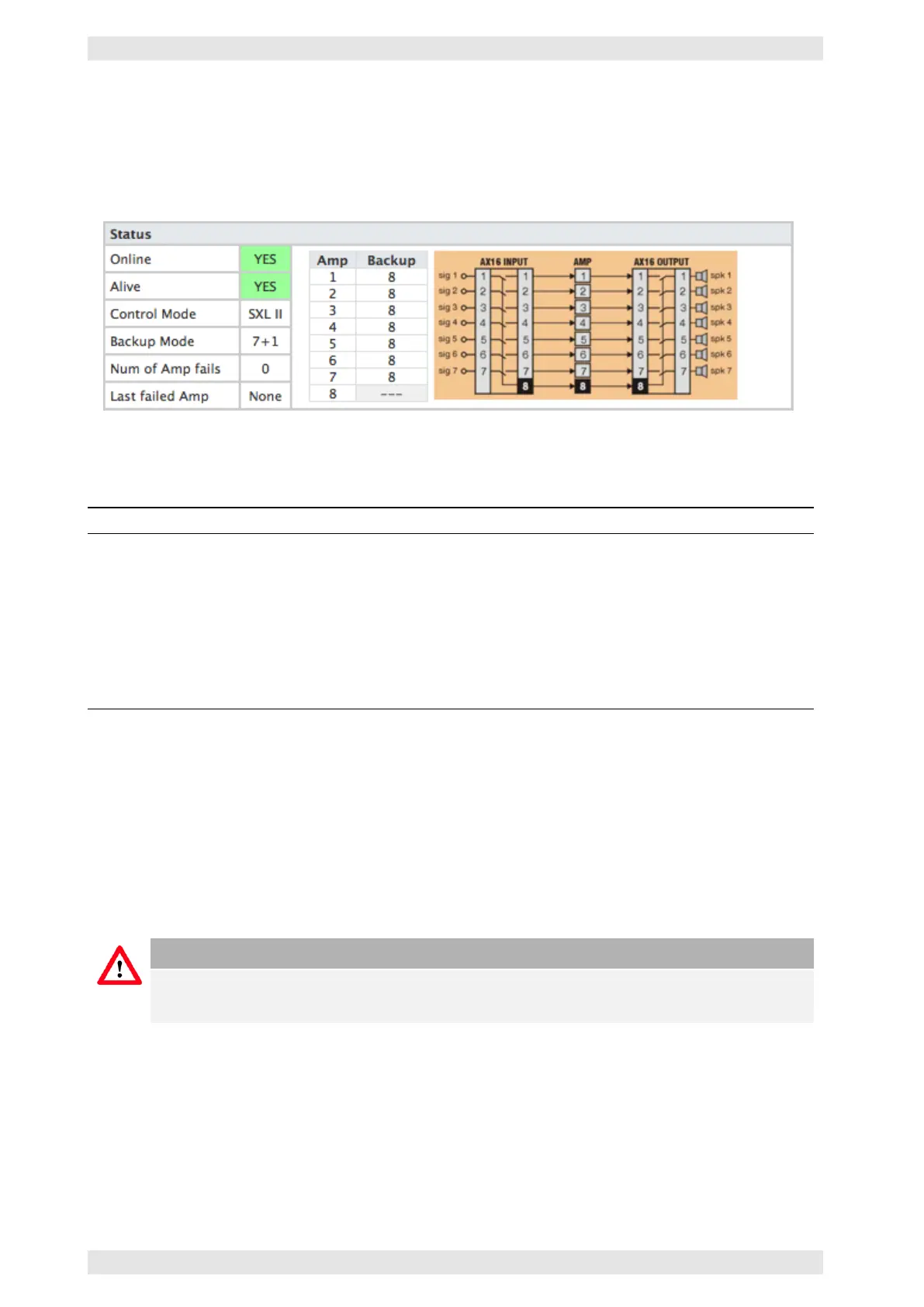
The block diagram and its corresponding tabel display the functions of the individual amplifiers, depending
on the selected mode of the AX16.
Figure 3.74: SXL II - Web Interface: Status Information
The controllable parameters are located at the lower part of the page:
Function Description
Use AX16 Defines which amplifiers are part of the backup switching.
Force Amp error For testing purposes, an error may be simulated for the specified
amplifier(s).
Copy settings to backup before
switch
If an amplifier fails, its settings will be transferred to the backup
amplifier.
Split mode Activates a mode that allows the use of amplifiers with or without SXL II
dataport to be used with an AX16 (refer to section 3.14.9.5).
4X/8X cross routing Allows for the use of 4- and 8-channel amplifiers with the AX16 (refer to
section 3.14.9.5)
Copying all settings to the backup amplifier is a unique Bittner Audio feature and should always be activated.
If the faulty amplifier and the backup amplifier are of the same model, all settings will be transmitted 1 to
1. This procedure and the following switch-over will be completed after 250ms.
The copying includes all settings that are provided by the backup amplifier. In any case, the system will
try to maintain the same volume. To achieve this, the SXL II „translates“ the level settings of the different
amplifiers. This feature allows for the replacement of defective amplifiers by models of different power, for
example a XR1500 with a XR4000!
Caution
The copying of all settings to the backup amplifier is a unique Bittner Audio feature and will not
work with models of third-party suppliers.
3.14.8.8 Misc
Some function blocks of the SXL II have been combined on this page. They are global settings for the SXL II
and will be explained in the following sections.
c
2016 Bittner Audio Int. GmbH



 To Next Page