Page 80
3 Specifications of the Devices
The associated parameters can be found in the CONFIG menu. The sequence is:
1. Select parameter CfgNumber and set the configuration number accordingly.
2. Select parameter/function CfgSave or CfgRecall. This parameter is set to OFF.
3. Setting the parameter to ON. After completing the desired changes, the parameter will automatically
be set OFF again.
The parameters CfgStatus and ActualCfg may be used to check whether the procedure has been accomplished
correctly. The parameter CfgStatus should show OK and the parameter ActualCfg should display the selected
configuration number.
3.14.8 Web Interface
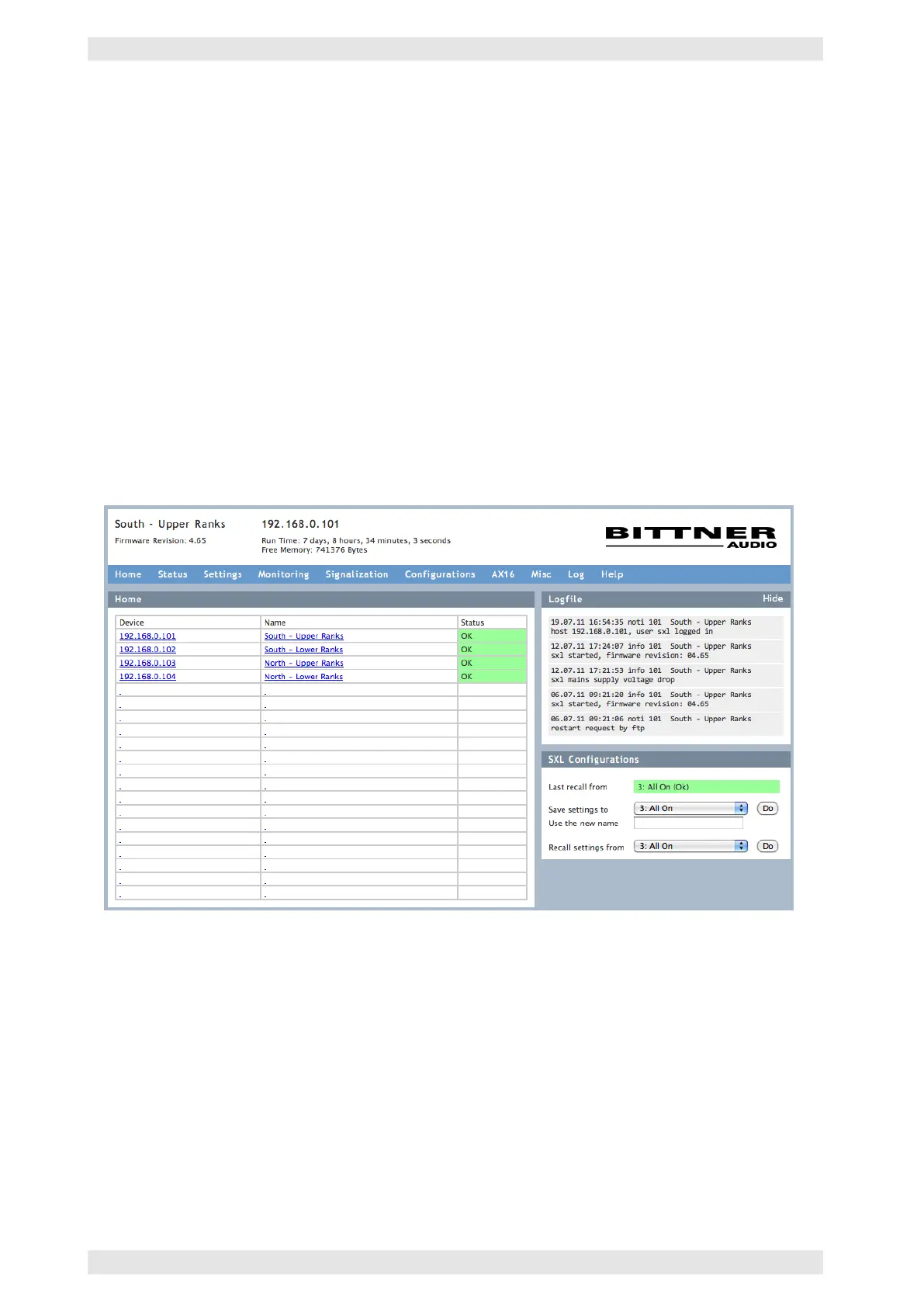
As an easy way of operation, the SXL II offers a web interface. The advantages are:
• Access to all parameters (except Service Mode) and status messages
• No software installation necessary
• Software and firmware always match
Figure 3.66: SXL II - Web Interface
The web interface is made up of several files (pages). These files may be edited with any standard text
or web editor. Consequently, specific requirements, e.g. illustrations in different languages, may easily be
accommodated.
To use the web interface, it is necessary to:
• Connect it to a PC (directly or via an Ethernet network)
• Run a common web browser (Internet Explorer, Firefox, Safari, etc.)
• Know the IP address of the SXL
c
2016 Bittner Audio Int. GmbH



 To Next Page