3 Specifications of the Devices
Page 83
In addition the Settings segment provides a comfortable way to copy and paste all or only selected DSP
settings between amplifier channels:
1. Select the channel to be copied. Alternatively all displayed DSP settings are being copied.
2. Device will select the DSP functions by clicking into the check box. To copy only the EQ settings for
example, only the check box EQ is selected.
3. Channel selects the destination(s) with the 16 check boxes.
4. Clicking the Set button will copy the selected settings.
3.14.8.4 Monitoring
This page consists of three sections.
Signal Generator
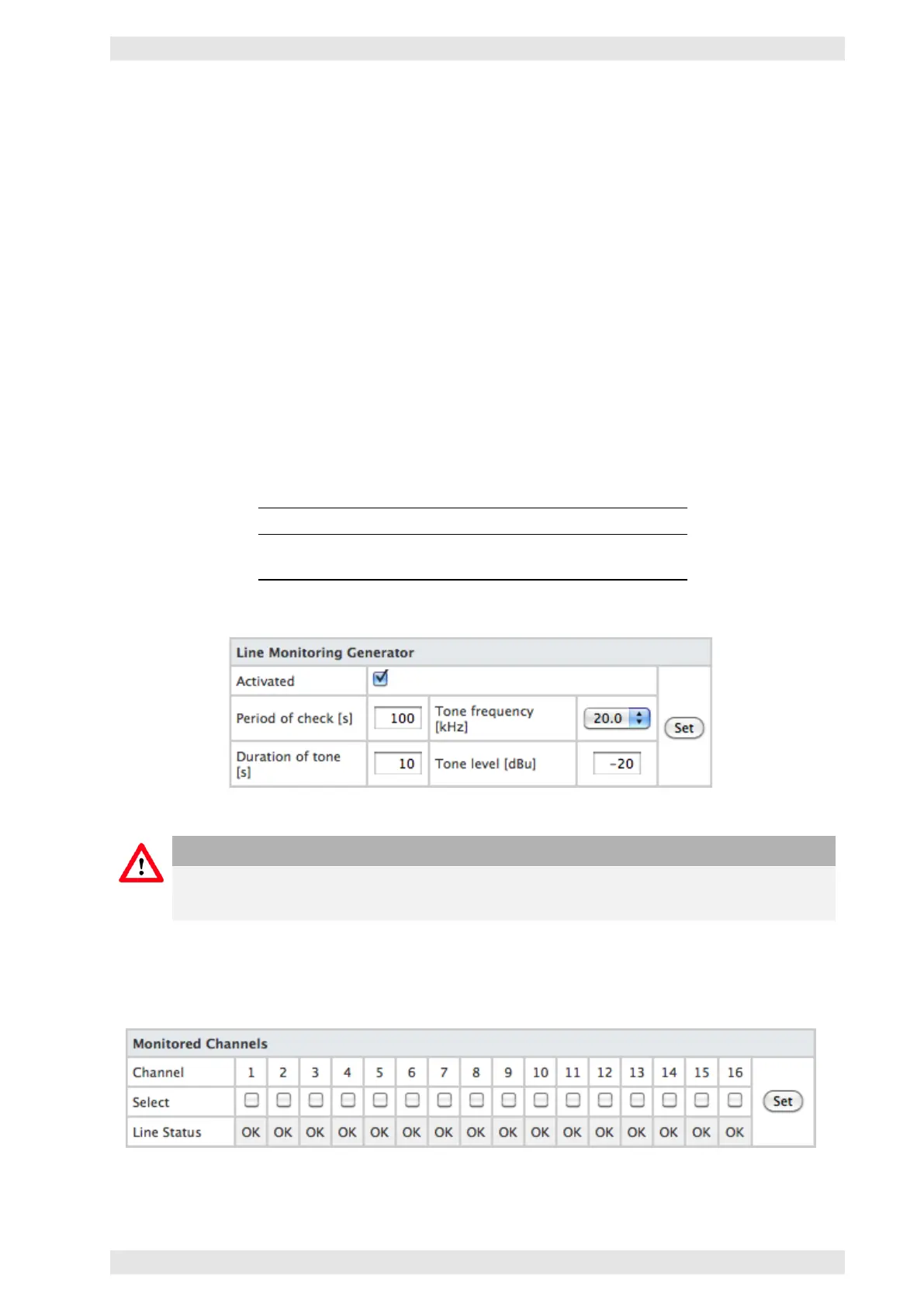
The pilot tone generator works with an adjustable frequency between 19 and 22.5 kHz. The output level
can be freely adjusted.
Two parameters set the intervals:
Parameter Function
Period of check Total duration of deactivation and operation
Duration of tone Active time
Figure 3.70: SXL II - Web Interface: Signal Generator
Caution
It is possible to switch relay GPR 1 or GPR 2 in the selected interval. This allows fo the use of an
external signal generator (refer to Line Monitoring section 3.14.9.3).
Monitored Channels
The channels to be monitored have to be selected.
Figure 3.71: SXL II - Web Interface: Monitored Channels
c
2016 Bittner Audio Int. GmbH



 To Next Page