BBP™31 Sign & Label Printer
User Guide
2-7
Unpacking and Setting up Printer
Setting up the Printer
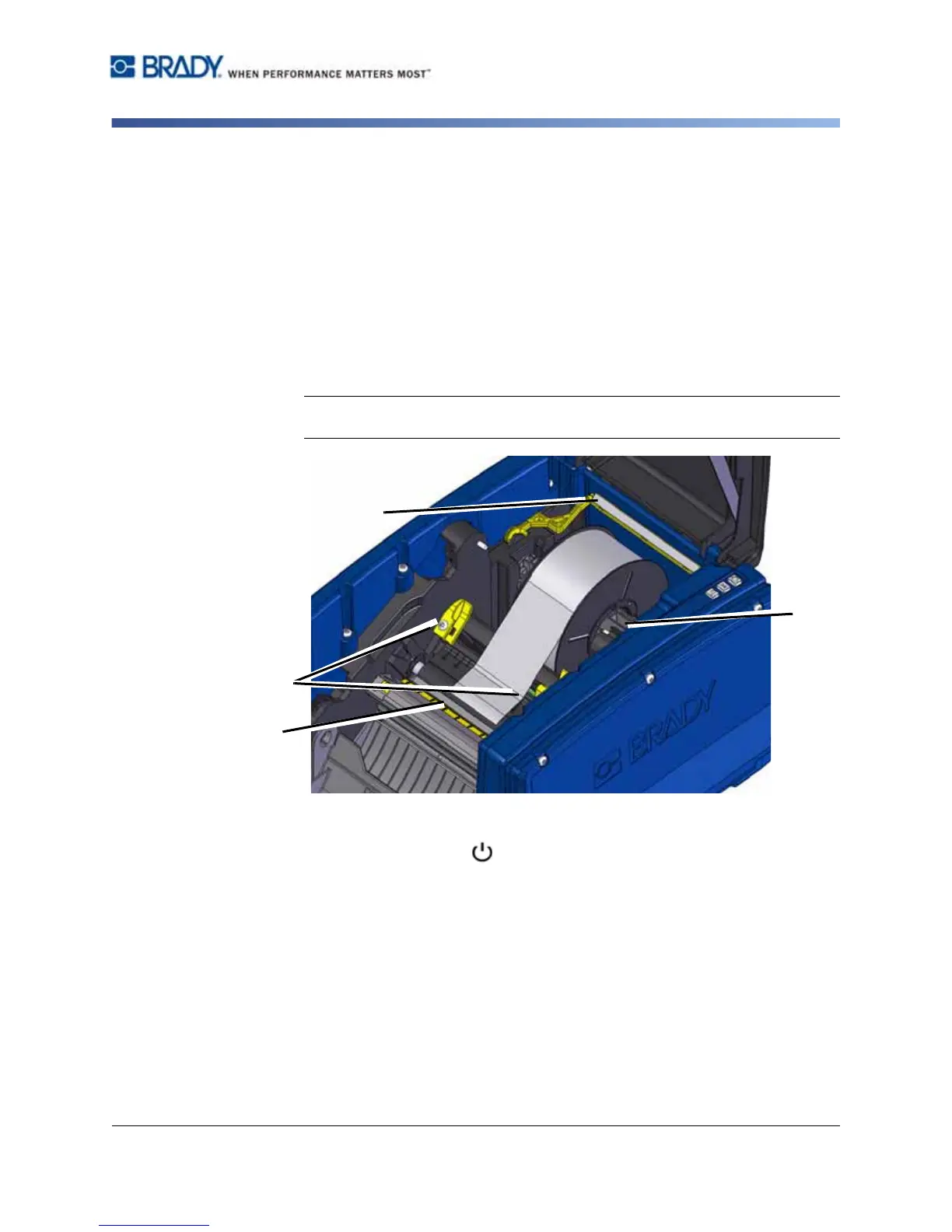
3. Swing yellow media wiper [3] to far right (when facing display), if engaged.
4. Slide yellow media guides [4] to full-open.
5. Remove existing media, if installed, by pulling cartridge from printer. Media
unwinds from the top of the roll.
6. Insert media cartridge until spindle ends rest in slots of media holder [5].
7. Feed media from top of roll until it sits on top of black rubber roller ~.25 in.
(6.35 mm) from cutter entrance.
8. Close media guides until they touch edge of media liner with media under the
guides.
9. Move media wiper into position so it rests on media.
Note: Not all media requires the use of the media wiper. Engage the media
wiper only if needed for the supply installed.
10. Close and latch ribbon cover, then close enclosure cover.
11. If printer was off, press . The system detects the installed supplies, sets
background and foreground colors, indicates the label dimensions and the
amount of remaining supplies.



 To Next Page