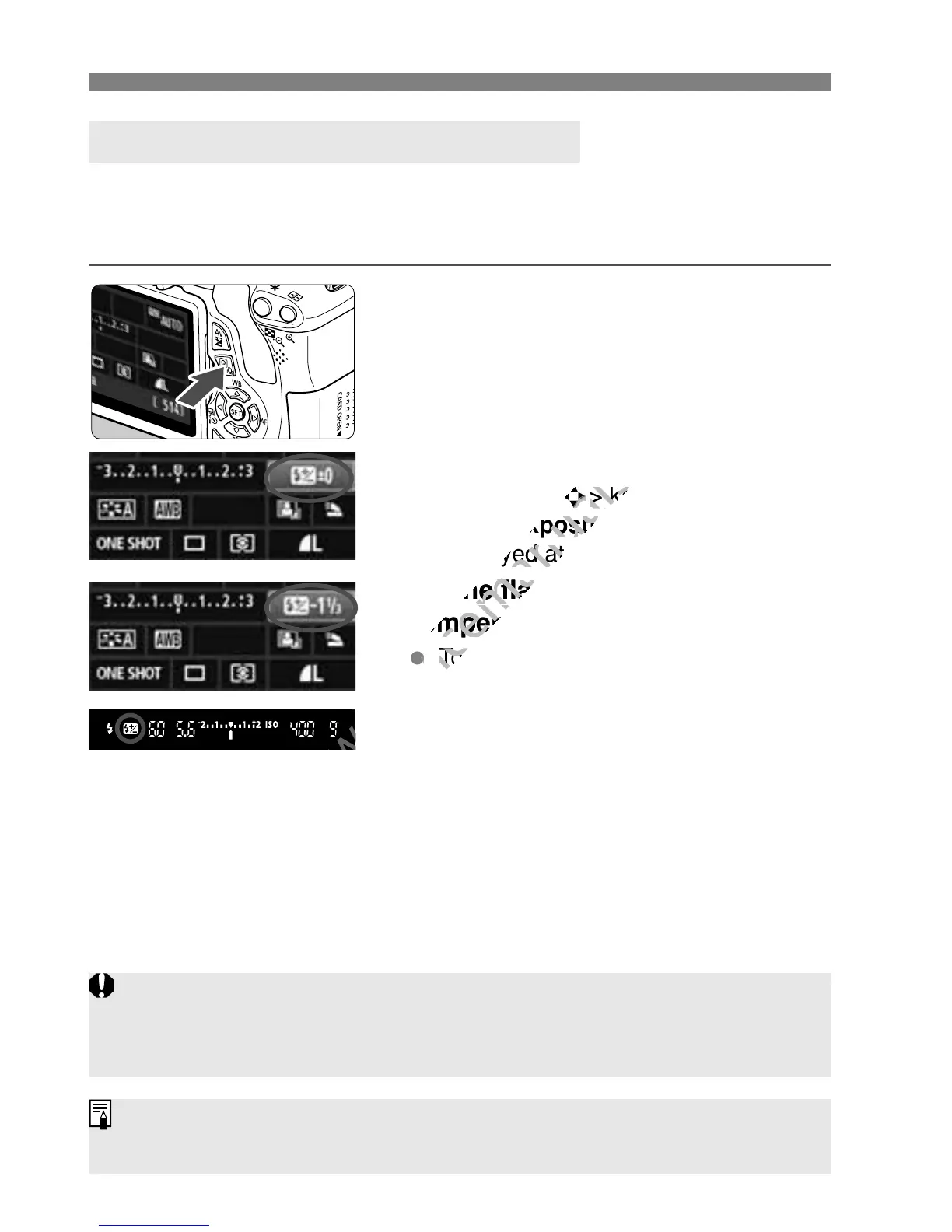
Setting Exposure CompensationN
104
Set flash exposure compensation if the flash exposure of the subject
does not come out as desired. You can set the flash exposure
compensation up to ±2 stops in 1/3-stop increments.
1
Press the <Q> button. (7)
X The Quick Control screen will appear
(p.41).
2
Select [y].
Press the <S> key to select [y*].
X [Flash exposure comp.] will be
displayed at the bottom.
3
Set the flash exposure
compensation amount.
To make the flash exposure brighter,
turn the <6> dial to the right.
To make it darker, turn the <6> dial
to the left. (Decreased exposure)
X When you press the shutter button
halfway, the <y> icon will appear in
the viewfinder.
After taking the picture, cancel the
flash exposure compensation by
setting it back to 0.
y Flash Exposure Compensation
If [2 Auto Lighting Optimizer] (p.109) is set to any setting other than
[Disable], the image may look bright even if a decreased exposure
compensation or decreased flash exposure compensation has been set.
You can also set flash exposure compensation with [Built-in flash func.
setting] in [1 Flash control] (p.181).



 To Next Page