119
You can correct the white balance that has been set. This adjustment
will have the same effect as using a commercially-available color
temperature conversion filter or color compensating filter. Each color
can be corrected to one of nine levels.
This is for advanced users who are familiar with using color temperature
conversion or color compensating filters.
1
Select [WB Shift/BKT].
Under the [2] tab, select [WB Shift/
BKT], then press <0>.
X The WB correction/WB bracketing
screen will appear.
2
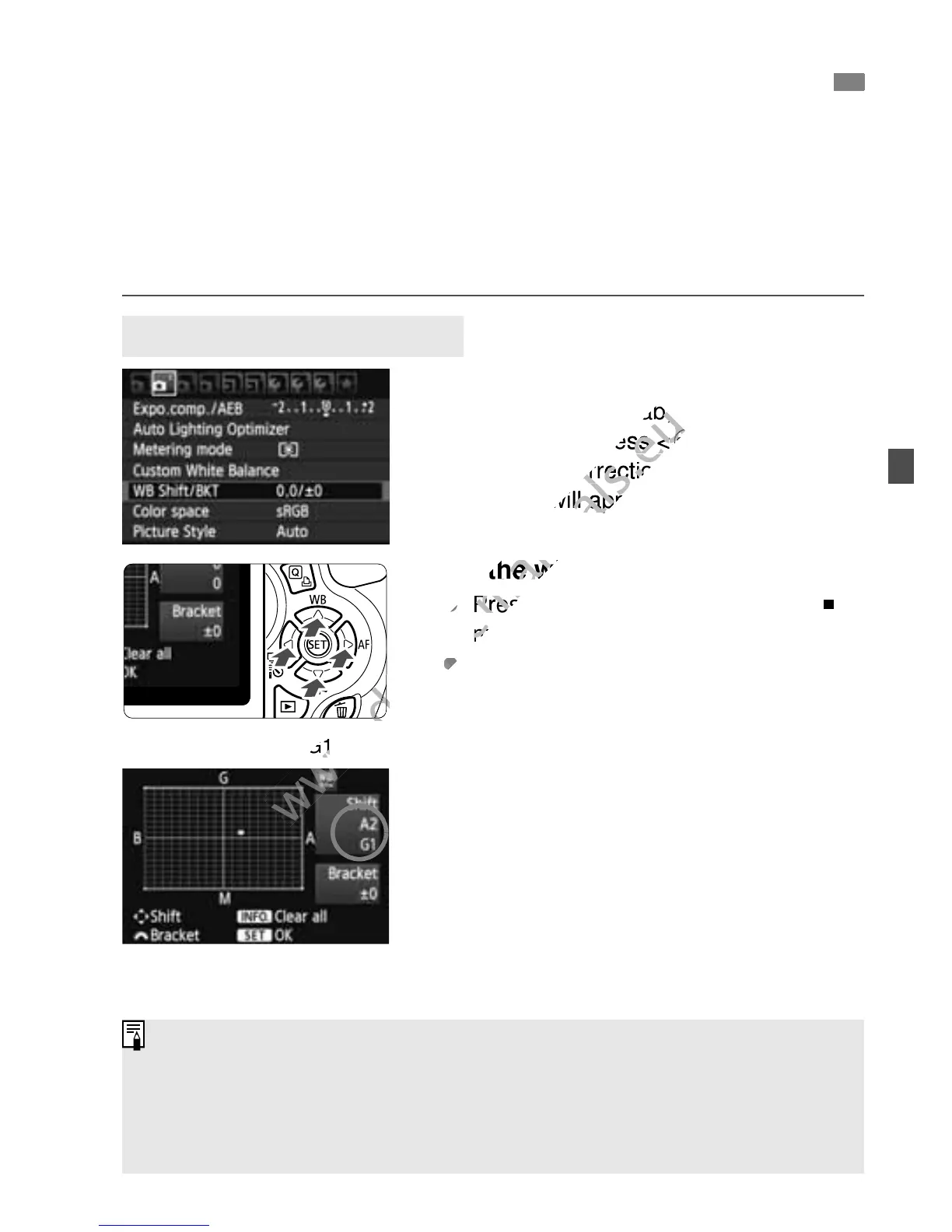
Set the white balance correction.
Press the <S> key to move the “ ”
mark to the desired position.
B is for blue, A is amber, M is
magenta, and G is green. The color in
the respective direction will be
corrected.
On the upper right, “Shift” indicates
the direction and correction amount.
Pressing the <C > button will
cancel all the [WB Shift/BKT]
settings.
Press <0> to exit the setting and
return to the menu.
2
Adjusting the Color Tone for the Light Source
N
White Balance Correction
Sample setting: A2, G1
During the white balance correction, <2> will be displayed in the
viewfinder and on the LCD monitor.
One level of the blue/amber correction is equivalent to 5 mireds of a color
temperature conversion filter. (Mired: Measuring unit indicating the
density of a color temperature conversion filter.)



 To Next Page