EasyManua.ls Logo

Canon EOS 600D - Handy Features; Silencing the Beeper; Card Reminder; Setting the Image Review Time

Canon EOS 600D
328 pages
Print Icon
To Next Page IconTo Next Page
To Previous Page IconTo Previous Page
Loading...
166
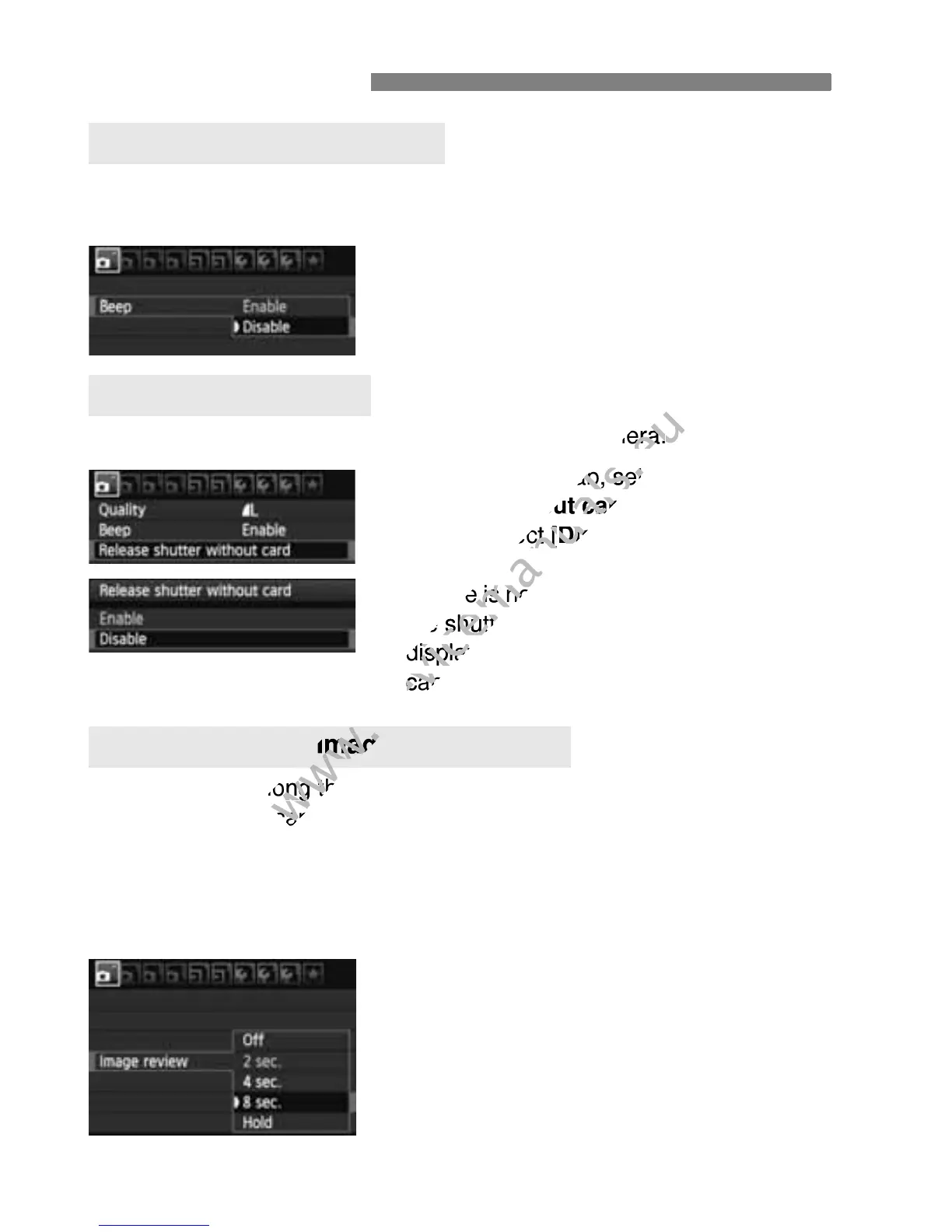
You can prevent the beeper from sounding when focus is achieved or
during self-timer operation.
Under the [1] tab, select [Beep], then
press <0>. Select [Disable], then
press <0>.
This prevents shooting if there is no card in the camera.
Under the [1] tab, select [Release
shutter without card], then press
<0>. Select [Disable], then press
<0>.
If there is no card installed and you press
the shutter button, “Card” will be
displayed in the viewfinder, and you
cannot release the shutter.
You can set how long the image is displayed on the LCD monitor
immediately after capture. If [Off] is set, the image will not be displayed
immediately after image capture. If [Hold] is set, the image review will
be displayed up until the [Auto power off] time.
During image review, if you operate any camera controls such as
pressing the shutter button halfway, the image review will end.
Under the [1] tab, select [Image
review], then press <0>. Select the
desired setting, then press <0>.
Handy Features
3 Silencing the Beeper
3 Card Reminder
3 Setting the Image Review Time

www.devicemanuals.eu
This prevents shooting if there is no card in the camera.
www.devicemanuals.eu
This prevents shooting if there is no card in the camera.
] tab, select [
www.devicemanuals.eu
] tab, select [
shutter without card
www.devicemanuals.eu
shutter without card
>. Select [
www.devicemanuals.eu
>. Select [
Disable
www.devicemanuals.eu
Disable
If there is no card installed and you press
www.devicemanuals.eu
If there is no card installed and you press
the shutter button,
www.devicemanuals.eu
the shutter button,
displayed in the viewfinder, and you
www.devicemanuals.eu
displayed in the viewfinder, and you
cannot release the shutter.
www.devicemanuals.eu
cannot release the shutter.
www.devicemanuals.eu
You can set how long the image is displayed on the LCD monitor
www.devicemanuals.eu
You can set how long the image is displayed on the LCD monitor
immediately after capture. If [
www.devicemanuals.eu
immediately after capture. If [
www.devicemanuals.eu
Setting the Image Review Time
www.devicemanuals.eu
Setting the Image Review Time

Table of Contents

Other manuals for Canon EOS 600D

Related product manuals