36
1
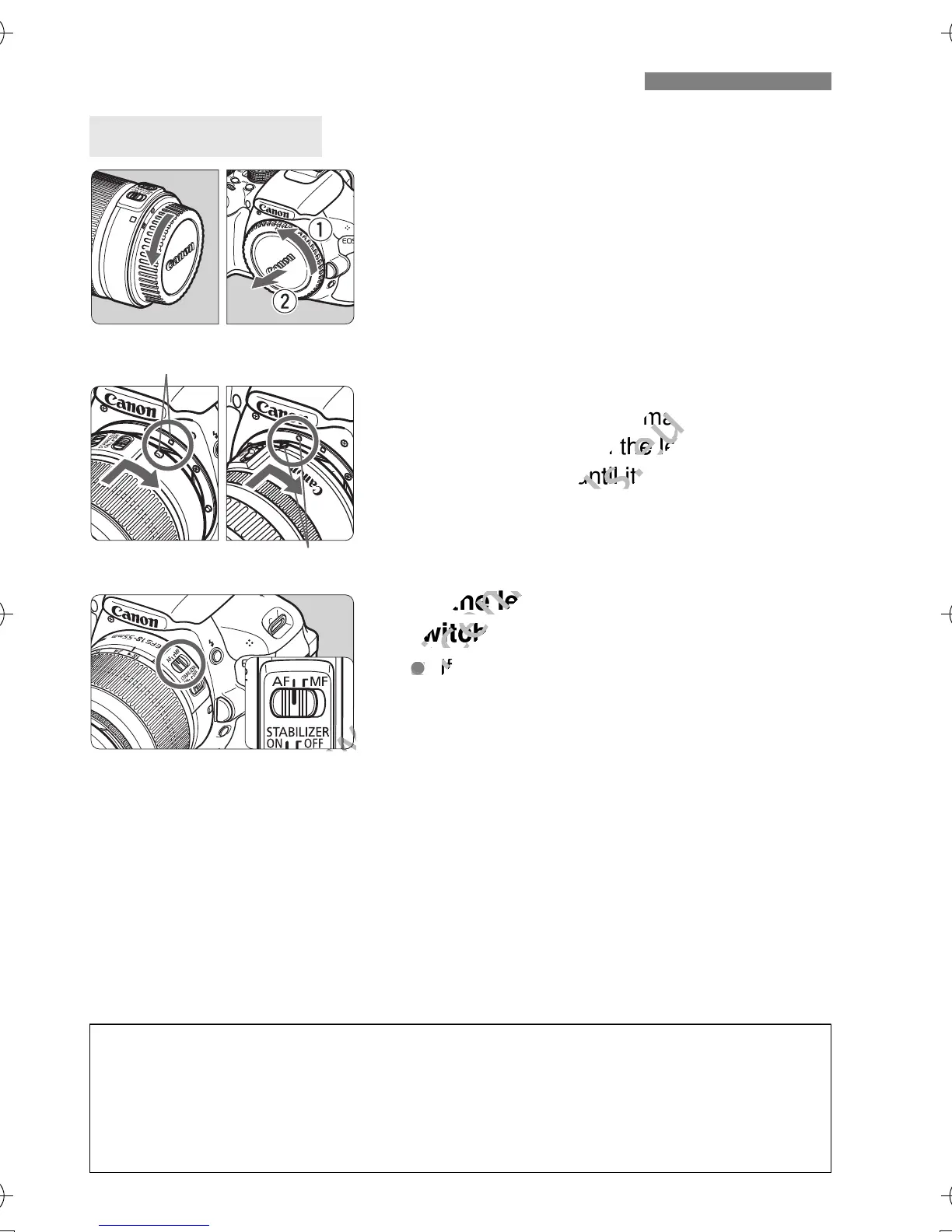
Remove the caps.
Remove the rear lens cap and the
body cap by turning them as shown
by the arrows.
2
Attach the lens.
Align the lens’ red or white index with
the camera’s index matching the
same color. Turn the lens as shown
by the arrow until it snaps in place.
3
On the lens, set the focus mode
switch to <AF> (autofocus).
If it is set to <MF> (manual focus),
autofocus will not operate.
4
Remove the front lens cap.
Attaching and Detaching a Lens
Attaching a Lens
White index
Red index
Minimizing Dust
When changing lenses, do it in a place with minimal dust.
When storing the camera without a lens attached, be sure to attach the
body cap to the camera.
Remove dust on the body cap before attaching it.
H104_HG_EN.book Page 36 Monday, April 9, 2012 11:28 AM
the camera’s index matching the
www.devicemanuals.eu
the camera’s index matching the
same color. Turn the lens as shown
www.devicemanuals.eu
same color. Turn the lens as shown
by the arrow until it snaps in place.
www.devicemanuals.eu
by the arrow until it snaps in place.
On the lens, set the focus mode
www.devicemanuals.eu
On the lens, set the focus mode
switch to <AF> (autofocus).
www.devicemanuals.eu
switch to <AF> (autofocus).
If it is set to <
www.devicemanuals.eu
If it is set to <



 To Next Page