105
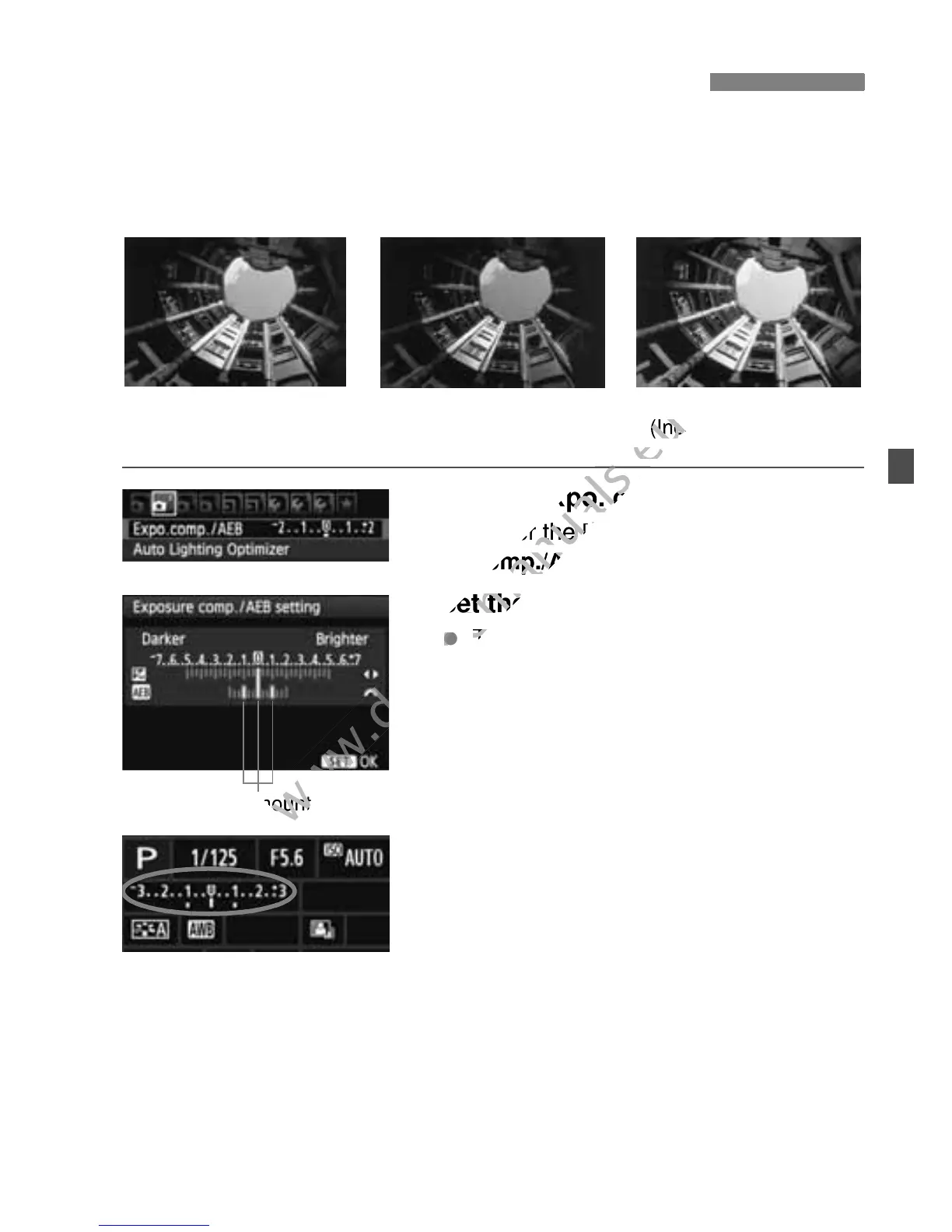
This feature takes exposure compensation a step further by varying the
exposure automatically (up to ±2 stops in 1/3-stop increments) with
three shots as shown below. You can then choose the best exposure.
This is called AEB (Auto Exposure Bracketing).
1
Select [Expo. comp./AEB].
Under the [2] tab, select [Expo.
comp./AEB], then press <0>.
2
Set the AEB amount.
Turn the <6> dial to set the AEB
amount.
Press the <U> key to set the
exposure compensation amount. If
AEB is combined with exposure
compensation, AEB will be applied
centering on the exposure
compensation amount.
Press <0> to set it.
When you press the <M> button
to exit the menu, the AEB level will be
displayed on the LCD monitor.
3
Take the picture.
Focus and press the shutter button
completely. The three bracketed
shots will be taken in this sequence:
Standard exposure, decreased
exposure, and increased exposure.
3 Auto Exposure BracketingN
Standard exposure
Darker exposure
(Decreased exposure)
Brighter exposure
(Increased exposure)
AEB amount



 To Next Page