EasyManua.ls Logo

Canon EOS 600D - Setting Copyright Information

Canon EOS 600D
328 pages
Print Icon
To Next Page IconTo Next Page
To Previous Page IconTo Previous Page
Loading...
Handy Features
172
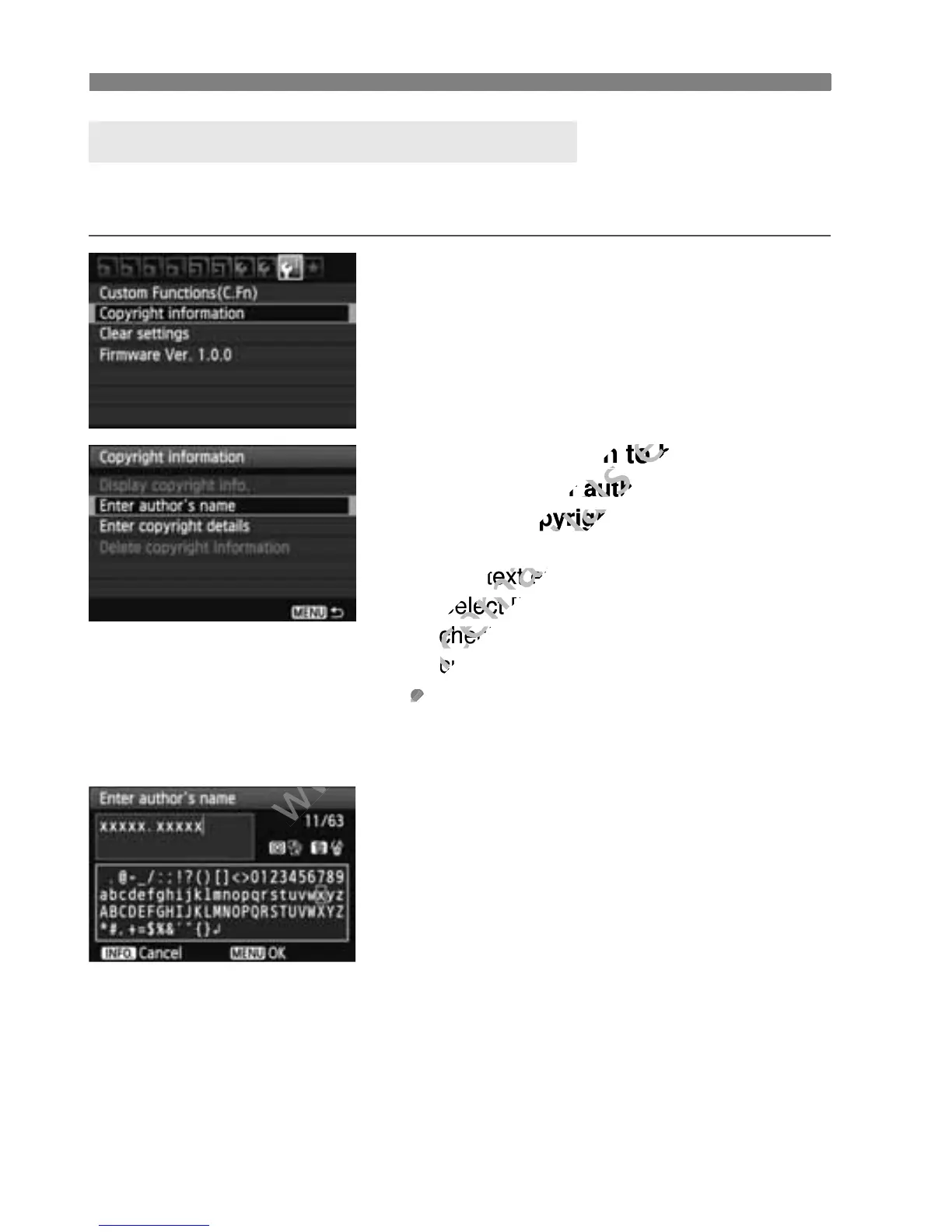
When you set the copyright information, it will be appended to the
image as Exif information.
1
Select [Copyright information].
Under the [7] tab, select [Copyright
information], then press <0>.
2
Select the option to be set.
Select [Enter authors name] or
[Enter copyright details], then press
<0>.
X The text entry screen will appear.
Select [Display copyright info.] to
check the copyright information
currently set.
Select [Delete copyright
information] to delete the copyright
information currently set.
3
Enter text.
Refer to “Text Entry Procedure” on
the next page and enter the copyright
information.
Enter up to 63 alphanumeric
characters and symbols.
4
Exit the setting.
After entering the text, press the
<M> button to exit.
3 Setting Copyright InformationN

www.devicemanuals.eu
Select the option to be set.
www.devicemanuals.eu
Select the option to be set.
Enter authors name
www.devicemanuals.eu
Enter authors name
Enter copyright details
www.devicemanuals.eu
Enter copyright details
The text entry screen will appear.
www.devicemanuals.eu
The text entry screen will appear.
Select [
www.devicemanuals.eu
Select [
Display copyright info.
www.devicemanuals.eu
Display copyright info.
check the copyright information
www.devicemanuals.eu
check the copyright information
currently set.
www.devicemanuals.eu
currently set.
www.devicemanuals.eu

Table of Contents

Other manuals for Canon EOS 600D

Related product manuals