3 Menu Function Settings
160
[o] tab
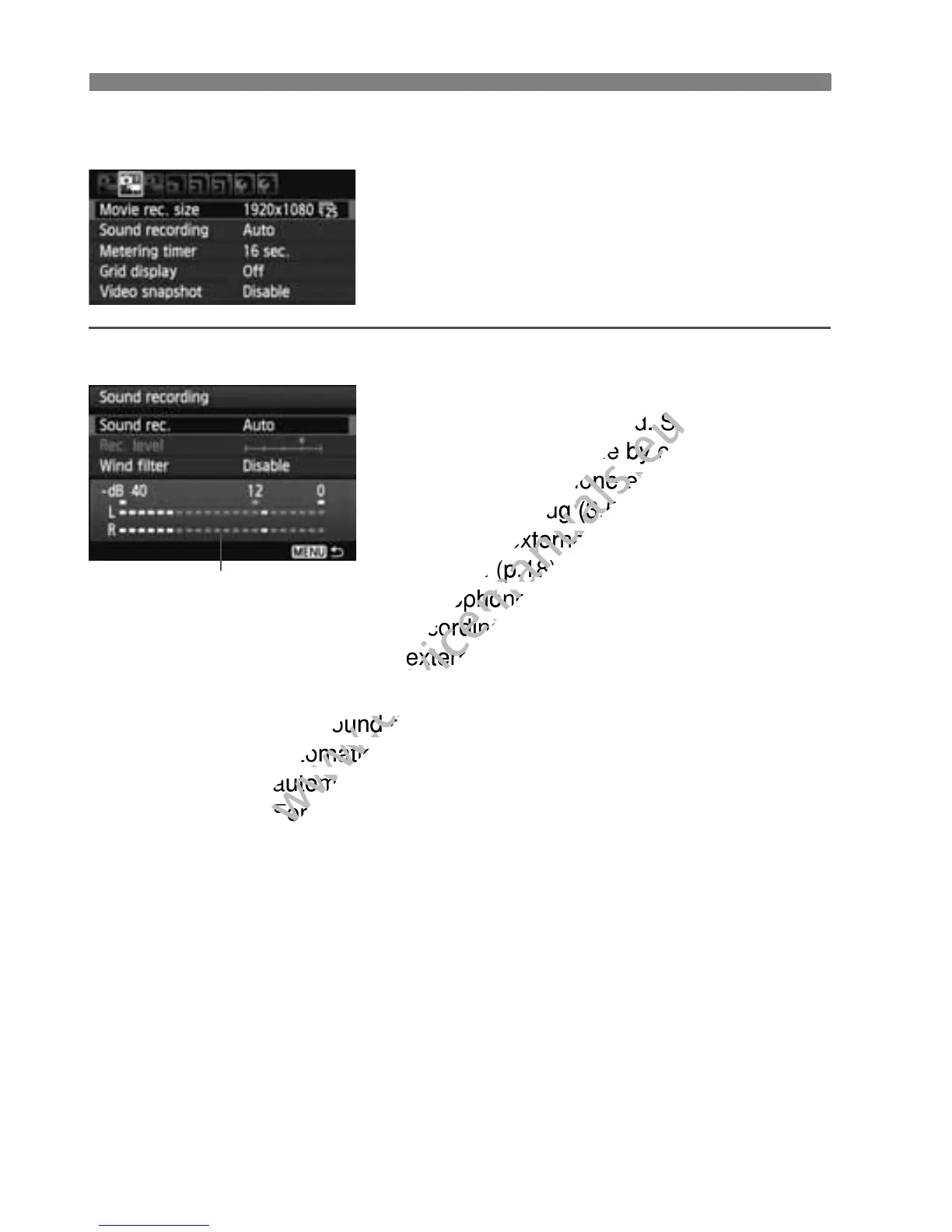
Sound recording
Normally, the built-in microphone will
record monaural sound. Stereo sound
recording is possible by connecting an
external microphone equipped with a
stereo mini plug (3.5mm dia.) to the
camera’s external microphone IN
terminal (p.18). When an external
microphone is connected, sound
recording will switch automatically to the
external microphone.
[Sound rec.] options
[Auto] : The sound recording level will be adjusted
automatically. Auto level control will operate
automatically in response to the sound level.
[Manual] : For advanced users. You can adjust the sound
recording level to one of 64 levels. Select [Rec. level]
and look at the level meter while pressing the <U>
key to adjust the sound recording level. While looking
at the peak hold indicator (approx. 3 sec.), adjust so
that the level meter sometimes lights up the “12” (-12
dB) mark on the right for the loudest sounds. If it
exceeds “0,” the sound will be distorted.
[Disable] : Sound will not be recorded.
Level meter
Normally, the built-in microphone will
www.devicemanuals.eu
Normally, the built-in microphone will
record monaural sound. Stereo sound
www.devicemanuals.eu
record monaural sound. Stereo sound
recording is possible by connecting an
www.devicemanuals.eu
recording is possible by connecting an
external microphone equipped with a
www.devicemanuals.eu
external microphone equipped with a
stereo mini plug (3.5mm dia.) to the
www.devicemanuals.eu
stereo mini plug (3.5mm dia.) to the
camera’s external microphone IN
www.devicemanuals.eu
camera’s external microphone IN
terminal (p.18). When an external
www.devicemanuals.eu
terminal (p.18). When an external
microphone is connected, sound
www.devicemanuals.eu
microphone is connected, sound
recording will switch automatically to the
www.devicemanuals.eu
recording will switch automatically to the
external microphone.
www.devicemanuals.eu
external microphone.
] : The sound recording le
www.devicemanuals.eu
] : The sound recording le
automatically. Auto level control will operate
www.devicemanuals.eu
automatically. Auto level control will operate
automatically in response to the sound level.
www.devicemanuals.eu
automatically in response to the sound level.
] : For advanced users. You can adjust the sound
www.devicemanuals.eu
] : For advanced users. You can adjust the sound



 To Next Page