EasyManua.ls Logo

Canon EOS 600D - Z: Changing the ISO Speed

Canon EOS 600D
328 pages
Print Icon
To Next Page IconTo Next Page
To Previous Page IconTo Previous Page
Loading...
79
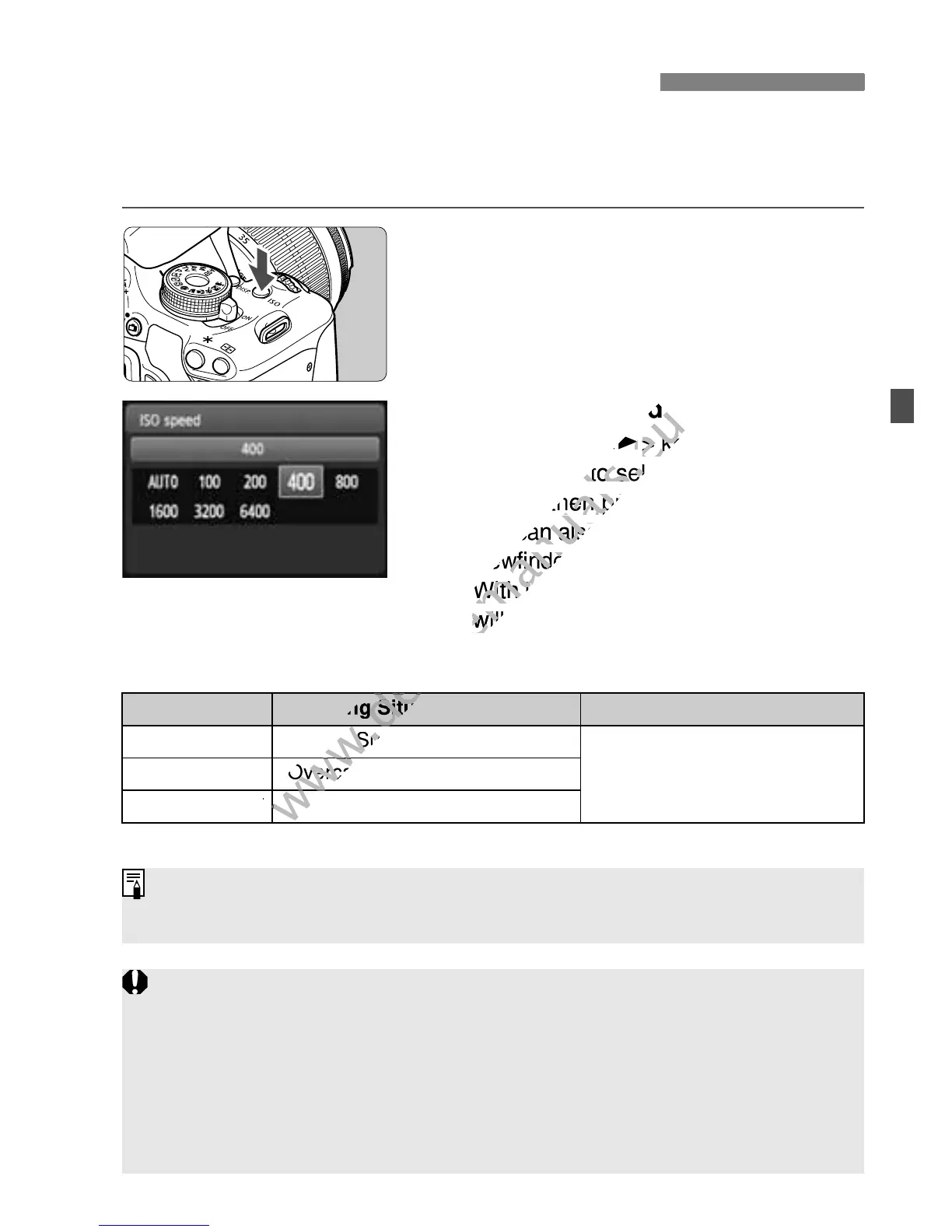
Set the ISO speed (image sensor’s sensitivity to light) to suit the
ambient light level. In Basic Zone modes, the ISO speed is set
automatically (p.80).
1
Press the <Z> button. (9)
X [ISO speed] will appear.
2
Set the ISO speed.
Press the <U> key or turn the
<6> dial to select the desired ISO
speed, then press <0>.
You can also set the ISO speed in the
viewfinder while turning the <
6
> dial.
With [AUTO] selected, the ISO speed
will be set automatically (p.80).
ISO Speed Guide
* High ISO speeds will result in grainier images.
Z: Changing the ISO SpeedN
ISO Speed Shooting Situation (No flash) Flash Range
100 - 400 Sunny outdoors
The higher the ISO speed,
the farther the flash range will
extend (p.90).
400 - 1600 Overcast skies or evening time
1600 - 6400, H Dark indoors or night
Under [7 Custom Functions (C.Fn)], if [2: ISO expansion] is set to [1:
On], “H” (equivalent to ISO 12800) can also be set (p.252).
Under [7 Custom Functions (C.Fn)], if [6: Highlight tone priority] is
set to [1: Enable], ISO 100 and “H” (equivalent to ISO 12800) cannot be
selected (p.254).
Shooting in high temperatures may result in images that look grainier.
Long exposures can also cause irregular colors in the image.
When you shoot at high ISO speeds, noise (banding, dots of light, etc.)
may become noticeable.

www.devicemanuals.eu
Set the ISO speed.
www.devicemanuals.eu
Set the ISO speed.
U
www.devicemanuals.eu
U
> key or turn the
www.devicemanuals.eu
> key or turn the
> dial to select the desired ISO
www.devicemanuals.eu
> dial to select the desired ISO
speed, then press <
www.devicemanuals.eu
speed, then press <
You can also set the ISO speed in the
www.devicemanuals.eu
You can also set the ISO speed in the
viewfinder while turning the <
www.devicemanuals.eu
viewfinder while turning the <
With [
www.devicemanuals.eu
With [
AUTO
www.devicemanuals.eu
AUTO
will be set automatically (p.80).
www.devicemanuals.eu
will be set automatically (p.80).
www.devicemanuals.eu
Shooting Situation
www.devicemanuals.eu
Shooting Situation
www.devicemanuals.eu
Sunny outdoors
www.devicemanuals.eu
Sunny outdoors
www.devicemanuals.eu
Overcast skies or evening time
www.devicemanuals.eu
Overcast skies or evening time
www.devicemanuals.eu
1600 - 6400, H
www.devicemanuals.eu
1600 - 6400, H
www.devicemanuals.eu

Table of Contents

Other manuals for Canon EOS 600D

Related product manuals