EasyManua.ls Logo

Canon EOS 600D - Page 116

Canon EOS 600D
328 pages
Print Icon
To Next Page IconTo Next Page
To Previous Page IconTo Previous Page
Loading...
A Registering Preferred Image CharacteristicsN
116
5
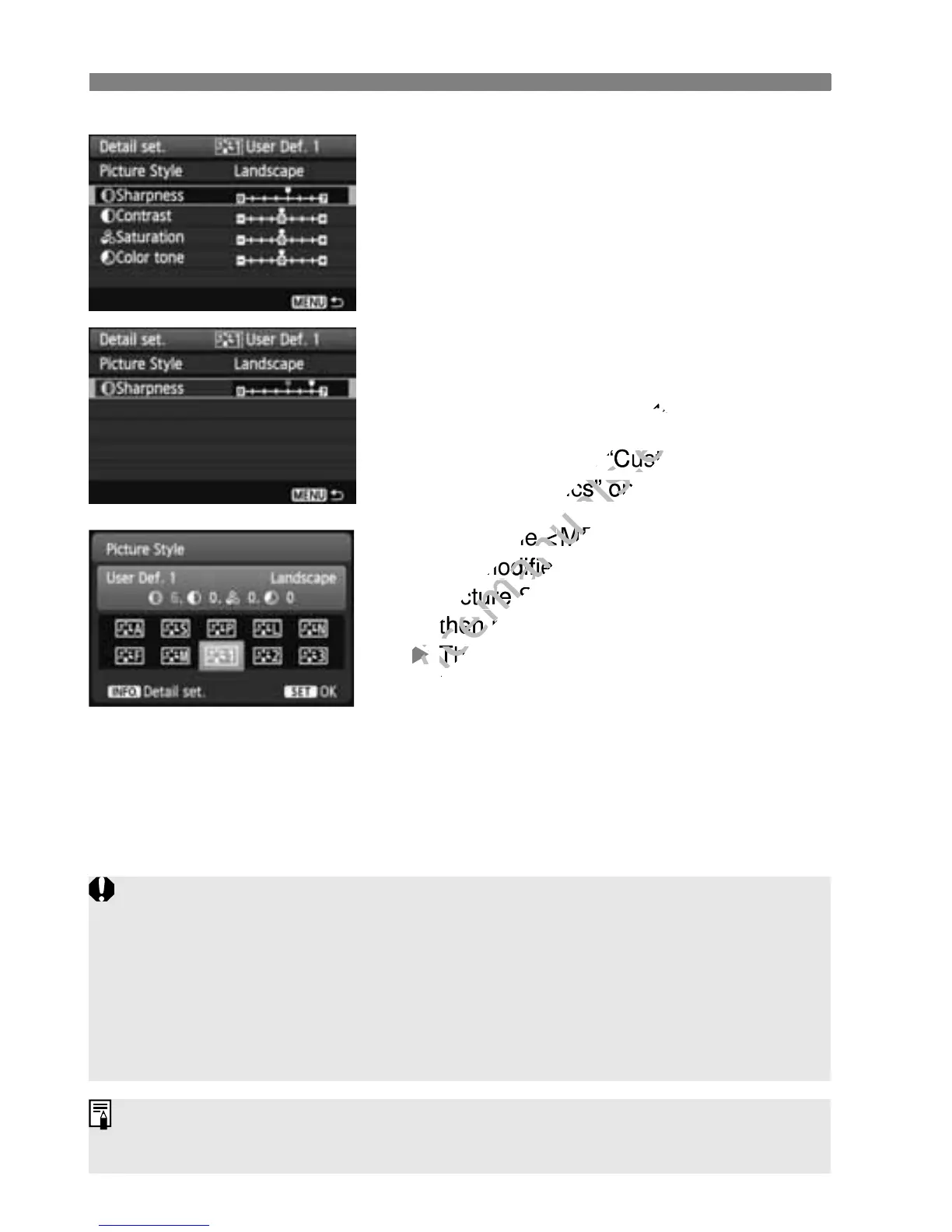
Select a parameter.
Select a parameter such as
[Sharpness], then press <0>.
6
Set the parameter.
Press the <U> key to adjust the
parameter as desired, then press
<0>.
For details, see “Customizing Image
Characteristics” on pages 112-114.
Press the <M> button to register
the modified Picture Style. The
Picture Style selection screen will
then reappear.
X The base Picture Style will be
indicated on the right of [User Def. *].
If a Picture Style has already been registered under [User Def. *],
changing the base Picture Style in step 4 will nullify the parameter
settings of the registered Picture Style.
If you execute [Clear all camera settings] (p.176), all the [User Def. *]
settings will revert to the default. Any Picture Style registered via EOS
Utility (provided software) will have only its modified parameters reverted
to the default setting.
To shoot with a registered Picture Style, follow step 2 on page 81 to select
[User Def. *] and then shoot.

www.devicemanuals.eu
parameter as desired, then press
www.devicemanuals.eu
parameter as desired, then press
For details, see “C
www.devicemanuals.eu
For details, see “C
ustomizing Image
www.devicemanuals.eu
ustomizing Image
Characteristics” on pages 112-114.
www.devicemanuals.eu
Characteristics” on pages 112-114.
Press the <
www.devicemanuals.eu
Press the <
M
www.devicemanuals.eu
M
the modified Picture Style. The
www.devicemanuals.eu
the modified Picture Style. The
Picture Style selection screen will
www.devicemanuals.eu
Picture Style selection screen will
then reappear.
www.devicemanuals.eu
then reappear.
X
www.devicemanuals.eu
X
The base Picture Style will be
www.devicemanuals.eu
The base Picture Style will be
indicated on the right of [
www.devicemanuals.eu
indicated on the right of [

Table of Contents

Other manuals for Canon EOS 600D

Related product manuals