130
z Menu Function Settings
Metering timerN
You can change how long the exposure setting is displayed (AE lock
time). This option is not displayed in Basic Zone modes. (Metering
timer is fixed at 16 sec.)
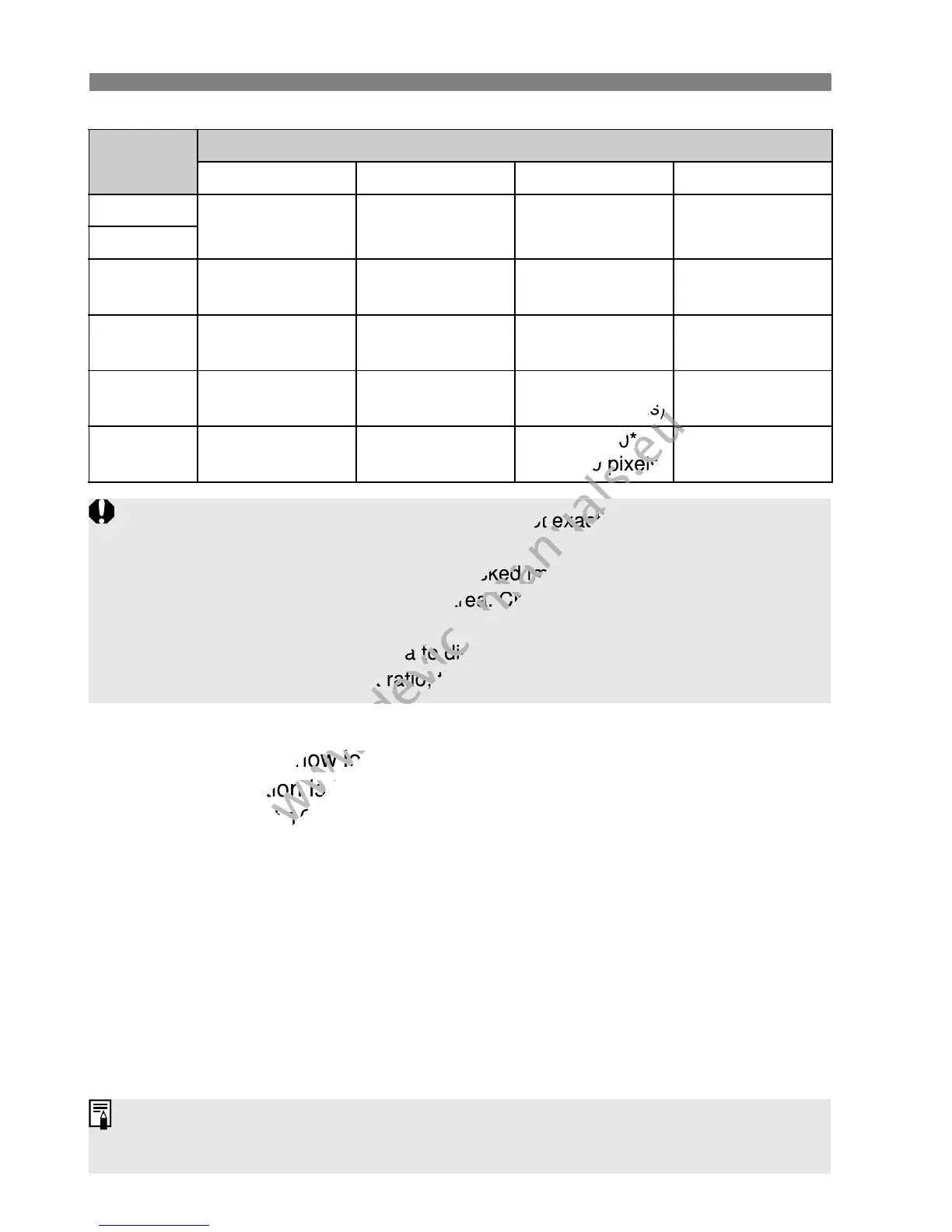
Quality
Aspect Ratio and Pixel Count
3:2 4:3 16:9 1:1
3
5184x3456
(18.0 megapixels)
4608x3456
(16.0 megapixels)
5184x2912*
(15.1 megapixels)
3456x3456
(11.9 megapixels)
1
4
3456x2304
(8.0 megapixels)
3072x2304
(7.0 megapixels)
3456x1944
(6.7 megapixels)
2304x2304
(5.3 megapixels)
a
2592x1728
(4.5 megapixels)
2304x1728
(4.0 megapixels)
2592x1456*
(3.8 megapixels)
1728x1728
(3.0 megapixels)
b
1920x1280
(2.5 megapixels)
1696x1280*
(2.2 megapixels)
1920x1080
(2.1 megapixels)
1280x1280
(1.6 megapixels)
c
720x480
(350,000 pixels)
640x480
(310,000 pixels)
720x400*
(290,000 pixels)
480x480
(230,000 pixels)
Asterisked image-recording qualities do not exactly match the set aspect
ratio.
The image area displayed for asterisked image-recording qualities is
slightly larger than the recorded area. Check the captured images on the
LCD monitor when shooting.
If you use a different camera to directly print images shot with this
camera in the 1:1 aspect ratio, the images might not be correctly printed.
If you select [y Dust Delete Data], [6 Sensor cleaning], [7 Clear
settings], or [7 Firmware Ver.], the Live View shooting will terminate.
(2.1 megapixels)
www.devicemanuals.eu
(2.1 megapixels)
720x400*
www.devicemanuals.eu
720x400*
(290,000 pixels)
www.devicemanuals.eu
(290,000 pixels)
Asterisked image-recording qualities do not exactly match the set aspect
www.devicemanuals.eu
Asterisked image-recording qualities do not exactly match the set aspect
The image area displayed for asterisked image-recording qualities is
www.devicemanuals.eu
The image area displayed for asterisked image-recording qualities is
slightly larger than the recorded area. Check the captured images on the
www.devicemanuals.eu
slightly larger than the recorded area. Check the captured images on the
If you use a different camera to directly print images shot with this
www.devicemanuals.eu
If you use a different camera to directly print images shot with this
You can change how long the exposure setting is displayed (AE lock
www.devicemanuals.eu
You can change how long the exposure setting is displayed (AE lock
time). This option is not displa
www.devicemanuals.eu
time). This option is not displa
timer is fixed at 16 sec.)
www.devicemanuals.eu
timer is fixed at 16 sec.)
camera in the 1:1 aspect ratio, the images might not be correctly printed.
www.devicemanuals.eu
camera in the 1:1 aspect ratio, the images might not be correctly printed.



 To Next Page