EasyManua.ls Logo

Canon EOS 600D - Page 216

Canon EOS 600D
328 pages
Print Icon
To Next Page IconTo Next Page
To Previous Page IconTo Previous Page
Loading...
3 Slide Show (Auto Playback)
216
3
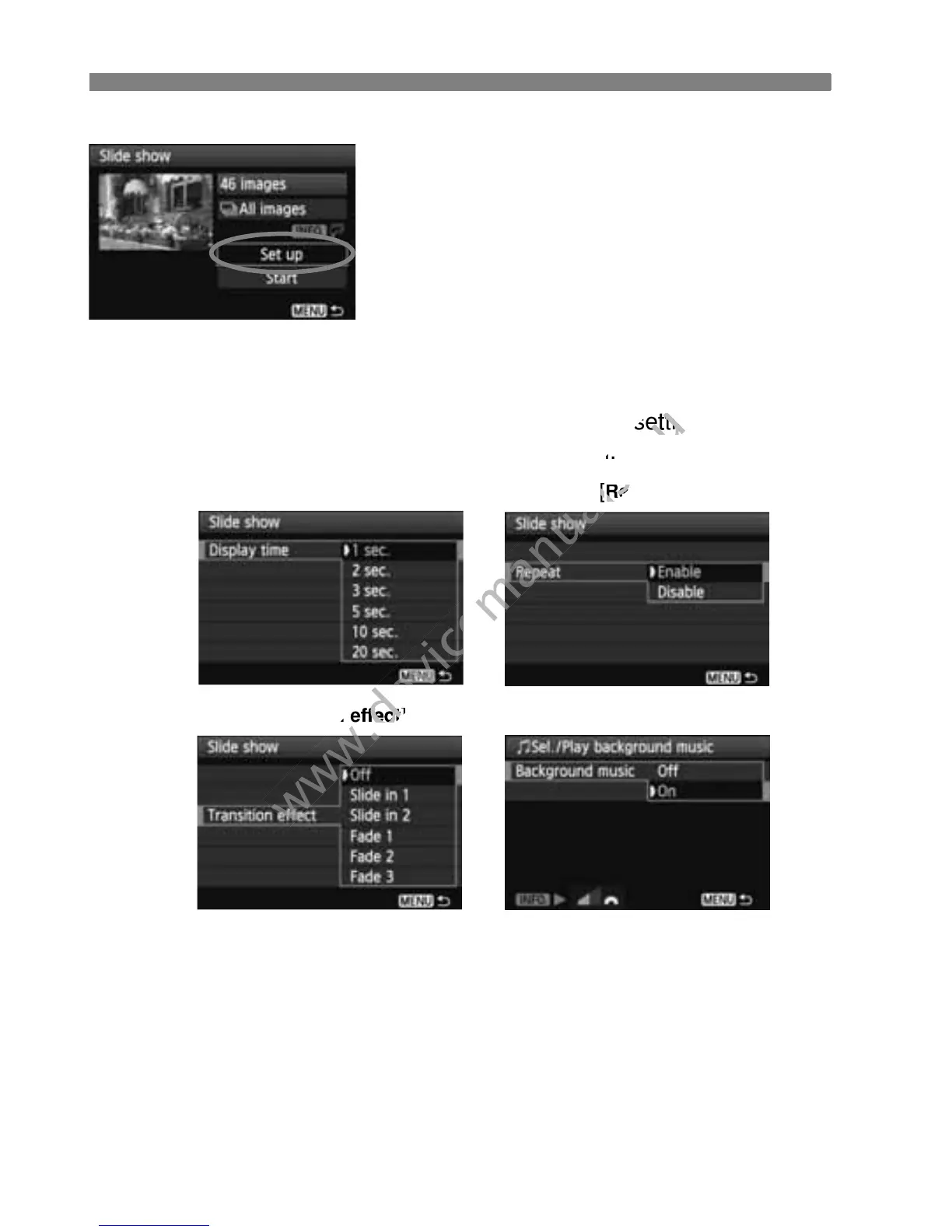
Set [Set up] as desired.
Press the <V> key to select [Set
up], then press <0>.
Set the [Display time] (still photos),
[Repeat], [Transition effect], and
[Background music].
The background music selection
procedure is explained on the next
page.
After selecting the settings, press the
<M> button.
[Display time]
[
Repeat]
[Transition effect] [Background music]
www.devicemanuals.eu
After selecting the settings, press the
www.devicemanuals.eu
After selecting the settings, press the

> button.
www.devicemanuals.eu
> button.
www.devicemanuals.eu
[
www.devicemanuals.eu
[
Repeat
www.devicemanuals.eu
Repeat
www.devicemanuals.eu
Transition effect
www.devicemanuals.eu
Transition effect
]
www.devicemanuals.eu
]

Table of Contents

Other manuals for Canon EOS 600D

Related product manuals