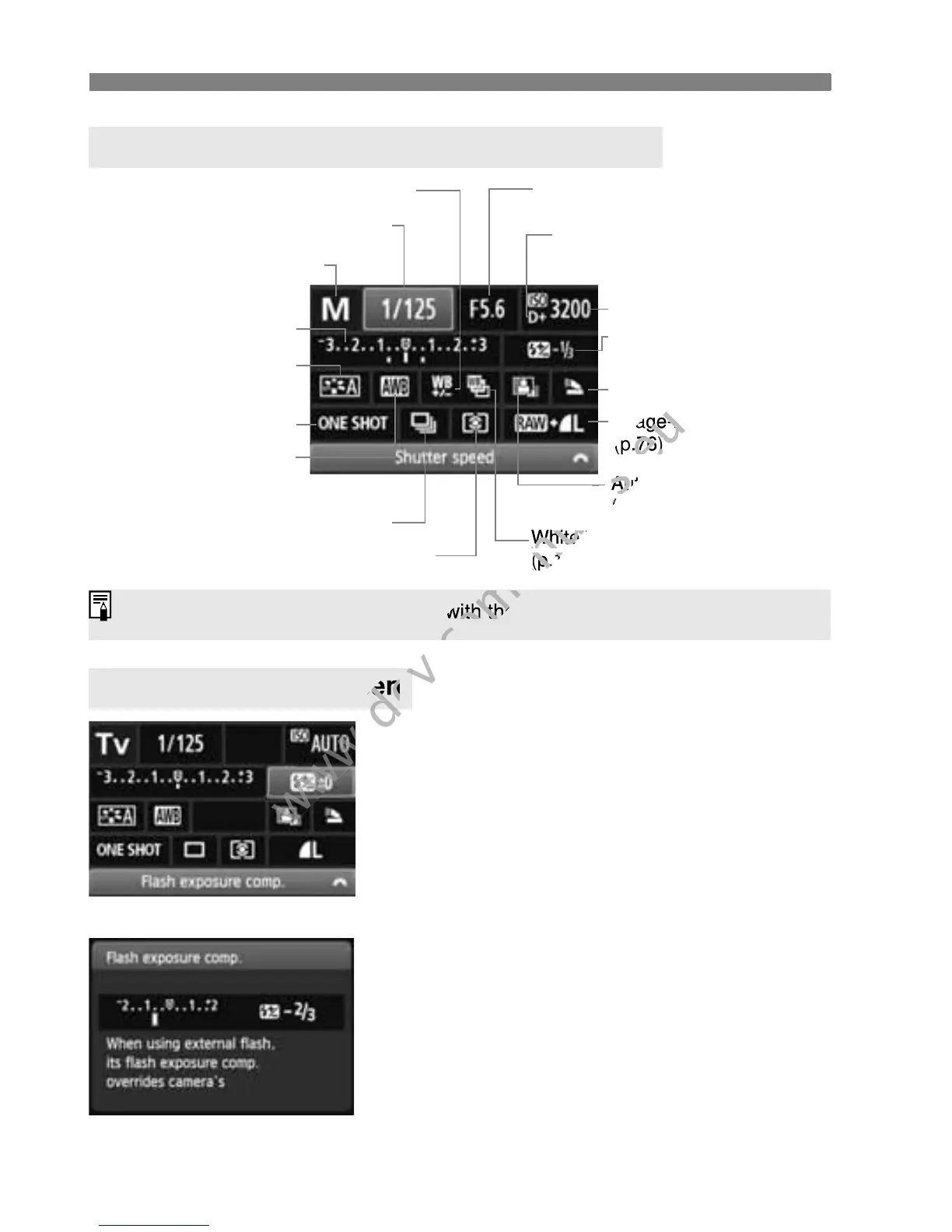
Q Quick Control for Shooting Functions
42
Select the desired function and press
<0>. The function’s setting screen
will appear.
Press the <U> key or turn the
<6> dial to change the setting.
There are also functions to be set
with the <C> button.
Press <0> to finalize the setting and
to return to the Quick Control screen.
Settable Functions on Quick Control Screen
Function Setting Screen
Shutter speed (p.94)
AF mode (p.83)
White balance (p.117)
Shooting mode* (p.22)
Highlight tone priority* (p.254)
Auto Lighting Optimizer
(p.109)
Metering mode (p.102)
Picture Style (p.81)
Exposure compensation/
AEB setting
(p.103, 105)
Flash exposure
compensation (p.104)
ISO speed (p.79)
Image-recording quality
(p.76)
Aperture (p.96)
Built-in flash function
White balance bracketing*
(p.120)
Drive mode (p.88, 89)
White balance correction* (p.119)
Asterisked functions cannot be set with the Quick Control screen.
<0>
Ð
Asterisked functions cannot be set with the Quick Control screen.
www.devicemanuals.eu
Asterisked functions cannot be set with the Quick Control screen.



 To Next Page