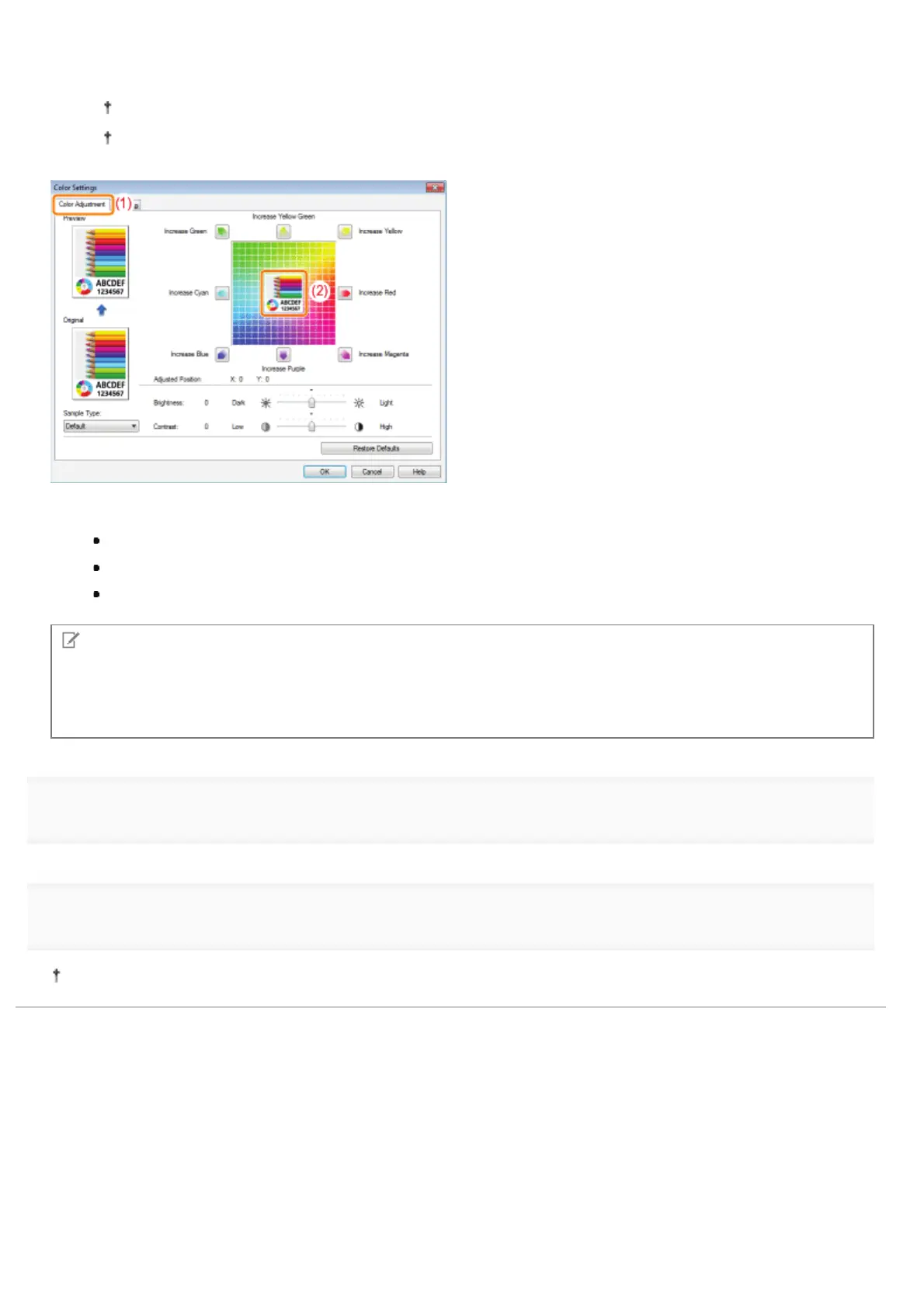
(1) Display the [Color Adjustment] sheet.
(2)
Adjust the colors by moving [Preview Image] at the center of the Adjustment Grid horizontally and vertically.
*
When [Preview Image] is in the center, the image has not been adjusted.
A sample image after adjustment is displayed in [Preview].
*
Move [Preview Image] by either of the following procedures.
Click the buttons of each color around the Adjustment Grid (the color is deepened by one increment).
Click any desired color on the Adjustment Grid ([Preview Image] is moved to the position you clicked).
Drag [Preview Image] onto the desired color.
NOTE
Confirm [Preview Image] position by values.
You can confirm the position of [Preview Image] by the X (horizontal) and Y (vertical) values for [Adjusted Position].
(The central position is X: 0, Y: 0.)
4
Click [OK]. Then, the [Quality] sheet reappears.
5
Click [OK].
For details on the basic printing procedure, see "Basic Printing Procedure."
㻞㻝㻡㻌㻛㻌㻟㻠㻟













 To Next Page