019A-04S
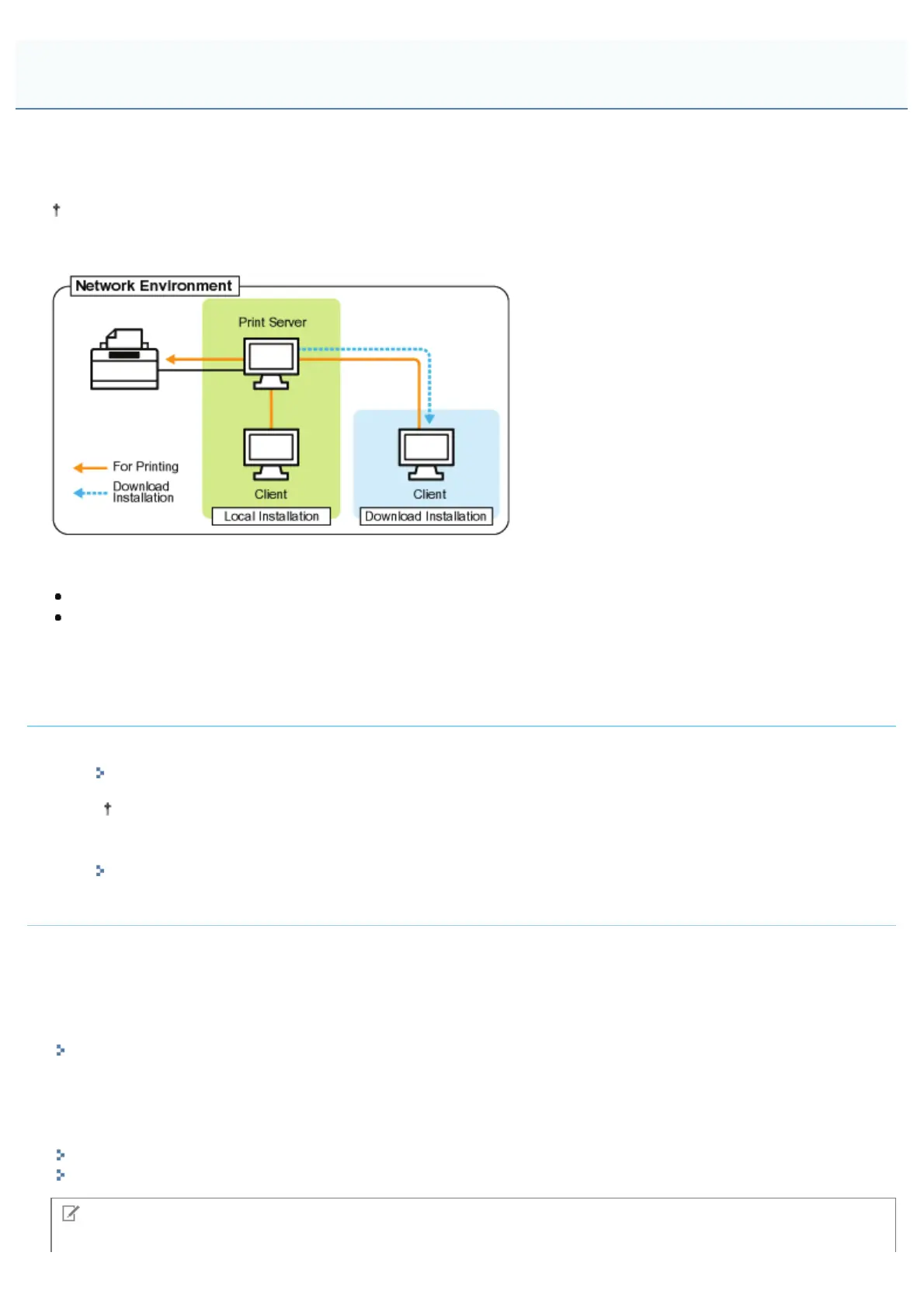
If you use the printer in the print server environment, you can perform printing from other computers (clients) that are not
directly connected to this printer.
The computer directly connected to the printer is called "print server", and the other computers which use the printer via
the print server are called "clients."
Also, if you set the print server, you can manage the printer efficiently as follows.
You can manage all the clients' jobs on the print server.
Clients can download and install the printer driver from the print server. (The CD-ROM is not required.)
If you want to use the printer in the print server environment, perform any one of the following tasks.
If your computer is the print server
1. Install the printer driver.
"Installing the Printer Driver"
If the printer driver is already installed, you do not need to install it.
2. Configure the print server.
"Configuring the Print Server"
If your computer is a client computer
Install the printer driver.
There are two ways to install the printer driver on client computers: Local installation and download installation.
<Local Installation>
You can install the printer driver using the supplied CD-ROM.
"Easy Installation"
<Download Installation>
You can install the printer driver without using the supplied CD-ROM, but by downloading the printer driver from the print
server. There are the following two ways to download and install the printer driver.
"Installing from the Printer Folder"
"Installing from [Windows Explorer]"
NOTE
Print Server Environment
㻞㻞㻤㻌㻛㻌㻟㻠㻟













 To Next Page