019A-04W
Before configuring the print server, check the settings of your network environment using the following procedure.
1
Perform the following procedure.
)URPWKH>6WDUW@PHQXVHOHFW>6HWWLQJV@ĺ>1HWZRUNDQG'LDO8S&RQQHFWLRQV@
)URPWKH>6WDUW@PHQXVHOHFW>&RQWURO3DQHO@DQGWKHQFOLFN>1HWZRUNDQG,QWHUQHW&RQQHFWLRQV@ĺ>1HWZRUN&RQQHFWLRQV@
)URPWKH>6WDUW@PHQXVHOHFW>&RQWURO3DQHO@DQGWKHQFOLFN>9LHZQHWZRUNVWDWXVDQGWDVNV@ĺ>0DQDJHQHWZRUN
connections].
)URPWKH>6WDUW@PHQXVHOHFW>&RQWURO3DQHO@DQGWKHQFOLFN>9LHZQHWZRUNVWDWXVDQGWDVNV@ĺ>&KDQJHDGDSWHUVHWWLQJV@
)URPWKH>6WDUW@PHQXVHOHFW>&RQWURO3DQHO@ĺ>1HWZRUN&RQQHFWLRQV@ĺ>/RFDO$UHD&RQQHFWLRQ@
From the [Start] menu, select [Control Panel], double-click [Network and Sharing Center], and then click [Manage network
connections].
2
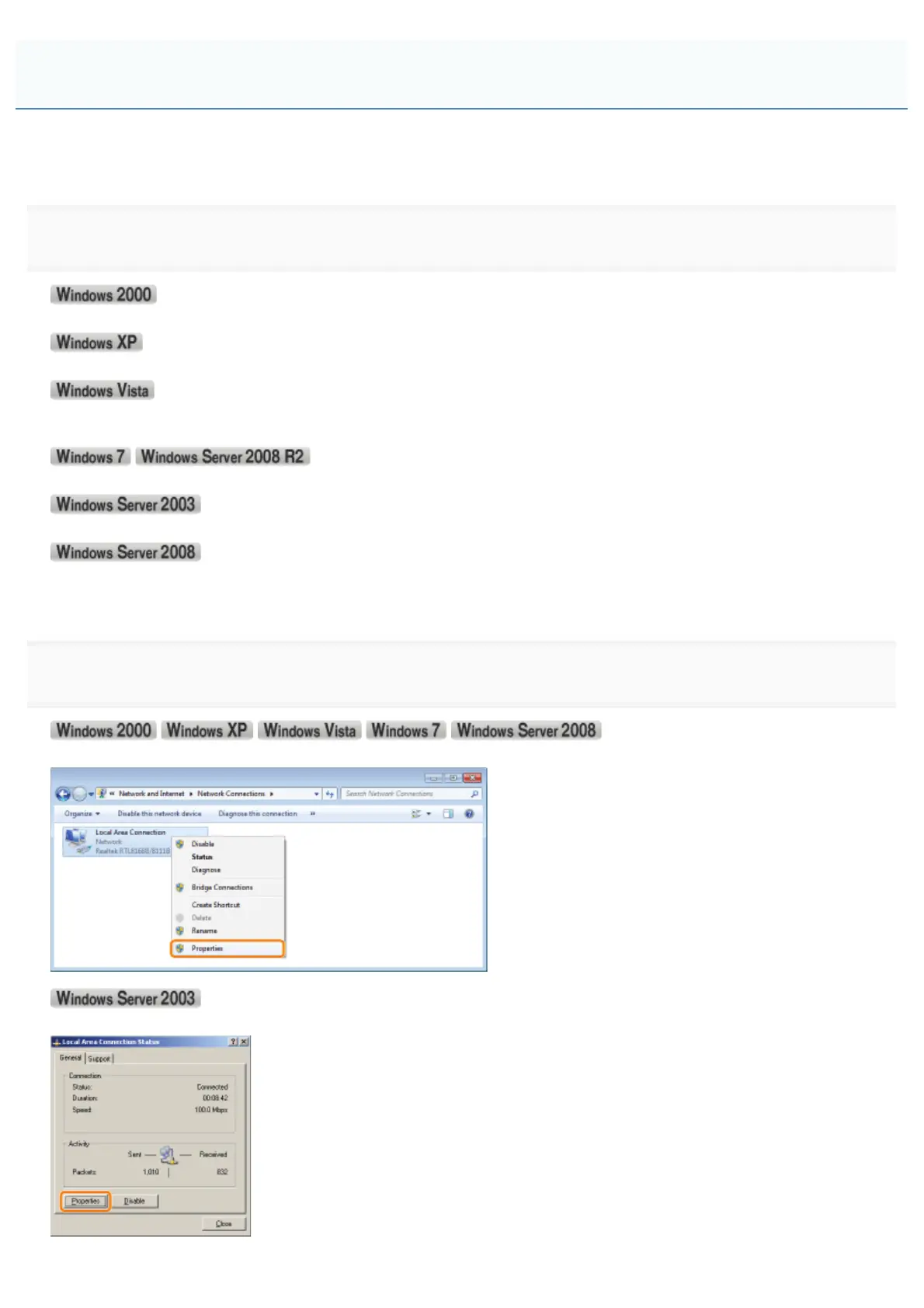
Display the [Local Area Connection Properties] dialog box.
Right-click the [Local Area Connection] icon, then select [Properties] from the pop-up menu.
Click [Properties].
Checking the Settings of Your Network
㻞㻟㻡㻌㻛㻌㻟㻠㻟













 To Next Page