154
Contents
Preparation/
Setup
Print Using a
Computer
Appendix
IndexPrint/SaveInput/Edit
Names of
Components
Maintenance/
Printer Settings
Trouble-
shooting
8
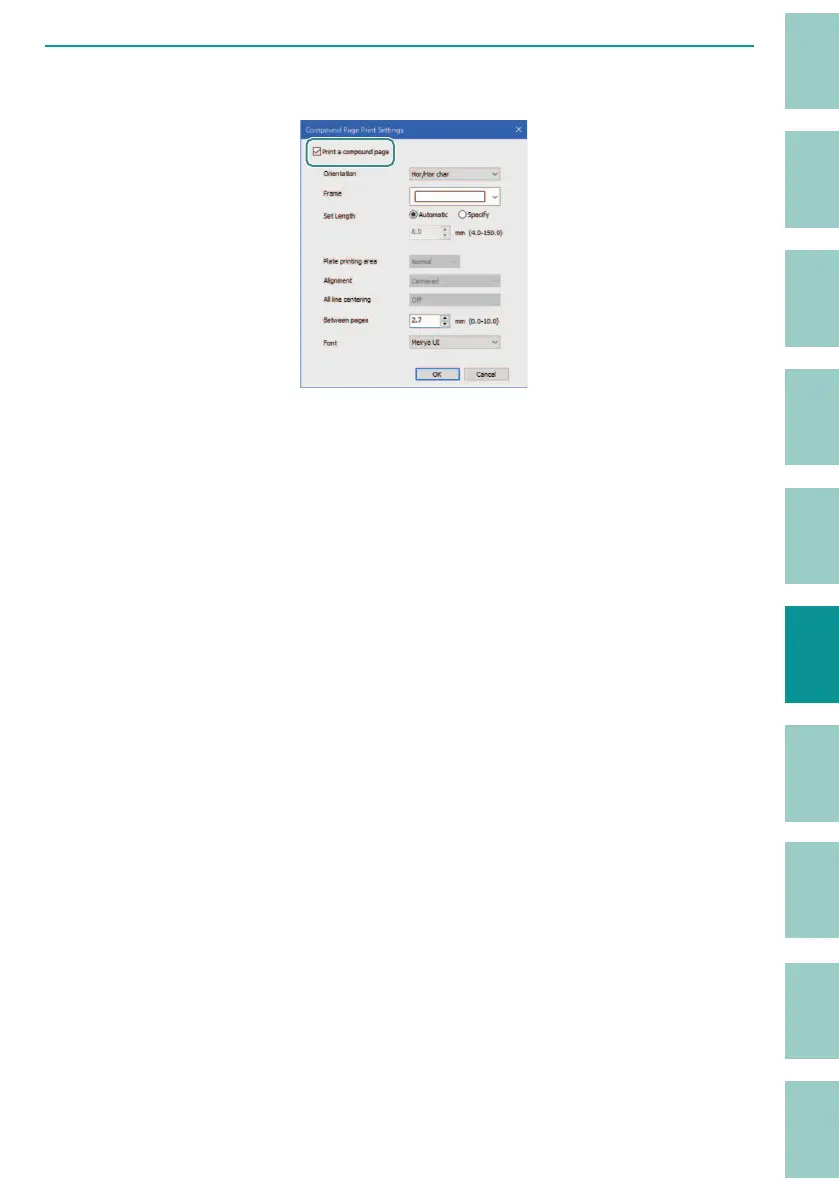
Select the check mark for "Print a compound page" and set the format.
[Orientation]
The orientation (Vert/Hor) and text direction (Vert char/Hor char) are speci ed in the
"Or
ientation" settings. The default setting is "Hor/Hor char."
For print image, refer to
"Specifying the Orientation and Character Direction
(P.45)"
.
[Frame]
You can surround the entire compound page with a frame. There are 5 frame shapes
a
vailable, with the default setting of "None."
[Set Length]
Allows you to specify the length of the compound page. The default setting is
"
Automatic."
When "Specify" is selected, the length can be entered in the range of
8 mm t
o 150 mm (4 mm to 150 mm for labels and plates only) in 0.1 mm increments.
[Plate printing area]
If you want to print the plate with the margin set to "0 mm," set the plate printing area
t
o "Expansion." The default setting is "Normal."
When "Expansion" is selected, the print media is automatically changed to "Plate." You
cannot selec
t any other print media except plate.
For print image, refer to
"Expanding the Print Area of the Plate (P.58)"
.



 To Next Page