SECTION 3
3-62
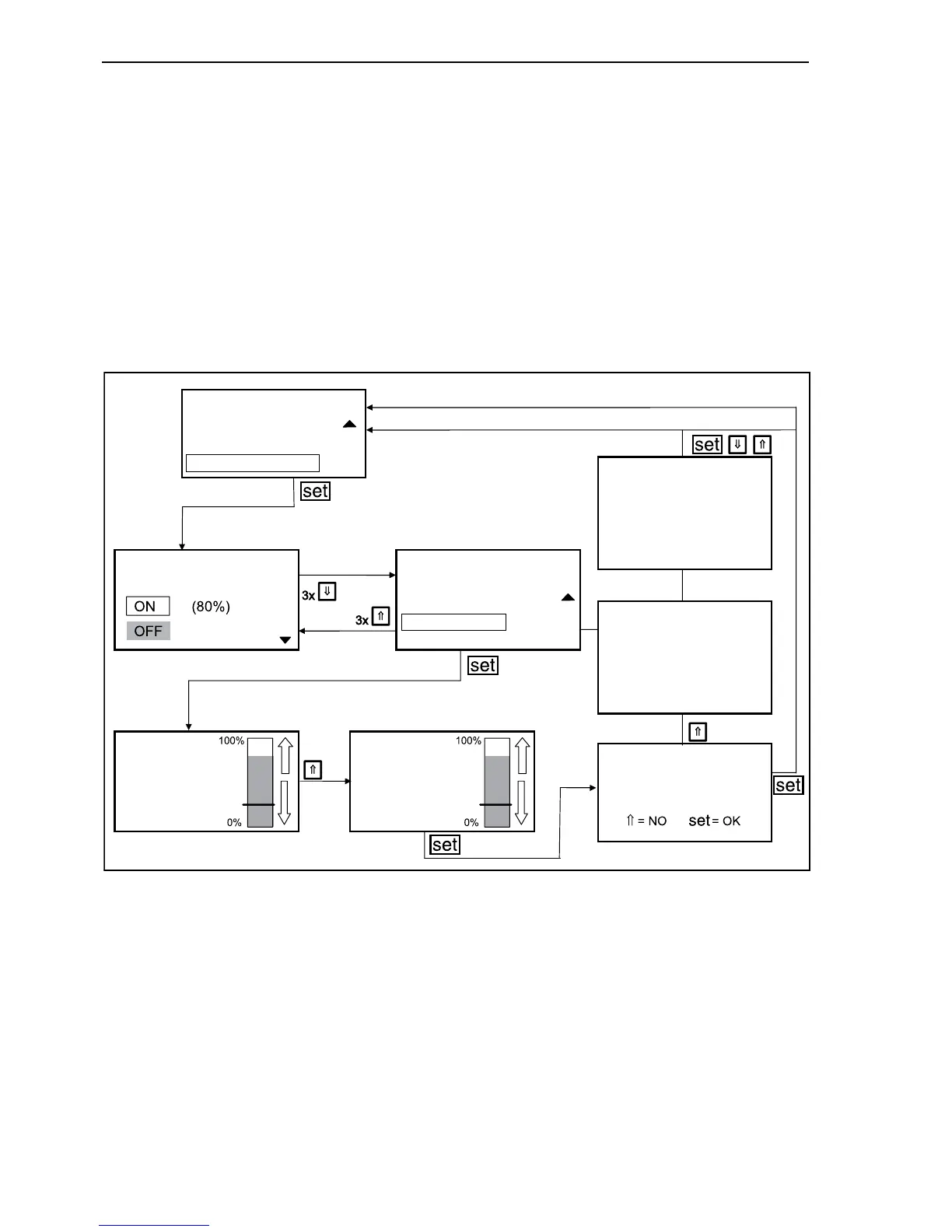
Depress the arrow buttons repeatedly until the bar
is on “SPEED LIMITATION”. Depress “set” button.
On the “SPEED LIMITATION” menu the bar back-
ground is grey.
By means of the arrow buttons you can shift the
frame on the required setting and activate the “set”
button.
Following settings are available:
-ON
-OFF
-STANDARD
- ADJUSTMENT
By selecting the “ADJUSTMENT” menu, by means
of arrow buttons you can set the working speed of
the adjusting cylinder, by shifting of 10% percent-
ages in a range between 0% and 100%. Depress
“set” button to confirm the selected value.
Now you are asked to memorize the settings. By
pressing button “set”, the new setting is memorized
and the modification becomes active. By depressing
the button with the upward arrow (⇑), the new set-
ting is not memorized and the modification is not
active.
After that the upper menu is recalled. Now the set-
ting can be repeated or you can return to main
menu “MACHINE” by means of arrow buttons.
F34158
SPEED LIMITATION SPEED LIMITATION
STANDARD
ADJUSTMENT
PLACING BOOM
SPEED
25
STANDARD
PLACING BOOM
SPEED
30
STANDARD
SAVE CHANGES?
MACHINE
LEVELLING
SPEED LIMITATION
SWING POWER
THE PARAMETERS HAVE
NOT BEEN UPDATED, RE-
TRY
THE TEMPORARY SYMBOL
WILL APPEAR IF A
DIFFERENT LIMIT OTHER
THAN DEFAULT IS
SELECTED
86



 To Next Page