CONTROLS AND INSTRUMENTS
2-35
EMERGENCY EXIT
Use the front window as an emergency exit, if the
cab door cannot be opened after it has been dam-
aged (e.g. in case of an accident).
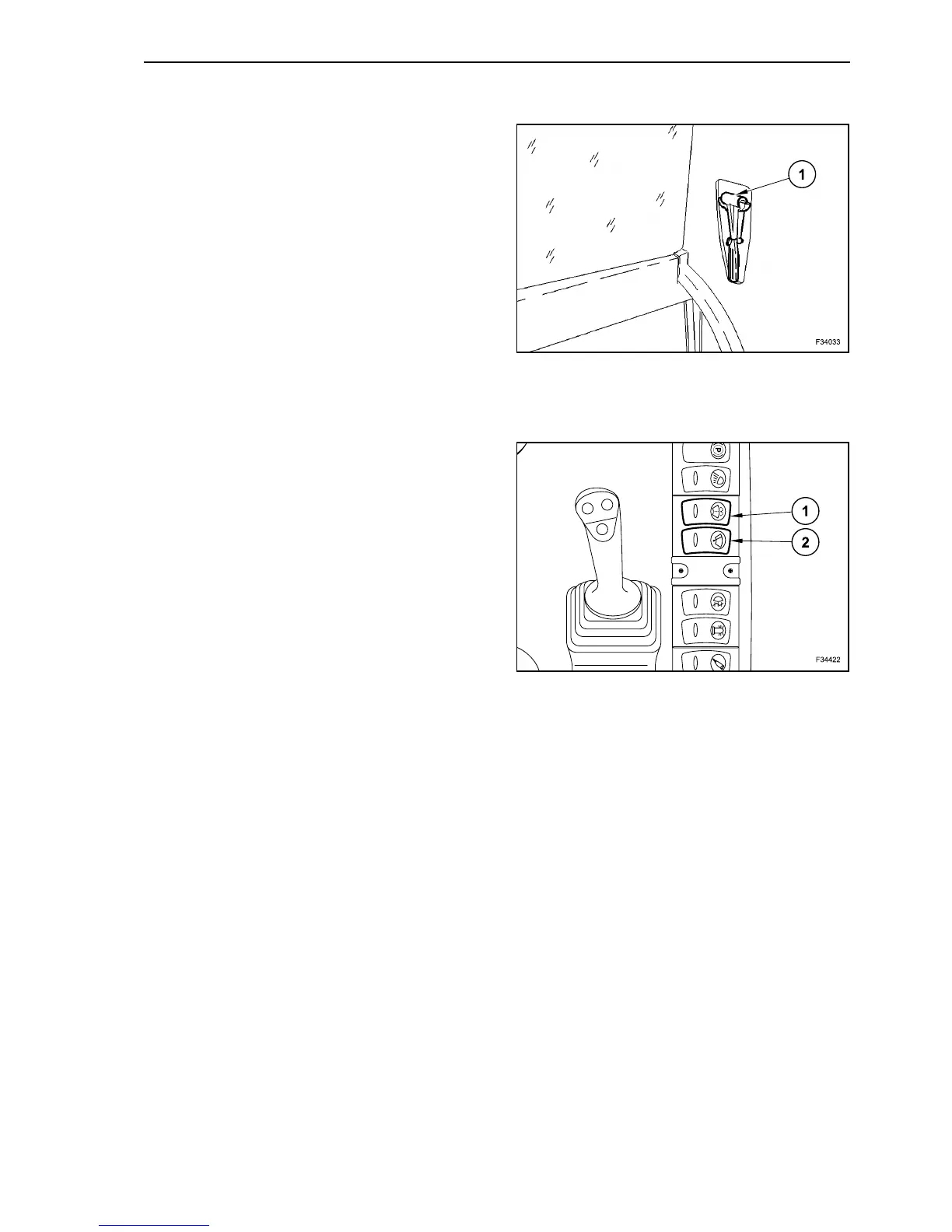
To break the glass panes in case of danger, use the
little hammer (1) on the rear wall behind the opera-
tor’s seat on the left.
WINDSCREEN WIPER AND WASHER
The windscreen wiper and washer are activated by
the relevant switches located on the cab right dash-
board.
Intermittent wiping
Depress rocker switch (2) once. (The switch face
without symbol is depressed and the lamp in the
switch is lit up).
Permanent wiping
Depress rocker switch (2) twice. (The switch face
without symbol is depressed and the lamp in the
switch is lit up).
Switching the wiper off
Disconnect switch (2). (Depress symbol face of
switch, the lamp goes out).
Activating the wipe / wash function
Depress button (1). (The lamp inside of button lights
up).
The screenwasher pump is switched on with the
wiper being activated at the same time.
After releasing the button, the wiper continues to
perform wiping movements for a short time.
NOTE: if the front screen is pushed back under the
cab roof, the functions of switches (1) and (2) are
automatically deactivated.
34
35



 To Next Page