SECTION 4
4-26
AIR FILTER - CLEANING
Besides the scheduled times for cleaning, the air fil-
ter must also to be cleaned by means of a electronic
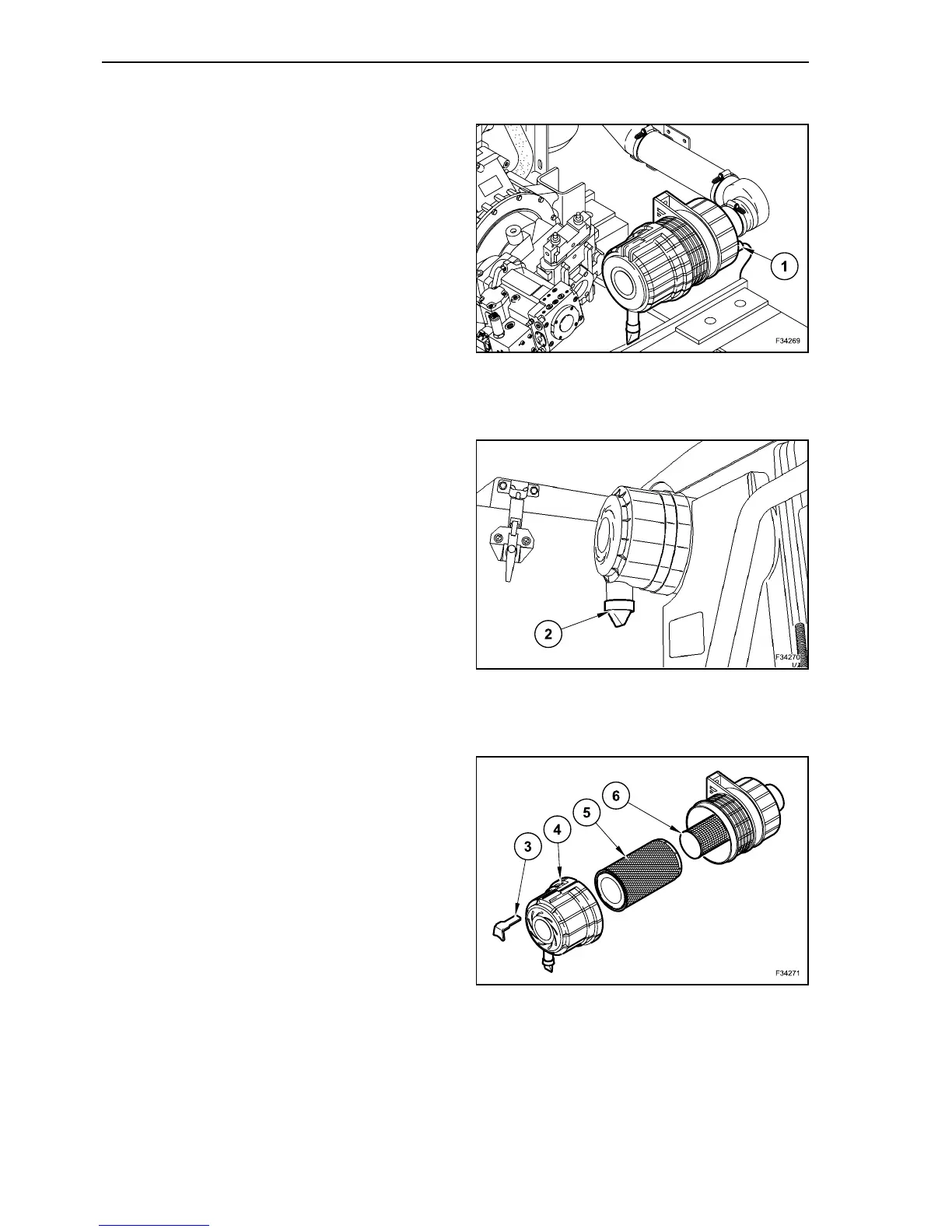
vacuum sensor (1), installed on the air filter housing,
the indication of this sensor is shown on the multi-
function display with a fault message.
DUST DISCHARGE VALVE - CLEANING
The dust discharge valve (2) collects dust penetrat-
ing into the air filter case.
To discharge the dust, compress the dust discharge
valve repeatedly.
The dirt is crumbled and comes out from the bottom.
AIR FILTER - DISASSEMBLY
Open the cover on the left side of the machine.
Push the clip (3) forward, turn the filter cover to the
left (4) and remove it.
Remove the main filter element (5) carefully from
the case.
The safety filter (6) remains in place.
Clean the main filter element (5).
If damaged, the filter element has to be replaced.
Clean the filter case inside.
Assemble the filter element, checked and cleaned,
or possibly a new element.
Reassemble the cover (4) and lock it with the fas-
tener (3).
23
24
25



 To Next Page