SECTION 7
7-32
MALFUNCTIONING OF THE OVERLOAD
WARNING SYSTEM
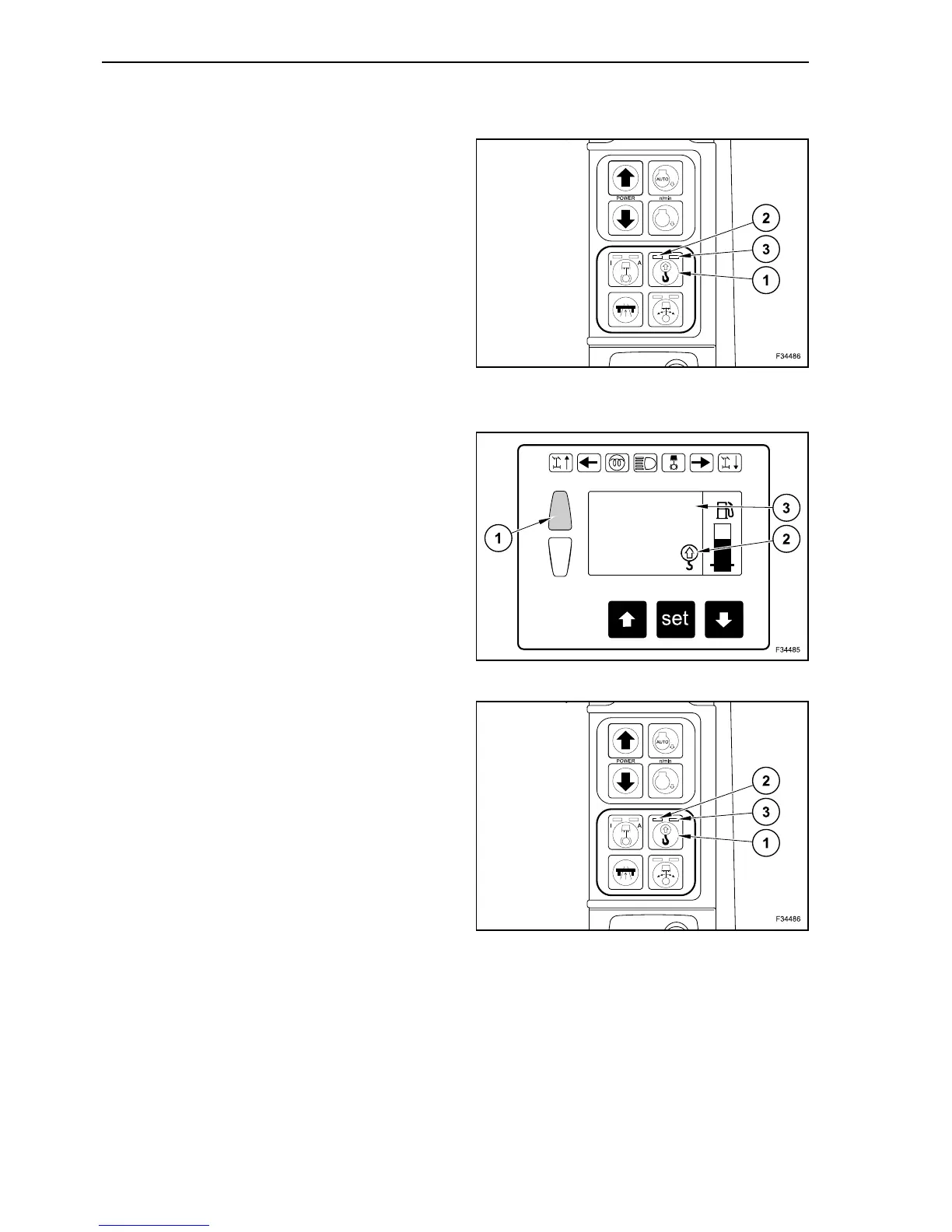
If a fault occurs in the overload warning system,
lamps (2) and (3) on button (1) are both flashing.
In this case, too, the red warning lamp lights up and
the “Overload” message is displayed on the screen.
IMPORTANT: have the overload warning system
repaired immediately by our Service Department.
OVERLOAD WARNING SYSTEM CHECK
The overload warning system has to be ckecked:
- every day before beginning the work;
- every time before using the machine for lifting.
Raise the boom to the highest position and move
against block.
Warning lamp (1) lights up and an acoustic warning
is sounded. The display shows the “overload” sym-
bol (2) and the relevant text (3).
If a fault occurs, have the overload warning system
checked and repaired immediately by our Service
Department.
OVERLOAD WARNING SYSTEM DEACTIVATION
If the machine has to be used exclusively for digging
and not for craning, the overload warning system
can be deactivated.
Depress repeatedly button (1) until lamps (2) and (3)
turn off.
Now the overload warning system is deactivated.
55
OVERLOAD!
56
57



 To Next Page