SECTION 2
2-24
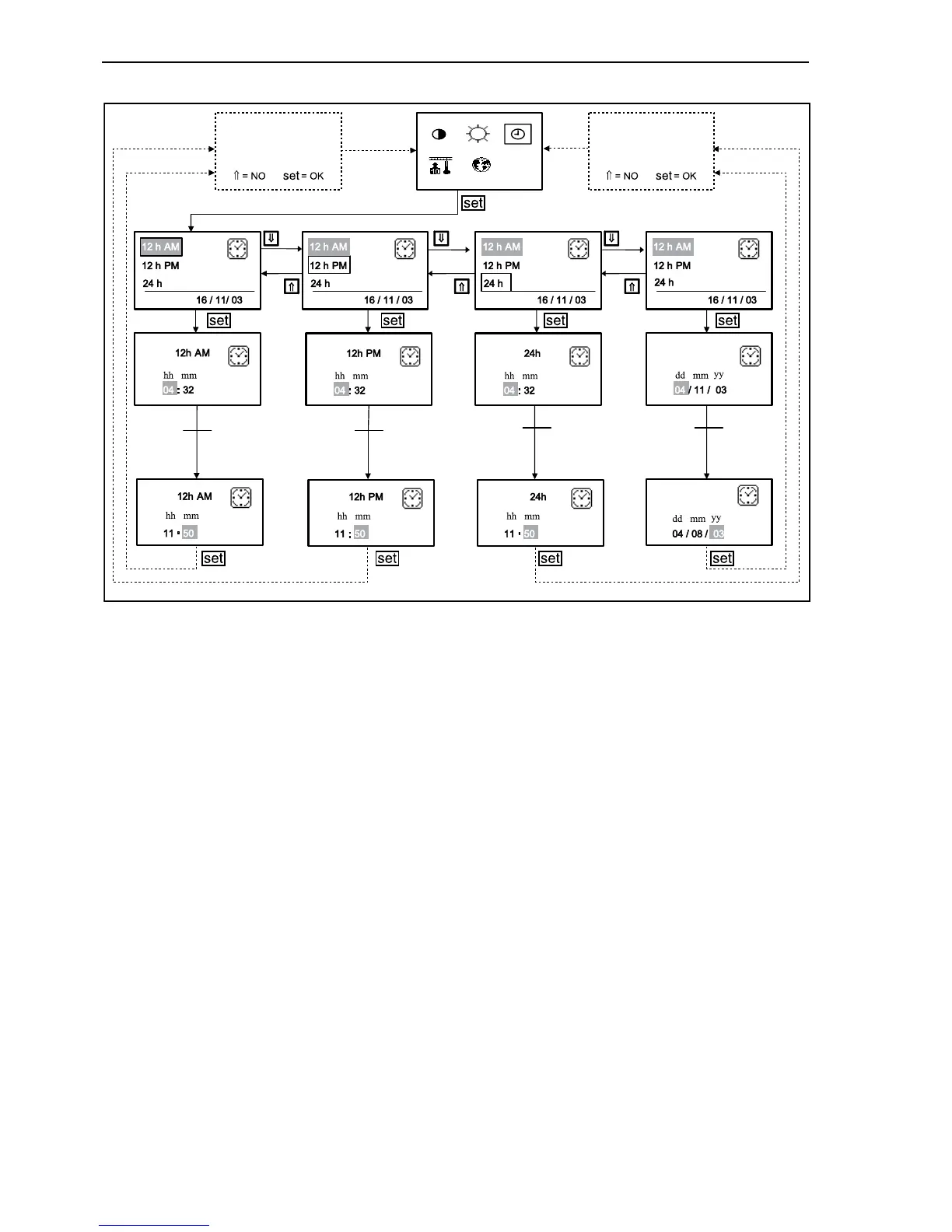
Indication of the 12 hours
Depress repeatedly the arrow keys until the indica-
tion “12 h” appears on grey background. Confirm
the setting with “set” button.
The display shows now the actual time, where AM
means ante meridiem (morning) and PM means
post meridiem (afternoon).
The cursor is now on the first digit of the hours set-
ting. By depressing the button with the upward
arrow (⇑), the number increases of one unit. By
depressing the button with the downward arrow (⇓),
the number decreases of one unit. By depressing
button “set”, the setting is confirmed and the cursor
slides to the right, waiting on the second digit of the
hours. Set the second digit of the hours as
described previously. The cursor shifts now on the
first digit of the minutes. Carry out the minutes set-
ting in the same way as described.
Once the minutes setting is confirmed with button
“set”, fields PM or AM becomes actives. By means
of the arrow keys you can scroll through these two
settings and confirm the selection with “set” button.
After that, the settings are shown on the display and
confirmed with button “set”.
Now you are asked to memorize the settings. By
depressing the button with the upward arrow (⇑),
the new setting is not memorized and the modifica-
tion is not active. By pressing button “set”, the new
time setting is memorized and the modification
becomes active. After that the upper menu is
recalled. Now the setting can be repeated or one of
the other setting options (indication of the 24 hours
or date) can be repeated. The display shows now
on the right near the time PM or AM.
F34019
Save
changes?
Save
changes?
DATE
DATE
DATE DATE
DATE
DATE
Data input
Data input
Data input
Data input
17



 To Next Page