CONTROLS AND INSTRUMENTS
2-27
LANGUAGE
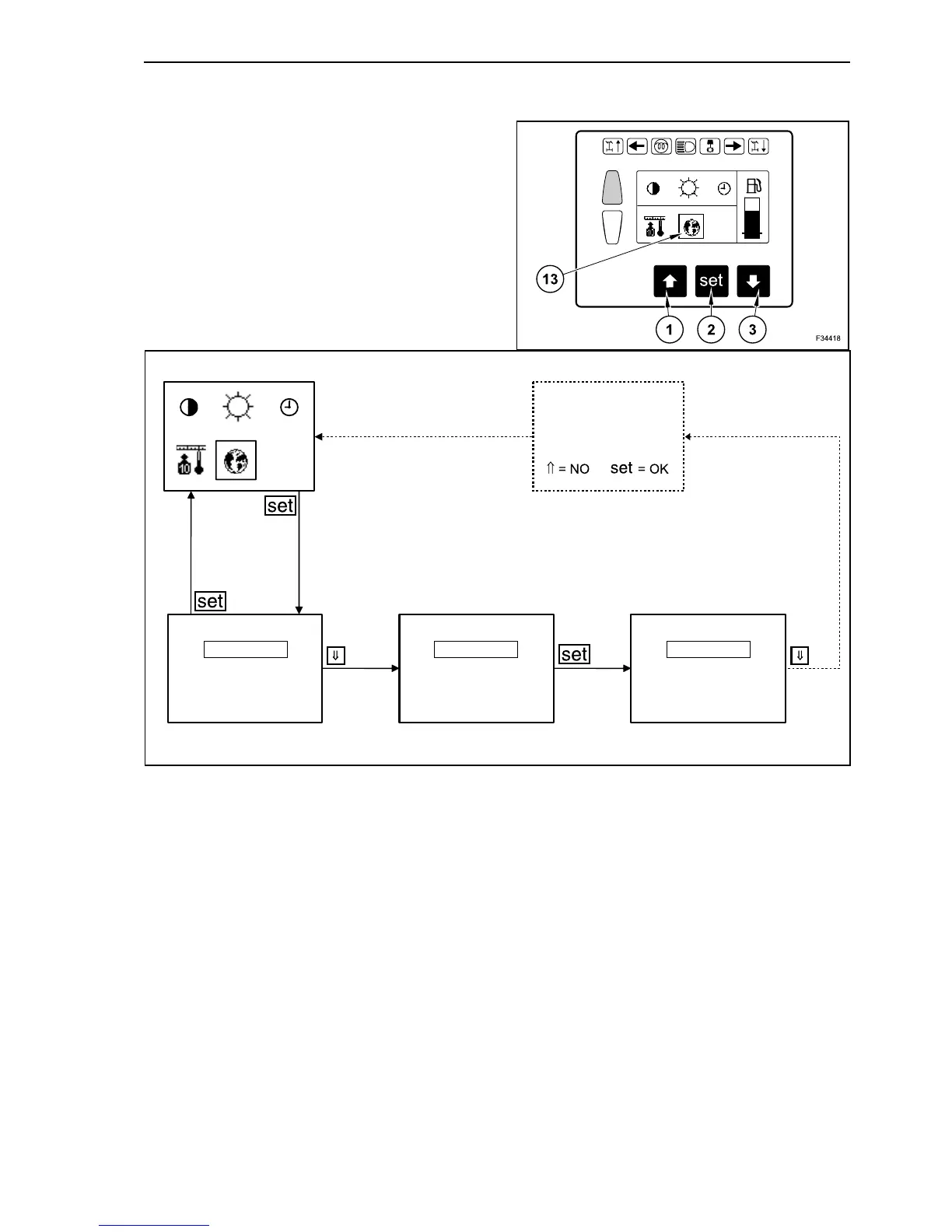
In operating mode depress repeatedly the arrow
button, until on main menu appears “display” on
grey background. Confirm with “set” button (2).
Depress repeatedly button with downward arrow
(3), until the language symbol appears on grey
background (13). Confirm the selection with “set”
button (2).
The display shows now 5 language options (Ger-
man, English, French, Italian and Spanish). The lan-
guage currently set is shown as active.
The current language setting is on grey background.
Depress repeatedly the arrow buttons until the
required language is highlighted inside of a frame.
Confirm the setting with “set” button (2).
The display shows now the language setting on a
grey background and highlighted into a frame. This
has to be confirmed again by means of the button
with the downward arrow (3).
After confirmation by button with downward arrow
(3), you are requested to memorize the language
setting.
By depressing the button with the upward arrow (1),
the new setting is not memorized and the modifica-
tion is not active. By pressing button “set” (2), the
new language setting is memorized and the modifi-
cation becomes active. After that the upper menu is
recalled. Now the setting can be repeated or one of
the other setting options (contrast, brightness, time
or measurement unit) can be performed. By
depressing the button with the upward arrow (1),
you exit the display menu and return to the main
menu.
20
F34023
Save changes?
Spanish
Italian
Spanish
Italian
English
German
French
21



 To Next Page