CG Drives & Automation, 01-5326-01r5 Operation via the Control Panel 83
Remote mode
When the AC drive is switched to REMOTE operation, the
AC drive will be controlled according to selected control
methods in the menu’s “Reference Control [214]”, “Run/
Stop Control [215]” and “Reset Control [216]”.
To monitor the actual Local or Remote status of the AC
drive control, a “Loc/Rem” signal is available on the
Digital Outputs or Relays. When the AC drive is set to
Local, the signal on the DigOut or Relay will be active/high,
in Remote the signal will be inactive/low. See menu “Digital
Outputs [540]” and “Relays [550]”.
10.3.6 Function keys
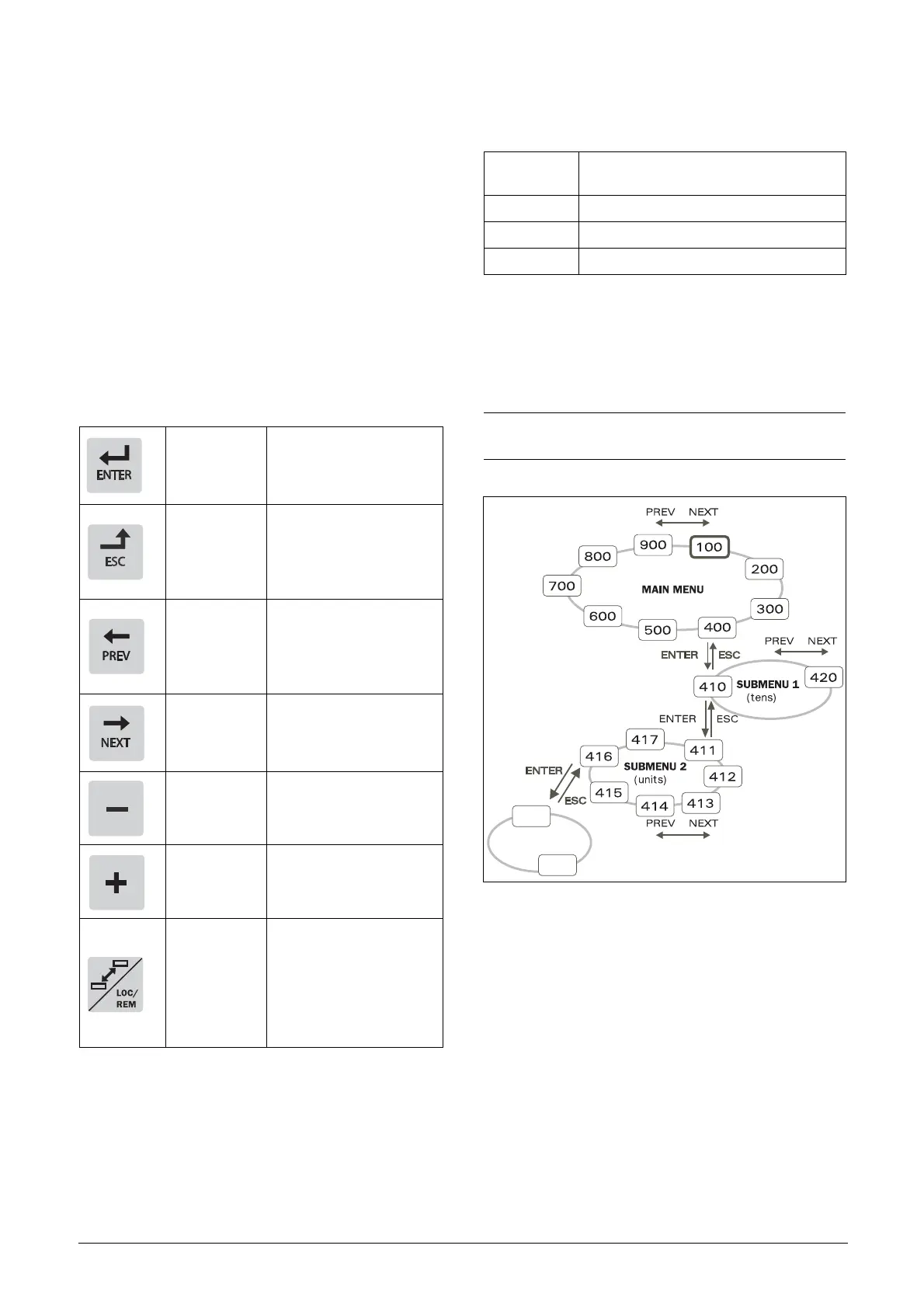
The function keys operate the menus and are also used for
programming and read-outs of all the menu settings.
10.4 The menu structure
The menu structure consists of 4 levels:
This structure is consequently independent of the number
of menus per level.
For instance, a menu can have one selectable menu (Set/
View Reference Value [310]), or it can have 17 selectable
menus (menu Speeds [340]).
Fig. 90 Menu structure
Ta b l e 3 2 Fu n c t i o n k e y s
ENTER key:
-step to a lower menu
level
- confirm a changed
setting
ESCAPE key:
- step to a higher
menu level
- ignore a changed
setting, without
confirming
PREVIOUS
key:
- step to a previous
menu within the same
level
- go to more significant
digit in edit mode
NEXT key:
- step to a next menu
within the same level
- go to less significant
digit in edit mode
- key:
- decrease a value
- change a selection
+ key:
- increase a value
- change a selection
TOGGLE and
LOC/REM
key:
- Toggle between menus
in the toggle loop
- Switching between
local and remote
control
- Change the sign of a
value
ESC
NEXT
Main Menu
1st level
The first character in the menu number.
2nd level The second character in the menu number.
3rd level The third character in the menu number.
4th level The fourth character in the menu number.
NOTE: If there are more than 10 menus within one
level, the numbering continues in alphabetic order.
NG_06-F28
4161
4162


 To Next Page
 Loading...