Home
Check Point
Network Hardware
UTM-1 Edge
Page 460 (Connecting to a Service Center)
Check Point UTM-1 Edge - Connecting to a Service Center
707 pages
Manual
Save Page as PDF
To Next Page
To Next Page
To Previous Page
To Previous Page
Loading...
Connecting to a Service Center
446
Check Point UTM-1 Edge User Guide
Connecting to a Service Center
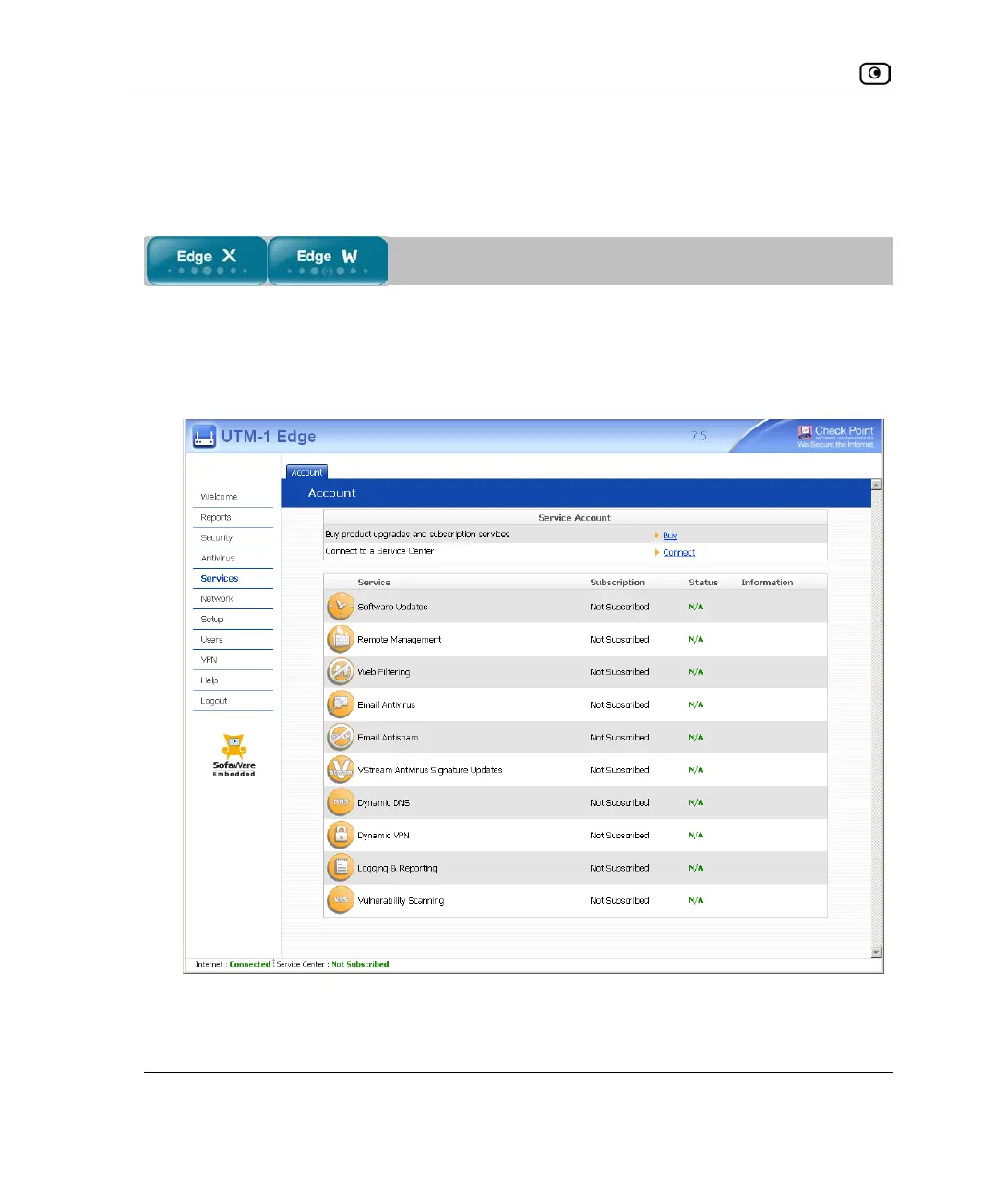
To connect to a Service Center
1.
Click
Services
in the main menu, and click the
Account
tab.
The
Account
page appears.
459
461
Table of Contents
Main Page
Table of Contents
7
About this Guide
13
Introduction
15
About Your Check Point UTM-1 Embedded NGX Appliance
15
The UTM-1 Edge X Series and UTM-1 Edge W Series
16
Contacting Technical Support
52
UTM-1 Security
53
Introduction to Information Security
53
The UTM-1 Firewall
58
Installing and Setting up UTM-1
67
Before You Install the UTM-1 Appliance
67
UTM-1 Edge X and UTM-1 Edge W Installation
81
Cascading Your Appliance
96
Connecting the Appliance to Network Printers
97
Setting up the UTM-1 Appliance
97
Getting Started
101
Initial Login to the UTM-1 Portal
101
Appliance
102
Logging on to the UTM-1 Portal
103
Accessing the UTM-1 Portal Remotely Using HTTPS
105
Using the UTM-1 Portal
106
Logging off
110
Configuring the Internet Connection
111
Overview
111
Using the Internet Wizard
112
Using Internet Setup
127
Setting up Dialup Modems
159
Viewing Internet Connection Information
166
Enabling/Disabling the Internet Connection
168
Using Quick Internet Connection/Disconnection
169
Configuring a Backup Internet Connection
169
Configuring WAN Load Balancing
170
Managing Your Network
173
Configuring Network Settings
173
Using Network Objects
202
Configuring Network Service Objects
213
Using Static Routes
216
Managing Ports
223
Using Bridges
235
Overview
235
Workflow
241
Adding and Editing Bridges
242
Adding Internal Networks to Bridges
246
Adding Internet Connections to Bridges
251
Deleting Bridges
256
Configuring High Availability
257
Overview
257
Configuring High Availability on a Gateway
260
Sample Implementation on Two Gateways
264
Using Traffic Shaper
269
Overview
269
Setting up Traffic Shaper
270
Predefined Qos Classes
271
Adding and Editing Classes
273
Viewing and Deleting Classes
277
Restoring Traffic Shaper Defaults
278
Working with Wireless Networks
279
Overview
279
Configuring Wireless Networks
287
Troubleshooting Wireless Connectivity
316
Viewing Reports
319
Viewing the Event Log
319
Using the Traffic Monitor
322
Viewing Computers
326
Viewing Connections
328
Viewing Wireless Statistics
330
Viewing ADSL Statistics
334
Viewing the Routing Table
336
Setting Your Security Policy
339
The UTM-1 Firewall Security Policy
340
Default Security Policy
341
Setting the Firewall Security Level
342
Configuring Servers
345
Using Rules
348
Using Port-Based Security
361
Using Secure Hotspot
365
Using NAT Rules
371
Using Web Rules
379
Using Smartdefense
389
Overview
389
Configuring Smartdefense
390
Smartdefense Categories
397
Resetting Smartdefense to Its Defaults
438
Using Vstream Antivirus
439
Overview
439
Enabling/Disabling Vstream Antivirus
442
Viewing Vstream Antivirus Signature Database Information
443
Configuring Vstream Antivirus
444
Updating Vstream Antivirus
458
SMART Management and Subscription Services
459
Connecting to a Service Center
460
Viewing Services Information
465
Refreshing Your Service Center Connection
466
Configuring Your Account
467
Disconnecting from Your Service Center
467
Web Filtering
468
Email Filtering
475
Automatic and Manual Updates
480
Working with Vpns
483
Overview
484
Setting up Your UTM-1 Appliance as a VPN Server
490
Adding and Editing VPN Sites
503
Viewing and Deleting VPN Sites
537
Enabling/Disabling a VPN Site
537
Logging on to a Remote Access VPN Site
538
Logging off a Remote Access VPN Site
541
Installing a Certificate
542
Uninstalling a Certificate
550
Viewing VPN Tunnels
551
Viewing IKE Traces for VPN Connections
554
Viewing VPN Topology
555
Managing Users
557
Changing Your Login Credentials
557
Adding and Editing Users
560
Adding Quick Guest Hotspot Users
564
Viewing and Deleting Users
566
Setting up Remote VPN Access for Users
567
Using RADIUS Authentication
567
Configuring RADIUS Attributes
574
Using Remote Desktop
579
Overview
579
Workflow
580
Configuring Remote Desktop
581
Configuring the Host Computer
584
Accessing a Remote Computer's Desktop
587
Maintenance
591
Viewing Firmware Status
592
Updating the Firmware
594
Upgrading Your License
596
Configuring Syslog Logging
598
Controlling the Appliance Via the Command Line
600
Configuring HTTPS
606
Configuring SSH
609
Configuring SNMP
611
Setting the Time on the Appliance
616
Using Diagnostic Tools
620
Backing up the UTM-1 Appliance Configuration
634
Resetting the UTM-1 Appliance to Defaults
637
Running Diagnostics
640
Rebooting the UTM-1 Appliance
641
Using Network Printers
643
Overview
643
Setting up Network Printers
644
Configuring Computers to Use Network Printers
646
Viewing Network Printers
663
Changing Network Printer Ports
664
Resetting Network Printers
665
Troubleshooting
667
Connectivity
667
Service Center and Upgrades
671
Other Problems
672
Specifications
673
Technical Specifications
673
CE Declaration of Conformity
681
Federal Communications Commission Radio Frequency Interference Statement
688
Glossary of Terms
691
Index
697
Related product manuals
Check Point UTM-1 U-5
41 pages
Check Point VPN-1 Edge X Series
633 pages
Check Point 730
134 pages
Check Point L-71
124 pages
Check Point QS-15
49 pages
Check Point Smart-1 625
8 pages
Check Point Smart-1 225
144 pages
Check Point Smart-1 5050
19 pages
Check Point QUANTUM SMART-1
20 pages
Check Point QUANTUM SPARK 1530
46 pages
Check Point QUANTUM SPARK 1600
332 pages
Quantum SMART-1 600-M
6 pages















 To Next Page