9 - DIAGNOSTICS
DIAGNOSTICA (ME)
ME2000S - User Manual
129 - 133
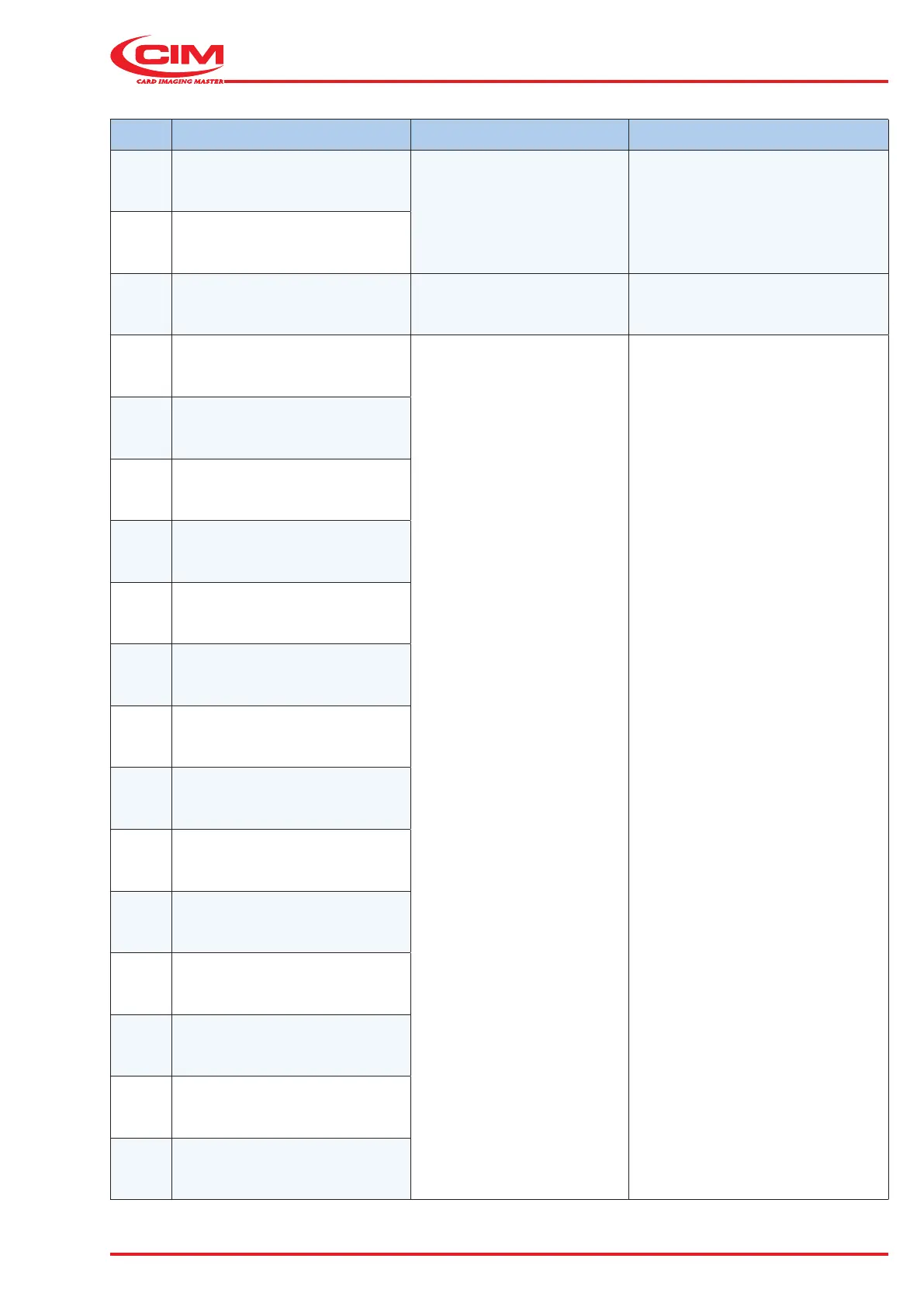
CODE MESSAGE DESCRIPTION SOLUTION
118 Command not valid
Internal error
Turn off the machine and wait
some seconds. Start and reset the
machine. If error persists contact
Technical Assistance.
119 Command not executable
120 Tag presence sensor Tag presence photocell active Check clamp sensor.
121 Driver (generic)
generic driver motor error
Turn o the machine and wait a few
seconds. Verify if a plate remains
jammed. Start and re-initialize the
machine. If the error still occurs,
contact Service Support.
122 Driver (High Z)
123 Driver (Busy)
124 Driver (Direction)
125 Driver (Status)
126 Driver (Command)
127 Driver (Step mode)
128 Driver (Under-voltage)
129 Driver (Under-voltage ADC)
130 Driver (Over-current)
131 Driver (Thermal)
132 Zero: First zero active not detected
133 Zero: Zero not active not detected
134
Zero: Second zero active not
detected



 To Next Page