265
© Tieline Research Pty. Ltd. 2021
Gateway and Gateway 4 Manual v1.2
24.16
System Backup and Restore
The Reset & Backup menu allows users to backup and restore Program and Scheduler information
and/or system data to external media like an SD card or USB stick. Note: A single partition SD card
must be used.
Important Note: Initial firmware only supports an SD card for saving backup data.
Therefore it is only possible to restore codec data files using an SD card backup.
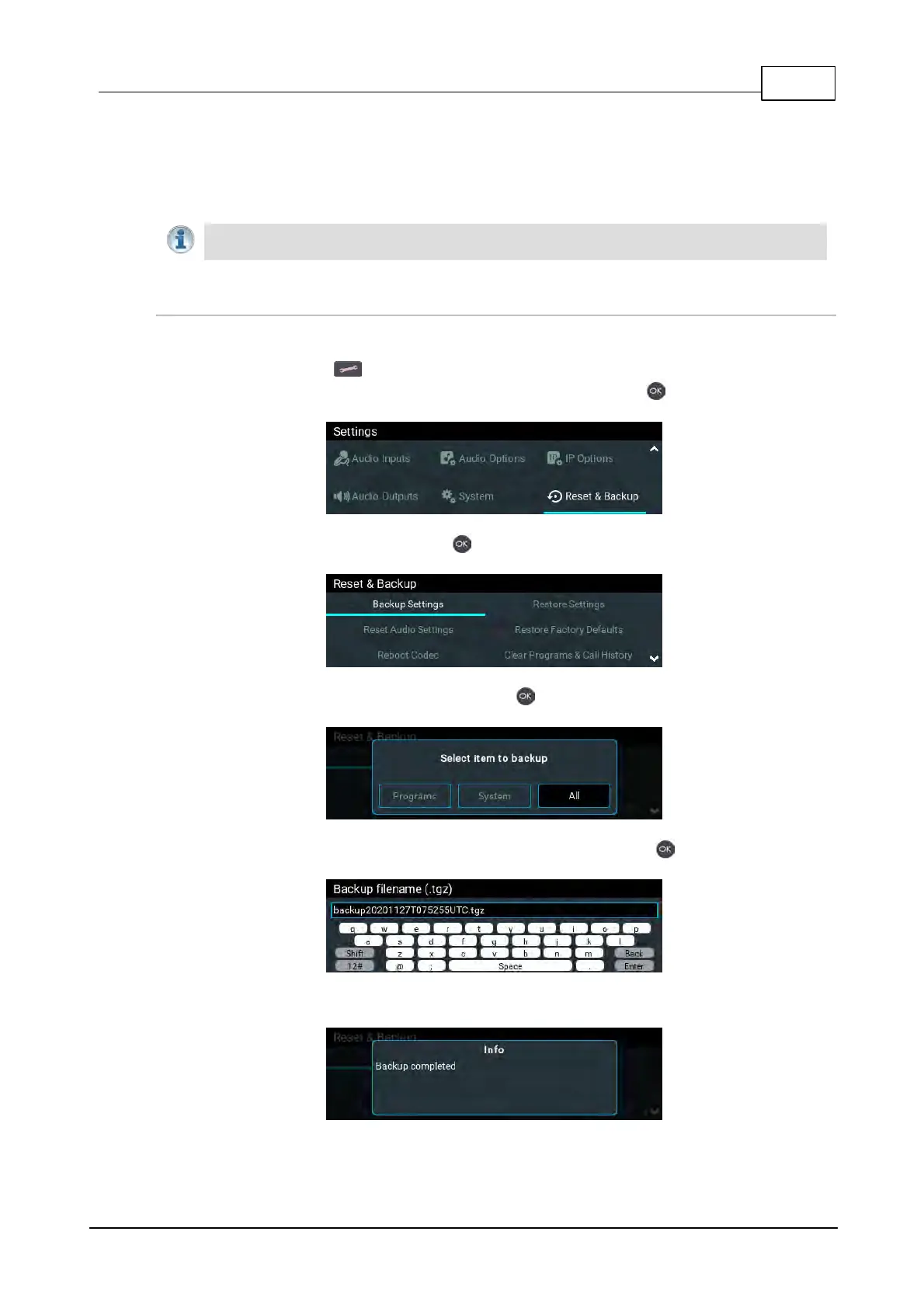
Creating a Backup File
1. Insert a single partition FAT 32 formatted SD card into the SD CARD SLOT on the front of the
codec.
2. Press the SETTINGS button.
3. Use the navigation buttons to select Reset & Backup and press the button.
4. Select Backup Settings and press the button.
5. Select the preferred backup option and press the button.
6. Edit the file name if required and then navigate to Enter and press the button to save the file.
7. A confirmation dialog is displayed when the file is saved successfully.



 To Next Page