40 Gateway and Gateway 4 Manual v1.2
© Tieline Research Pty. Ltd. 2021
14 Configuring AES3 Audio
Analog / AES3 Inputs /
Outputs
(4 Analog / AES3 in/out)
ANALOG/AES3 IN RJ-45 connectors provide shared
stereo analog line inputs 1-4, or stereo AES3 digital
inputs 1-4. ANALOG/AES3 OUT RJ-45 connectors
provide shared stereo analog line outputs 1-4, or stereo
AES3 digital outputs 1-4.
Analog / AES3 Inputs /
Outputs
(8 Analog in/out; 16 AES3
in/out)
ANALOG/AES3 IN RJ-45 connectors provide shared
stereo analog line inputs 1-4, or stereo AES3 digital
inputs 1-4. Connectors 5-8 provide stereo AES3 digital
inputs 5-8. Balanced ANALOG/AES3 OUT RJ-45
connectors provide shared stereo analog line outputs 1-
4, or stereo AES3 digital outputs 1-4, plus stereo
AES3 digital outputs 5-8.
Codecs feature stereo AES inputs and outputs on the rear panel of the codec for AES3 (AES/EBU)
format audio. These balanced 110 ohm inputs can operate effectively over distances of up to 100
meters and accept both mono and stereo AES3 signals.
Configuring AES3 Inputs and Outputs Globally
Either analog or digital audio is supported via RJ-45 inputs. To configure codec inputs and outputs
for digital AES3 requires two settings to be configured for inputs and outputs 1-4 (Gateway 4) and
inputs and outputs 1-8 (Gateway 8/16). First, the codec needs to be configured globally for AES3
input and output audio, instead of digital AES67 audio. Next, ensure inputs are configured for AES3
digital audio via Settings > Audio Inputs > Type.
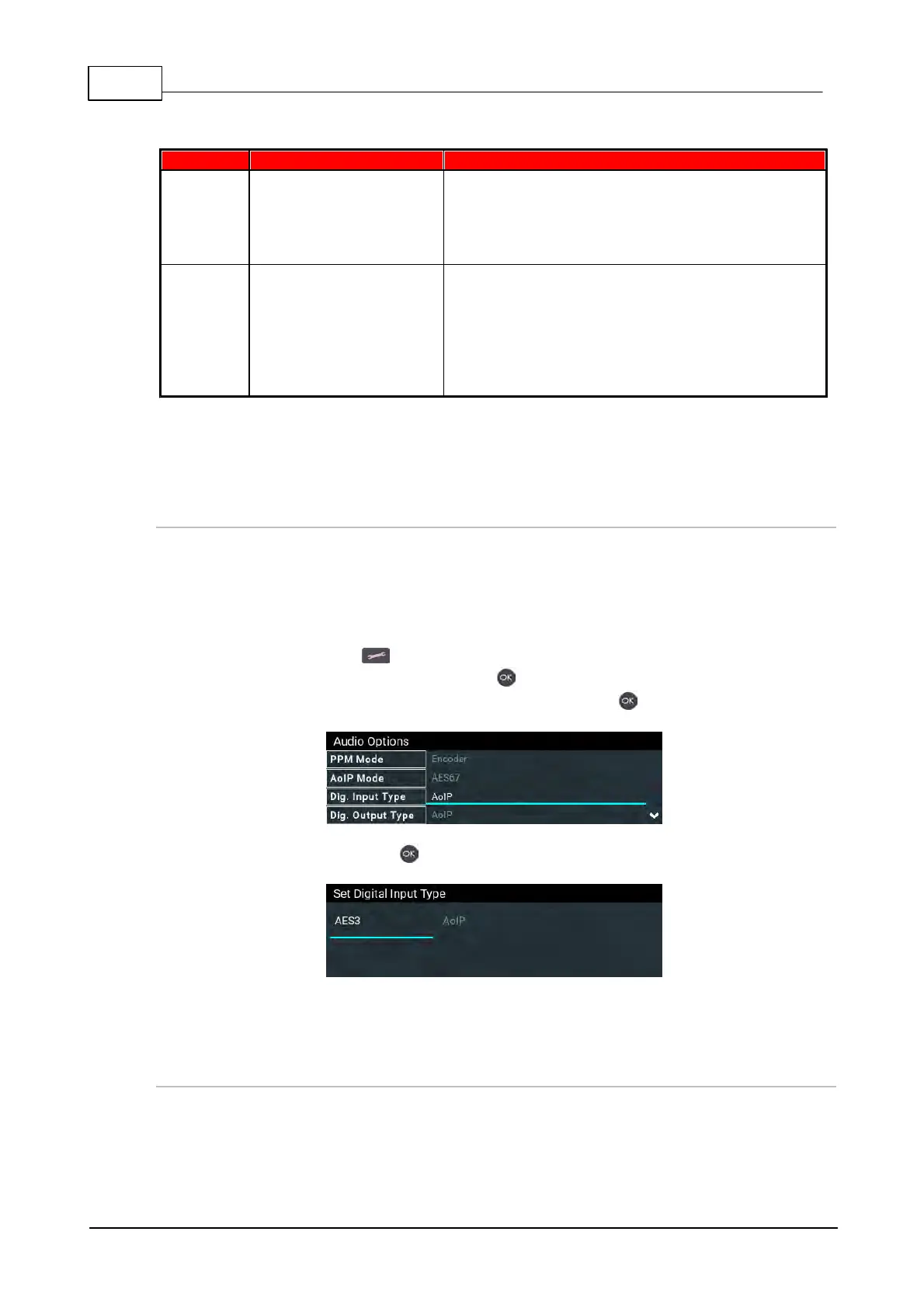
1. Press the SETTINGS button.
2. Navigate to Audio Options and press the button.
3. Select Dig. Input Type or Dig. Output Type and press the button.
4. Select AES3 and press the button.
Note: Gateway 16 codec inputs and outputs 9-16 are configured for AES3 when the Dig. Input
Type and Dig. Output Type are set for AES3 audio.
Configuring Inputs for Digital or Analog Audio
Inputs and outputs 1-4 (Gateway 4) and inputs and outputs 1-8 (Gateway 8/16) can be configured in
pairs for either Analog or Digital audio. After selecting AES3 globally for inputs and outputs in the
Dig. Input Type or Dig. Output Type menu, next ensure inputs and outputs are configured at the
input/output level:



 To Next Page