28 Gateway and Gateway 4 Manual v1.2
© Tieline Research Pty. Ltd. 2021
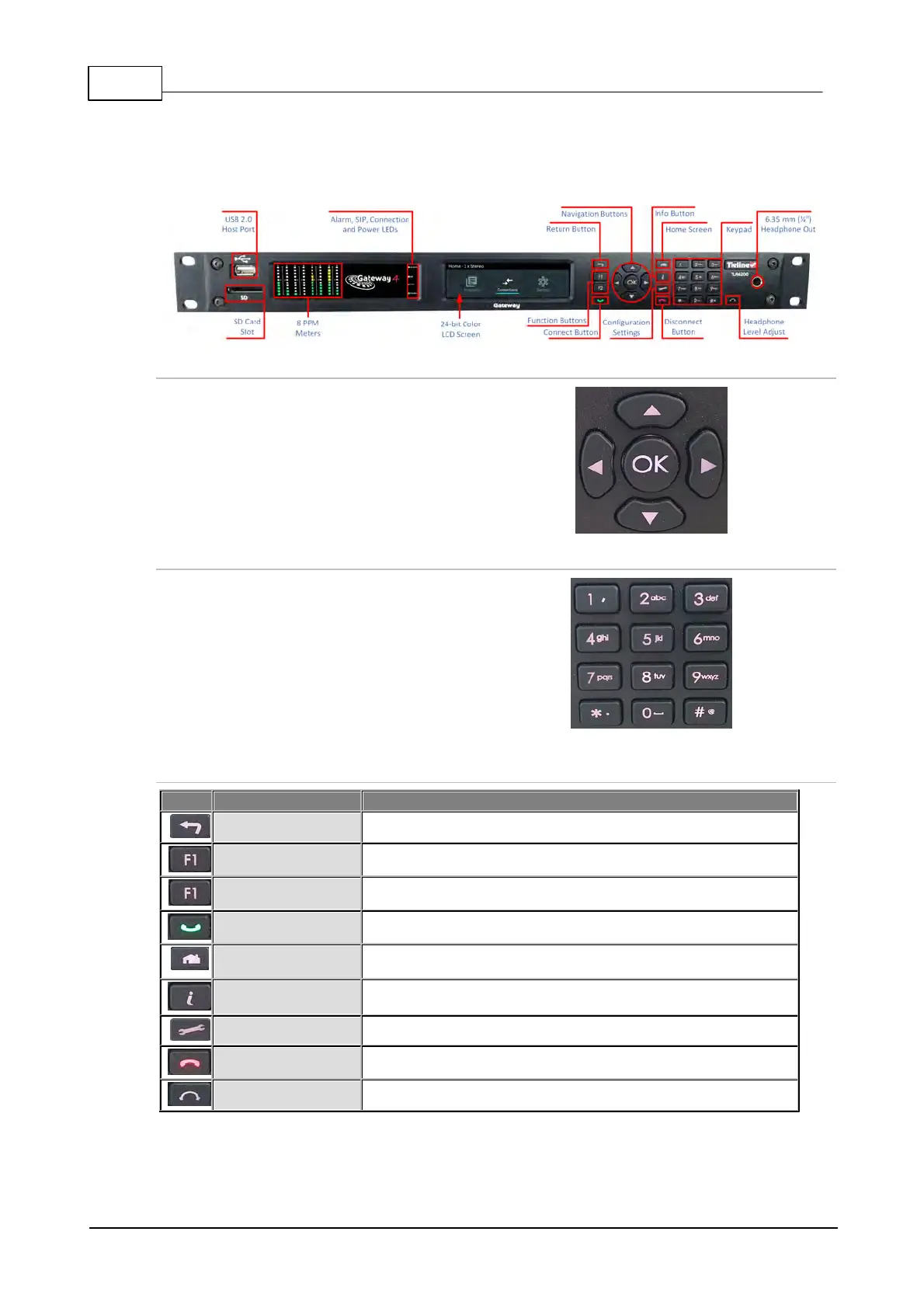
10 Gateway 4 Front Panel Controls
The hardware front panel interface features menu navigation buttons, an LCD display with PPM
metering and a dialing keypad.
Navigation Buttons
The codec has four arrow shaped navigation
buttons for navigating codec menus and
adjusting levels, and an OK button for
selecting menu items.
Dialing Keypad
The keypad has alpha-numeric buttons, plus
star and hatch (pound) buttons, which can
be used to enter contact and program
information into the codec. Note: a virtual
keyboard appears for entering alphanumeric
characters in fields displayed on the codec
LCD SCREEN.
Operation Button Description
Operation Button Descriptions
Press to move back through menus & delete characters
Press to activate codec user functions and relays
Press to activate codec user functions
Press to create an IP connection
Press to return to home screen
Press to view a help menu onscreen
Press to adjust codec settings
Press to end a connection
Press to adjust headphone audio levels



 To Next Page