80 Gateway and Gateway 4 Manual v1.2
© Tieline Research Pty. Ltd. 2021
Control Menu
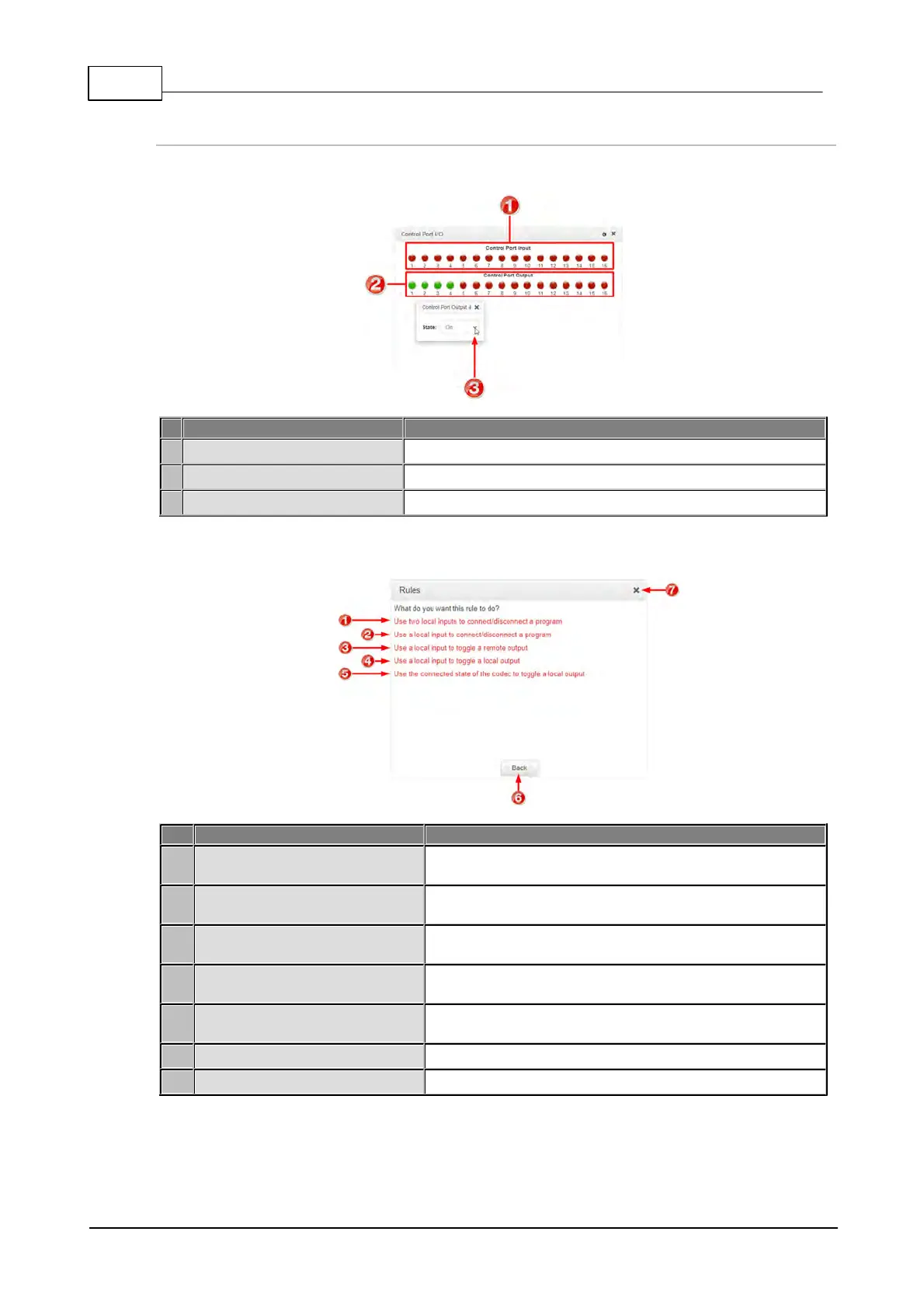
Control Port I/O
Displays the state of a control port input
Displays the state of a control port output
Click a Control Port Output to change the On/Off state
Rules Panel
Use two local inputs to
connect/disconnect a program
Click to configure connection and disconnection after
different relay inputs are switched ON.
Use a local input to
connect/disconnect a program
Click to configure connection and disconnection by
toggling an input.
Use a local input to toggle a
remote output
Click to configure a local relay input to synchronize with
the state of a remote relay output.
Use a local input to toggle a
local output
Click to configure a local relay input to synchronize with
the state of a local relay output.
Use the connected state of the
codec to toggle a local output
Click to configure a relay to toggle based on connection
status.
Back / Add New Rule button
Click to add a new rule, or exit the rule creation function.
Click to close the panel.



 To Next Page