User Manual: WaveLinx Lite (4.0)
103
sable and Enable Daylighting for Closed Loop Sensors
Default closed loop daylight operation is dependent on sensor type:
• By default, daylight dimming and dim-to-off functionality is enabled for outdoor closed loop sensors in dimmable zones. If the devices are
in areas that should not respond to daylighting disable the daylight set.
• By default, daylight dimming and dim-to-off functionality is disabled for interior closed loop sensors in dimmable zones (ambient,
industrial, and tilemount sensors) and will need to be enabled for lighting to respond to daylighting.
WARNING: Disabling the daylight set will cause sensors to operate solely from motion sensor activity. The occupancy
sensor will trigger response during daytime and nighttime hours regardless of light level.
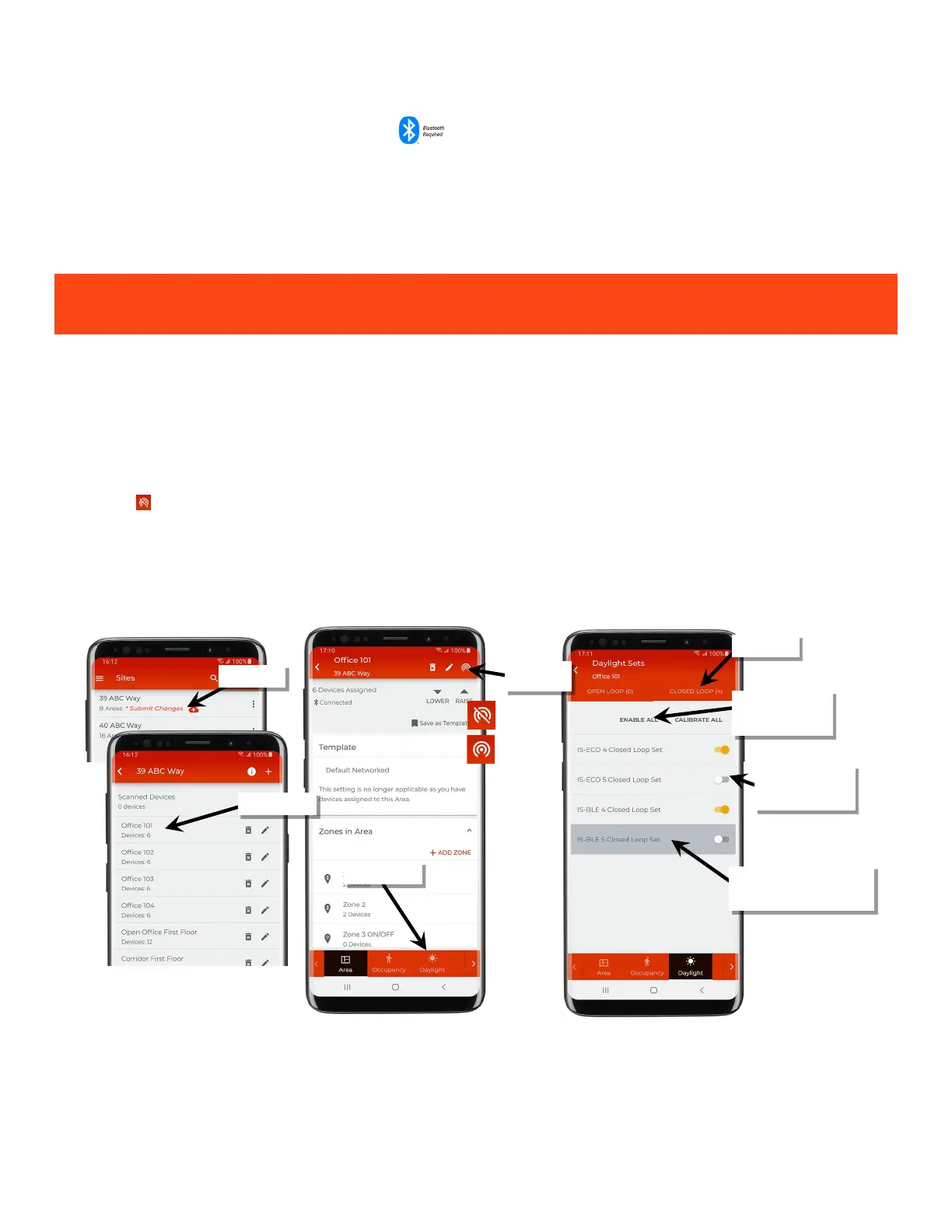
To disable or enable daylighting for a sensor:
1: If necessary, identify the correct daylight set using the instructions starting on page 102.
2: Bring the mobile device within range (within 60 feet) of any line voltage powered provisioned WaveLinx Lite device in the desired area.
3: Ensure that the mobile device Bluetooth is turned on, and then open the WaveLinx Lite Mobile Application.
4: In the site list, select a site.
5: In the area list, select the desired area. After a short delay, verify that the area shows that the mobile application is connected to the network.
Tap on the icon if it is necessary to refresh the connection.
6: Tap ‘Daylight’ to open the daylight set list.
7: Tap ‘Closed Loop; and locate the desired daylight set, scrolling up and down as needed. Once located, slide the switch to disable or enable
the desired daylight set, or use the enable/disable all button at the top of the screen to affect all daylight sensors in the area.
Note: If a sensor is being used for an open loop daylight set it will appear inactive (grayed out) on the screen and cannot be adjusted. Devices that are
provisioned in a non-dimmable or receptacle zone will have a dark gray highlight and cannot be adjusted.
Verify network
connection
‘Disable All’ to adjust
all sensors
Device automatically disabled
because it is in a non-dimmable or
receptacle zone
enable or disable the
sensor



 To Next Page