User Manual: WaveLinx Lite (4.0)
97
Modify Wallstations in Networked Areas
Wallstations can only be provisioned/assigned to network areas. Within the area, wallstations can be modified to allow for a more descriptive
name and different command actions.
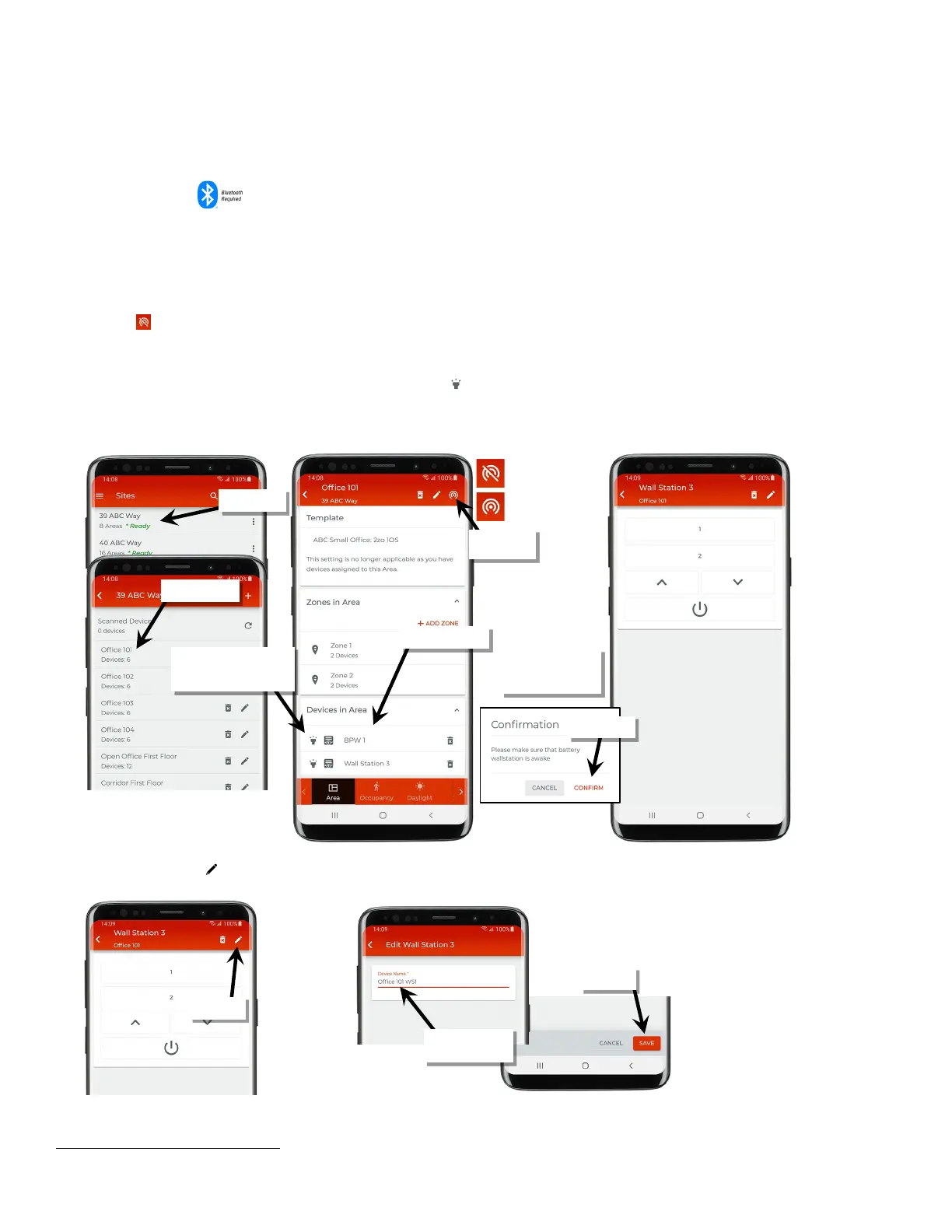
To modify a wallstation:
1: Bring the mobile device within range (within 60 feet) of any line voltage powered provisioned WaveLinx Lite device in the desired area.
75
2: Ensure that the mobile device Bluetooth is turned on, and then open the WaveLinx Lite Mobile Application.
3: In the site list, select a site.
4: In the area list, select the desired area. After a short delay, verify that the area shows that the mobile application is connected to the network.
Tap on the icon if it is necessary to refresh the connection.
5: In the ‘Devices in Area’ list, locate the wallstation. Tap on the wallstation to open it for configuration. The mobile application will display the
wallstation’s configuration on the screen.
• Line voltage wallstations only: If needed, use the identify icon ‘ ‘ to flash the wallstation LED until the correct one is identified.
• Battery powered wallstations only: After selecting the wallstation, when prompted to wake the station, go to the physical wallstation and
press any button. On the app screen, tap ‘Confirm’.
6: Tap on the pencil icon ‘ ’ at the top of the screen and type a unique name for the wallstation. Tap ‘Save’.
75
To make a change to a battery powered wallstation, there must be a Bluetooth communication connection through a line voltage powered WaveLinx Lite device.
Verify network
connection
If needed, use ‘identify’ to
locate the correct device (line
voltage wallstations only)
only: Press any button
on the wallstation



 To Next Page