User Manual: WaveLinx Lite (4.0)
77
Step 6: Site Administrator: View Co
-Commissioner(s) and Site Status
There are several locations where a site administrator can keep track of site progress.
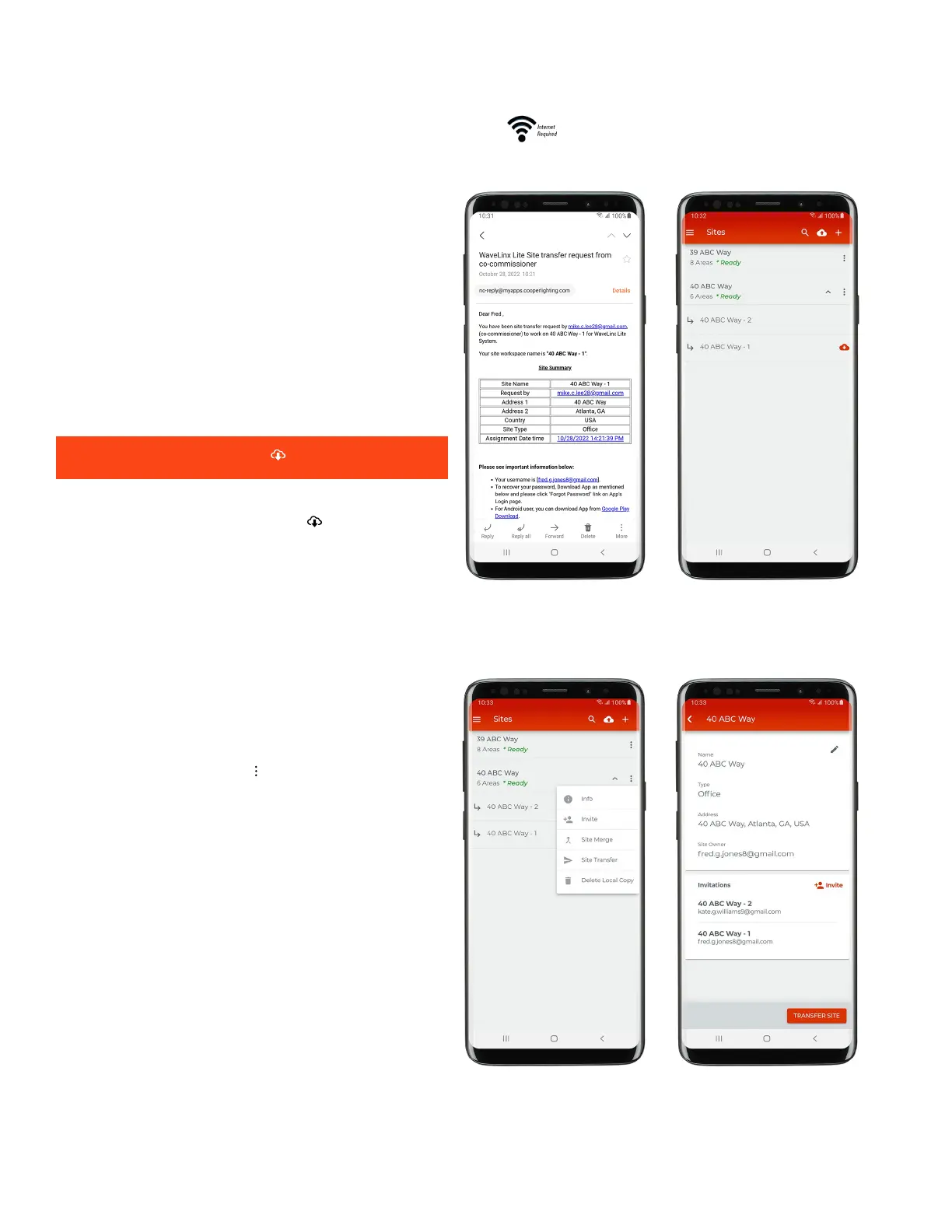
-commissioner transfers the site workspace to the site
administrator, the site administrator will receive an email letting
them know that the site workspace has been transferred.
When the site administrator logs into their WaveLinx Lite Mobile
App and expands the site, transferred sites will have a restore
option.
It is not necessary to restore ‘ ‘ the transferred site.
Other site workspaces without the
restore ‘ ’ option have not
been completed or transferred.
If the site administrator taps the ‘
’ icon and selects ‘Info’ their
user email should show under site owner and in the invitations
section for the site workspace that has been transferred. Other site
workspaces that are not completed/transferred will show the
assigned co
-commissioner’s email address.



 To Next Page