User Manual: WaveLinx Lite (4.0)
85
Modify Devices in Networked Areas
After devices are provisioned, it is possible to change the device name. Devices may also be deleted, returning them to an unprovisioned state.
For details on moving a device to a different zone, refer to page 83. Internet connection is not needed to modify a device but connection to the
WaveLinx Lite device/network is required.
Optionally devices may be given a more descriptive name to help with identifying the device location or function.
To change a device name:
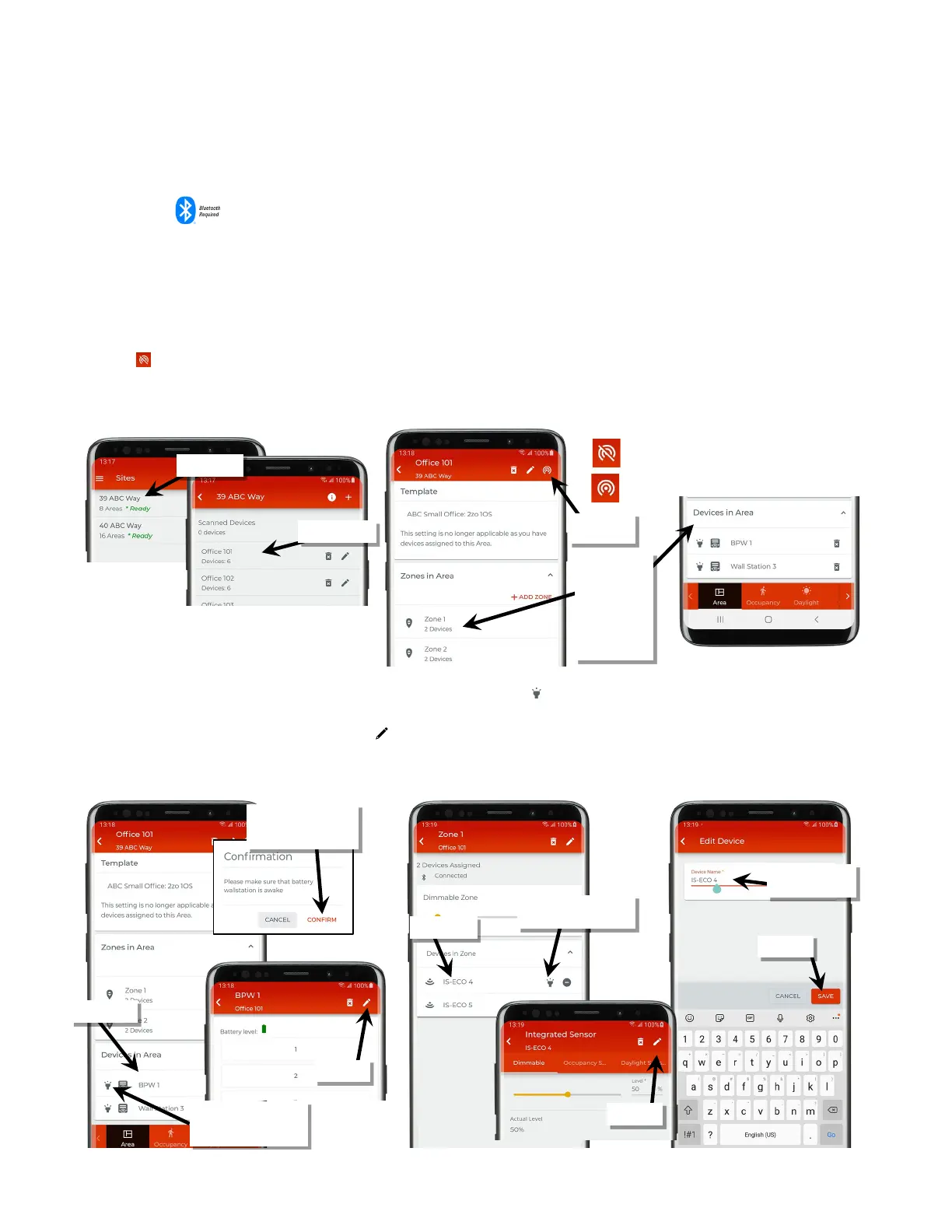
1: Bring the mobile device within range (within 60 feet) of any line voltage powered provisioned WaveLinx Lite device in the desired area.
2: Ensure that the mobile device Bluetooth is turned on, and then open the WaveLinx Lite Mobile Application.
3: In the site list, select a site.
4: In the area list, select the desired area. After a short delay, verify that the area shows that the mobile application is connected to the network.
Tap on the icon if it is necessary to refresh the connection.
5: If the device is a wallstation, scroll down to the ‘Devices in Area’ section. If the device is a control device (light fixtures with a fixture mount or
integrated sensor, for example), in the zone list, select the zone that the device is assigned to.
6: In the listed devices, locate the desired device. If needed, use the identify icon ‘ ‘ to place a device in identify mode until the correct device is
found (battery powered devices will not respond to an identify command).
7. Tap the device to open the device and then tap edit ‘ ’ to change the device a new name. Tap ‘Save’.
Note: Battery powered wallstations will request that a button be pressed. Once the wallstations is awake, tap ‘Confirm’ to proceed.
Verify network
connection
the device is
assigned to
OR
Locate the device
in ‘Devices in
Area’
Fixture Mount or Integrated Sensor
If needed, use ‘identify’ to
locate the correct device
wallstations: Press any
button then tap ‘Confirm’
If needed, use ‘identify’ to
locate the correct device
(only line voltage devices)



 To Next Page