User Manual: WaveLinx Lite (4.0)
71
Advanced Site Setup: Sites with Multiple Commissioners
This section is written specifically for site commissioning agents who are performing the initial WaveLinx Lite 4.0 equipment setup. For facility
owners/other personnel that are using the WaveLinx Lite Mobile App to administer a site that has already been programmed, skip to “Modify
Programming in Networked Areas” on page 80 or “Modify Programming in Standalone Areas” on page 119.
The WaveLinx Lite 4.0 Mobile Application allows up to five co-commissioners to work together to provision and program the same site. One
commissioner will be the site administrator. The site administrator creates the initial site, sends invites to up to four additional co-
commissioners, becomes the recipient of completed site workplace files once a team member’s work is completed, and then merges the files
into one final site database.
Co-commissioners, along with the site administrator, will individually work on specific portions of the site. An area cannot be shared between
co-commissioners. The team should communicate ahead of time to decide what areas each co-commissioner will be responsible for. Each co-
commissioner will only see the areas that they create.
Once the site administrator merges a site, it cannot be shared for co-commissioning again. Make sure that co-commissioning functions are
completed before merging the site.
The steps in this section show how to use the multiple commissioner option including:
• Step 1: Site administrator creates the site
• Step 2: Site administrator invites team members and shares templates
• Step 3: Co-commissioners receive invitation and restore their site workspaces and shared templates
• Step 4: Co-commissioners commission the site
• Step 5: Co-commissioners transfer completed site workspaces to the site administrator
• Step 6: The site administrator views co-commissioner site workspace status
• Step 7: Site administrator performs the site merge
• Additional considerations site ownership transfers during the commissioning process
Step 1: Site Administrator: Create the Site
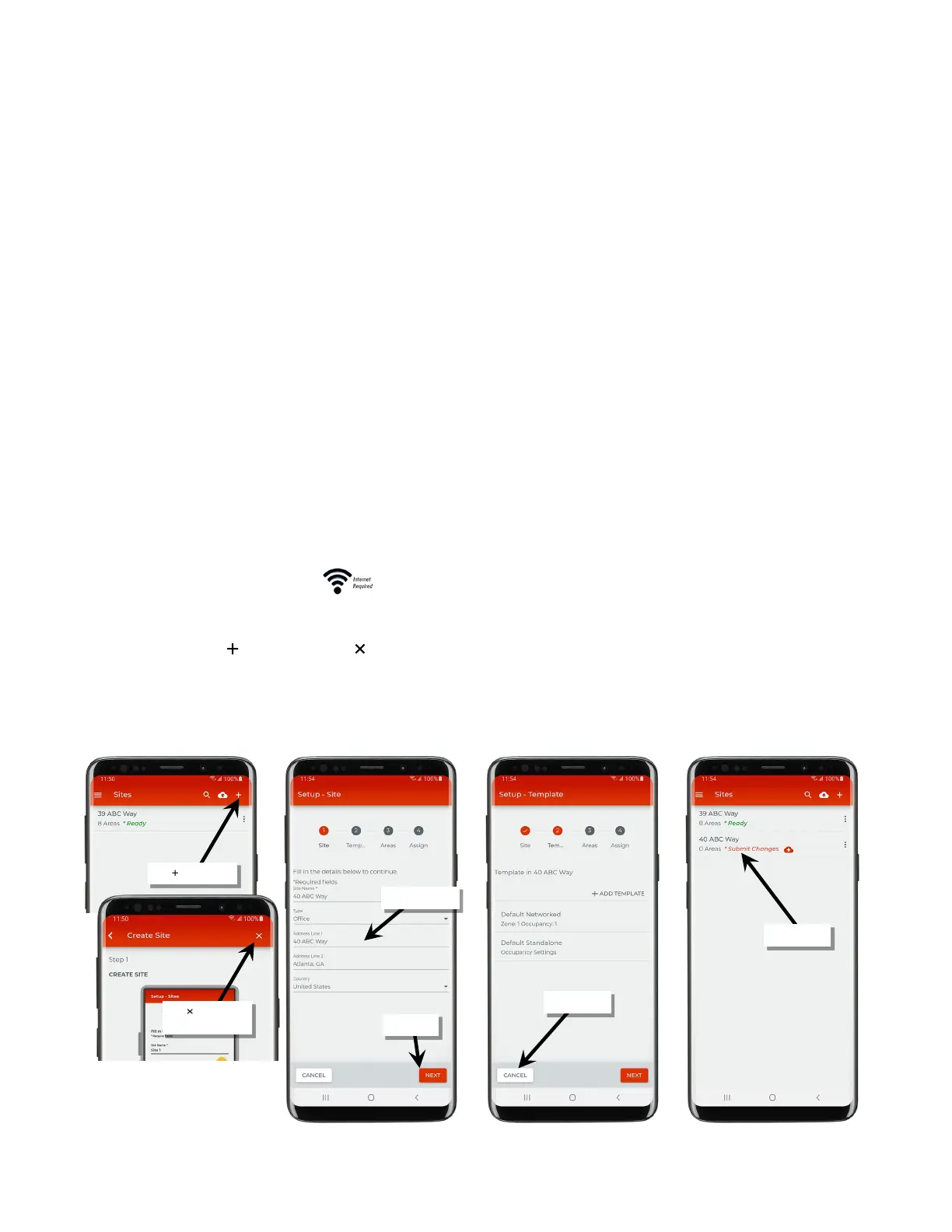
The site administrator needs to first create the main site that all team members will be commissioning. An internet connection is required.
1: The site administrator should open the WaveLinx Lite Mobile Application.
2: Tap ‘Add a Site’ or tap the ‘ ’ icon and then tap ‘ ’ to close the create site tutorial.
3: When prompted, enter a unique site name (alpha numeric) and the site details. Fields marked with the asterisk (*) are required. Tap ‘Next’ to
continue. If the app displays the message “Error, site name already exists”, the site name has already been taken by another user for their
site. Try adding a unique number or change the site name to something else.
4: At the bottom of the screen tap the option to ‘Cancel’ to exit from the setup wizard. The site will show in the site list.
tutorial



 To Next Page