User Manual: WaveLinx Lite (4.0)
154
IMPORTANT: Once the site ownership has been transferred, the site cannot be modified by the original user account
unless ownership is transferred back.
If the original site owner/administrator needs to transfer the site ownership to another person, the person must first register for their own
WaveLinx Lite user account. Make note of the registered email address for the new owner’s account.
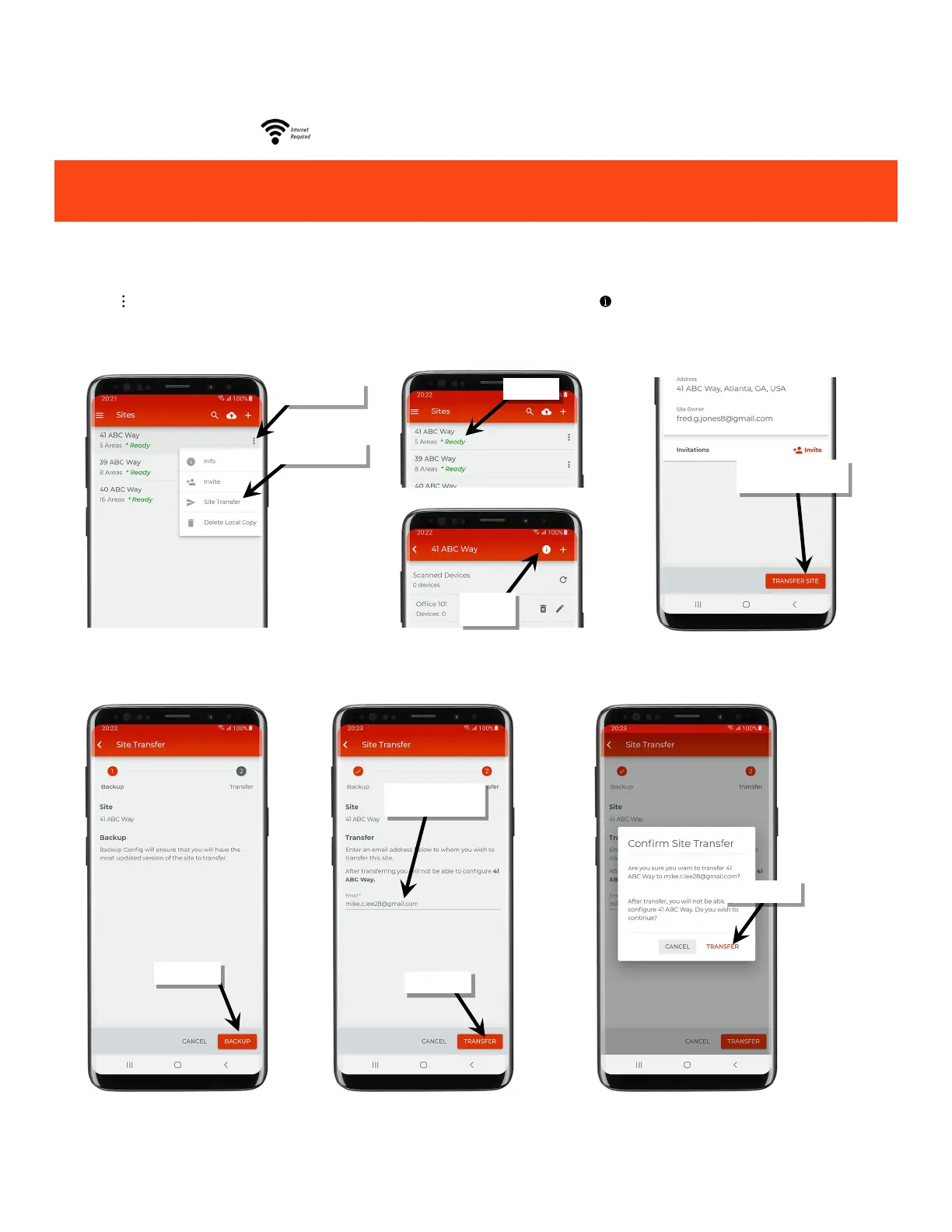
1: Ensure that the mobile device has internet access and then launch the WaveLinx Lite Mobile Application from the app icon.
2: Tap on ‘ ’ next to the desired site OR select the site and then tap on the information icon ‘ ’ at the top of the area list page to open the site
details.
3: Next, tap ‘Transfer Site’.
4: If prompted, tap ‘Backup’ and in the next screen enter the email address of the new site owner. Tap ‘Transfer’ and when prompted, confirm
the transfer.
icon
administrator’s email



 To Next Page