User Manual: WaveLinx Lite (4.0)
138
Raise and Lower the Light Level of a Single Dev
ice in a Networked Area
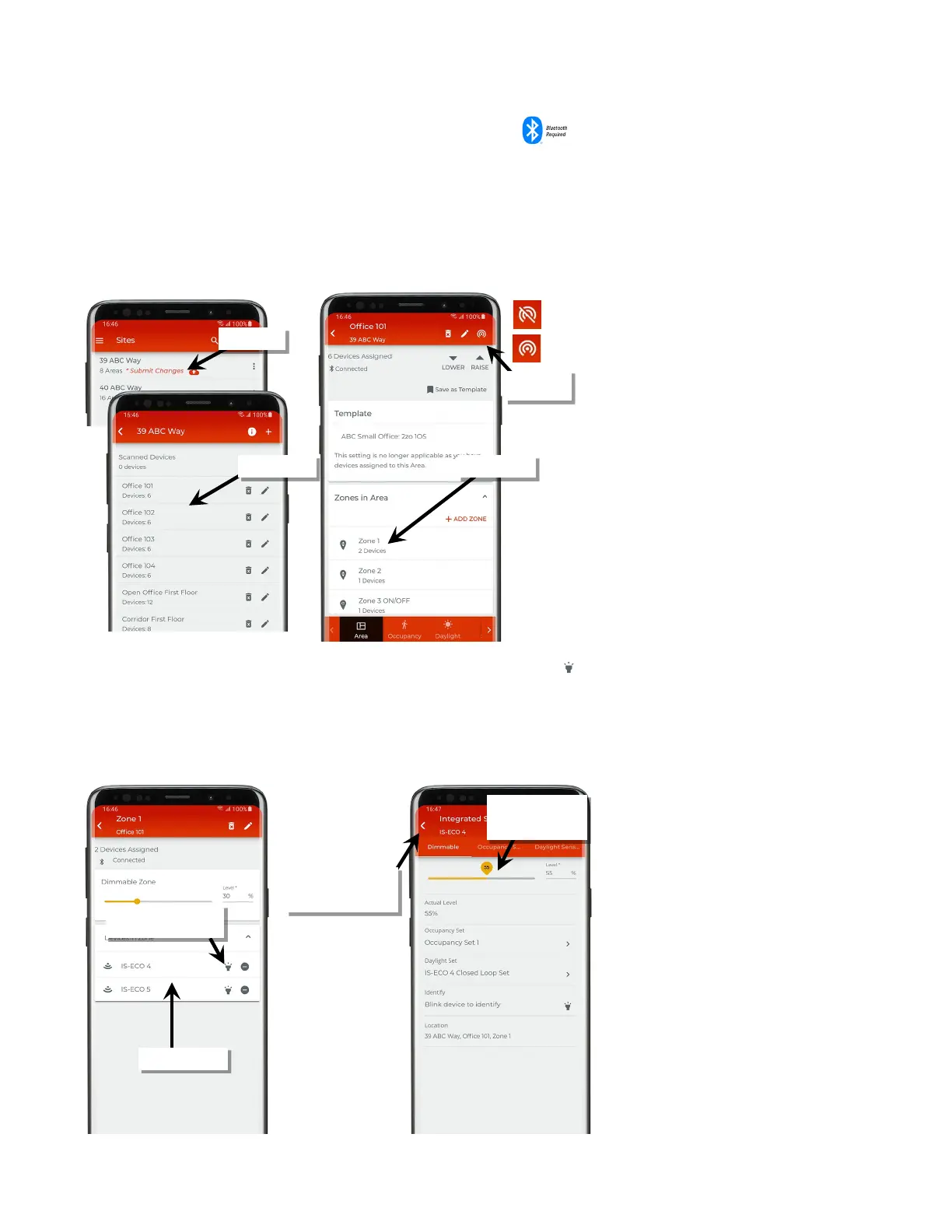
To temporarily raise and lower the light level of a specific device in a networked area:
1: Bring the mobile device within range (within 60 feet) of any line voltage powered provisioned WaveLinx Lite device in the desired area.
2: Ensure that the mobile device Bluetooth is turned on, and then open the WaveLinx Lite Mobile Application.
3: In the site list, select a site.
4: In the area list, select the desired area.
5: In the zone list, select the desired zone.
6: In the list of devices, locate the device to command. If needed, use the identify icon ‘ ‘ to flash the loads until the correct one is found, and
then tap the device to open the device details.
7: In the ‘Dimmable’ details page use the slider to adjust the light level for the desired device. The command will adjust the light to the desired
level for 10 minutes or until the device details page is exited.
Note: Devices in non-dimmable and receptacle zones will display a slider in the device details page. If the device is inherently a dimmable device it will dim with
commands from the slider. ON/OFF functionality will resume after the 10-minute timer expires or the device details page is exited.
Verify network
connection
If needed, use ‘identify’ to
locate the correct device
level using slider or
entry field
will cause light to resume
the last light level



 To Next Page