User Manual: WaveLinx Lite (4.0)
90
Adjust Occupancy Set Settings
The occupancy set programming defines the response for all sensors within that set. Zones are assigned to occupancy sets during the initial
site setup. Fixture mount or integrated sensors are then assigned to a zone when they are provisioned, which automatically joins the sensor to
the assigned occupancy set.
To modify the occupancy sensor set behavior:
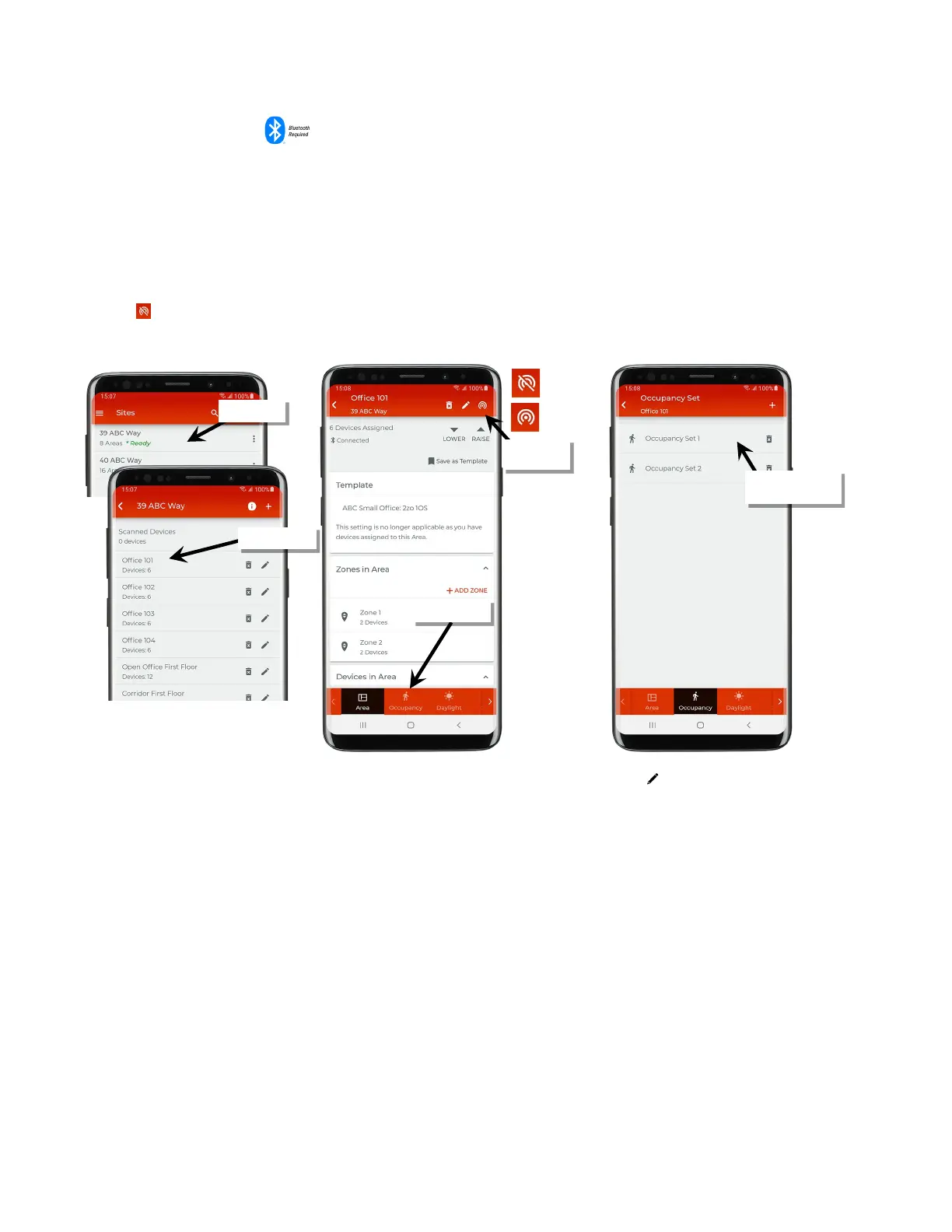
1: Bring the mobile device within range (within 60 feet) of any line voltage powered provisioned WaveLinx Lite device in the desired area.
2: Ensure that the mobile device Bluetooth is turned on, and then open the WaveLinx Lite Mobile Application.
3: In the site list, select a site.
4: In the area list, select the desired area. After a short delay, verify that the area shows that the mobile application is connected to the network.
Tap on the icon if it is necessary to refresh the connection.
5: Tap on the ‘Occupancy’ option and then select the desired occupancy set.
Note: To make it easier to find in the mobile app, the occupancy set can be renamed by tapping on the pencil icon ‘ ’at the top of the settings screen.
set to modify
Verify network
connection



 To Next Page