User Manual: WaveLinx Lite (4.0)
80
Modify Programming in Networked Areas
This section is specific to networked areas. For standalone areas, see “Modify Programming in Standalone Areas” on page 119.
Once a networked area has been defined, the default behavior can be modified if different operation is expected. This section discusses how
to:
• Modify areas
• Modify zones
• Modify devices
• Modify occupancy sets
• Modify wallstations
• Modify scene light levels
• Work with daylight sets
Modify Area Settings in Networked Areas
Once created, areas can be renamed or deleted. This section discusses how to perform these functions.
Rename an Area
An area can be renamed at any time. This process does not require connection to the internet or a connection to the WaveLinx Lite
device/network.
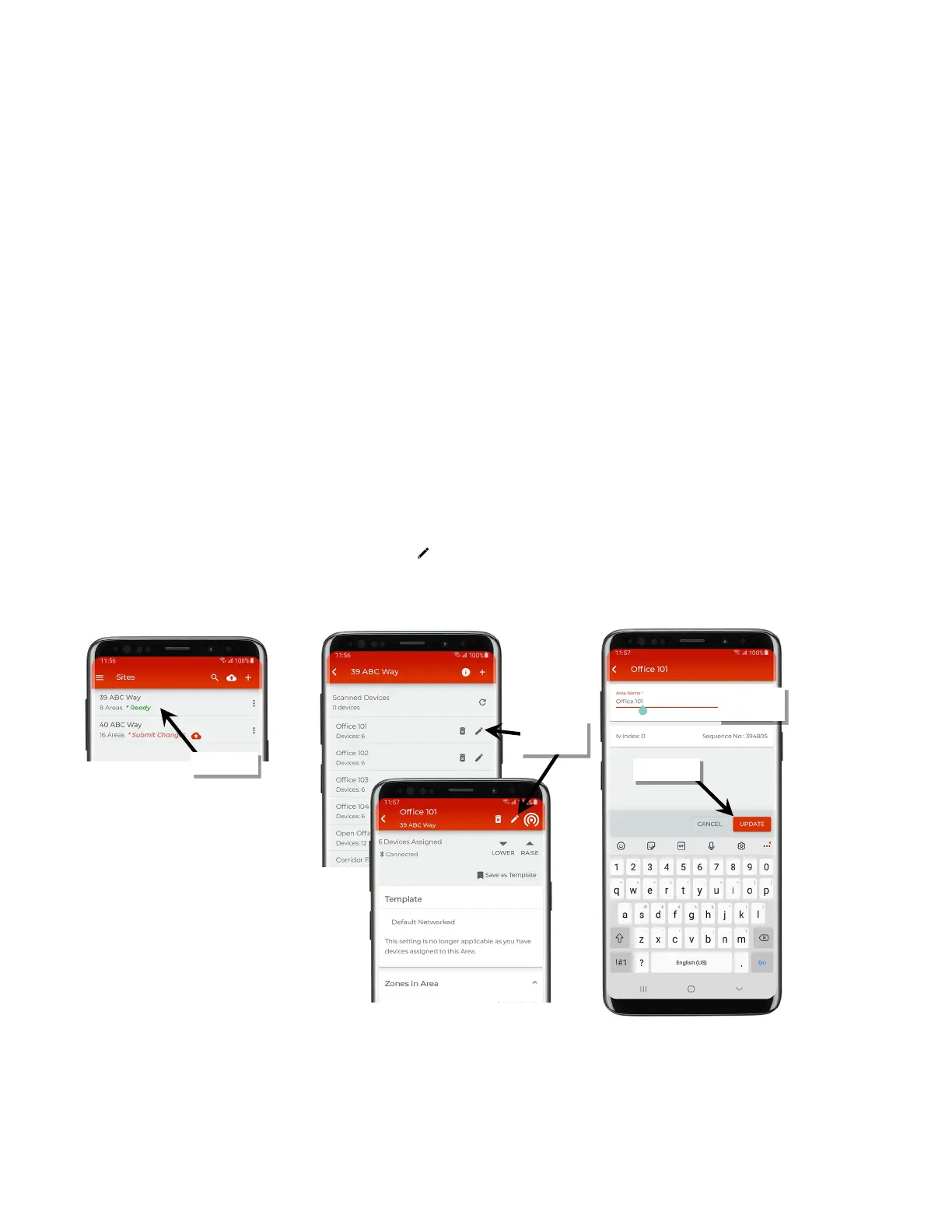
To rename an area:
1: Open the WaveLinx Lite Mobile Application.
2: In the site list, select a site.
3: In the area list or in an area’s screen, select the pencil icon ‘ ’.
4: Change the area name, and then tap ‘Update’.
icon
with changes



 To Next Page