User Manual: WaveLinx Lite (4.0)
18
Line Voltage Wallstation Reference Sheet
Line Voltage Wallstation
Features
• Bluetooth 4.2 Low Energy transmitter
• Commands Supported:
• Scene selection
• Raise/lower
• Zone level
• No Action
Power:
• Line voltage powered 120-277VAC (neutral
required)
Typical Applications
Education, office, and other interior spaces
Models:
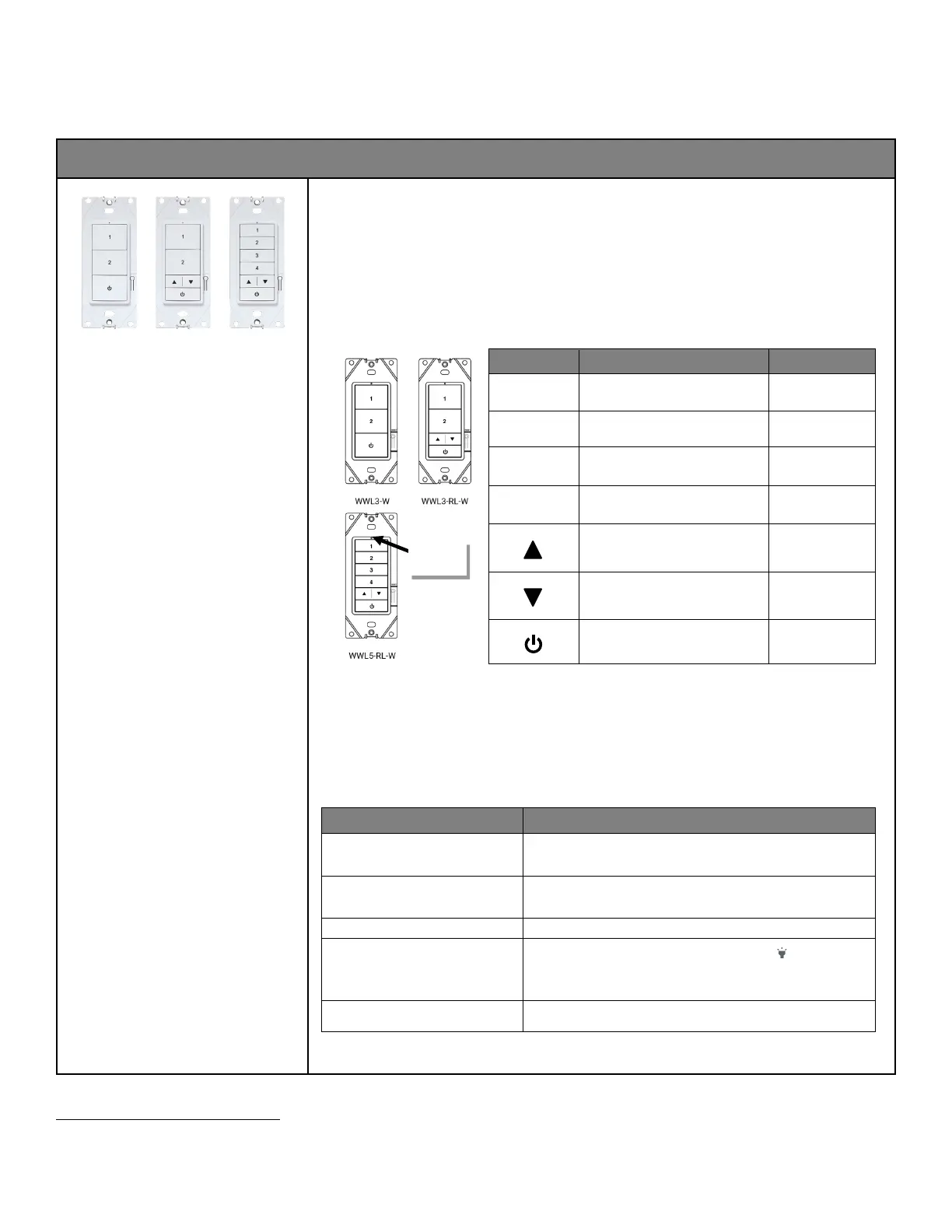
• WWL3: 3 Button
• WWL3-RL: 3 Button with Raise/Lower
• WWL5-RL: 5 Button with Raise/Lower
Custom engraving options
Mobile App Details:
• Device Category: Wallstation
• Default Device Name: Wall Station
Device name will be followed by a number once
provisioned
Powered from line voltage (120-277VAC), the WaveLinx Line Voltage Wallstation can be installed in single or multi-gang
configurations. The WaveLinx Line Voltage Wallstation controls WaveLinx Lite devices by sending control signals through the
Bluetooth Mesh network.
Out-of-the-Box Operation
• The wallstation will not control lighting out-of-the-box until it has been provisioned.
• When a button is pressed, the wallstation LED will blink green for 300ms, blue for 500ms, and then OFF for 1.2 second,
repeating the cycle for 10 seconds to indicate that the wallstation is powered and in out-of-the-box mode.
34
Provisioned Device Default Behavior
Once provisioned in a networked area using the WaveLinx Lite Mobile App, the Line Voltage Wallstation operates lighting
assigned to the same area per the default programming. When a button is pressed, the wallstation LED will blink white for
300ms, blue for 500ms, and then OFF for 1.2 seconds, repeating the cycle for 10 seconds.
34
Button Function Default Level
35
1 Scene 3 50%
2 Scene 1 100%
3
Scene 2 70%
4
Scene 4 30%
Press: increase 1% (per press)
36
Hold: increase 15% (per second)
36
Press: decrease 1% (per press)
36
Hold: decrease 15% (per second)
36
Scene 0 OFF
Loss of Communications Operation
There is no special operation for loss of communications for the wallstation. When the wallstation is powered, it will send a
command anytime a programmed button is pressed. If the controlled devices receive the signal, they will respond.
Operation upon Return of Power
The wallstation does not have any special behavior on powerup. Once powered, the wallstation will wait for the button to be
pressed before sending any commands.
LED Behavior
The LED is located above the top button on the wallstation.
LED conditions Meaning
Flashes green for 300ms, blue for 500ms
and then turns off for 1.2 seconds.
34
A button was pressed and the wallstation is not provisioned
Flashes white for 300ms, blue for 500ms
and then turns off for 1.2 second.
34
A button was pressed on the provisioned wallstation
The wallstation is being factory reset using the onboard reset.
Flashes (ON for 1 sec. OFF for 1 sec.) for
15 seconds
The device has been placed in ‘blink to identify’ mode ( )and is currently
identifying.
• LED green = unprovisioned wallstation
•
LED white = provisioned wallstation.
LED is OFF The LED will be OFF during normal conditions when buttons are not being
pressed if the station is powered
34
Devices with older firmware may not exhibit the exact LED pattern described.
35
If a custom template is used, behavior will follow the programming used in the template, not the default behavior shown.
36
This command affects all zones in the area.
location



 To Next Page