User Manual: WaveLinx Lite (4.0)
147
Perform Administrative Functions
This section describes some of the administrative functions that may be required in the WaveLinx Lite Mobile Application. This includes:
• Reset a site administrator password
• Edit the site details
• Understand site syncing
• Delete a local database
• Transfer site ownership
• Update device firmware
• Update the mobile application
Reset a Site Administrator Password
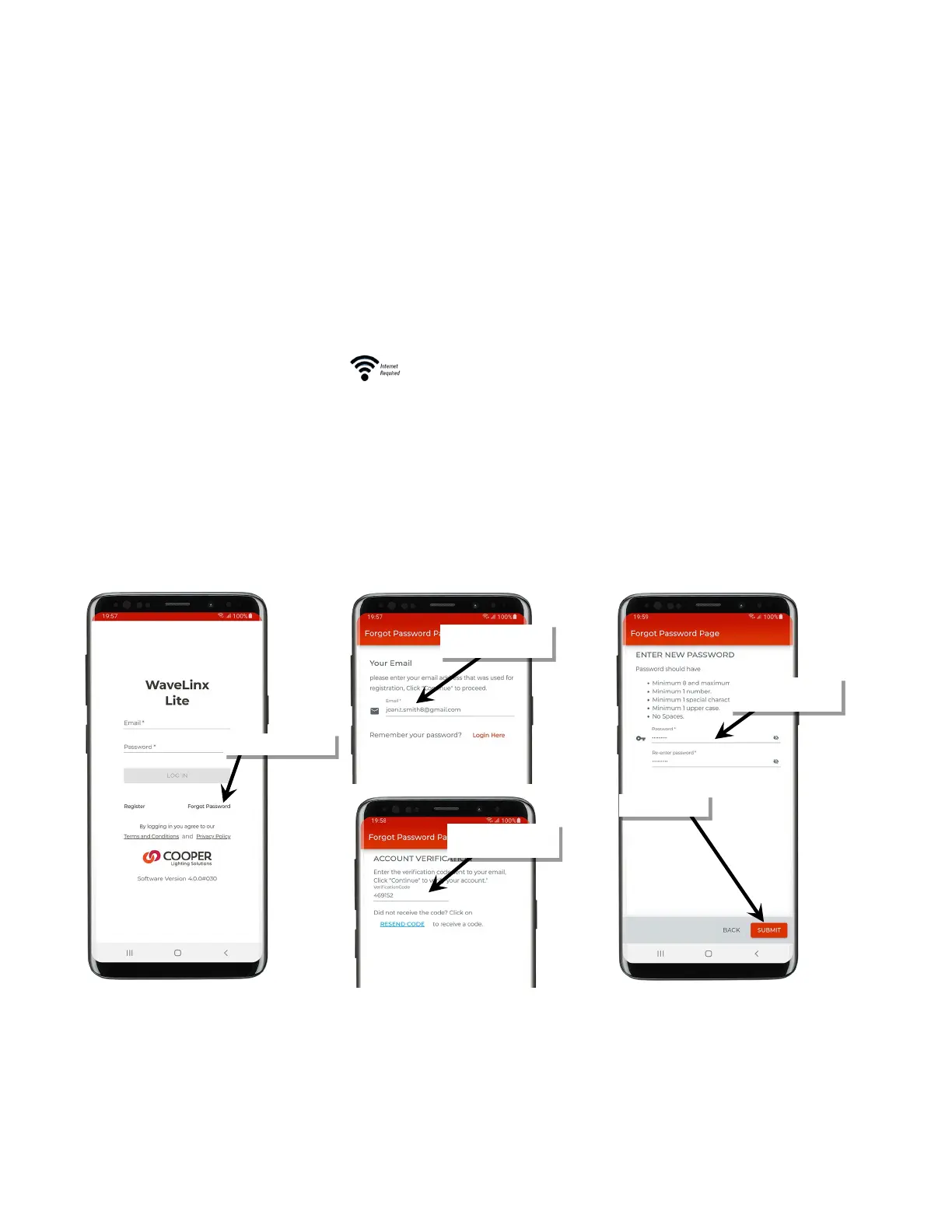
The WaveLinx Lite Mobile Application can be used to reset the password of a user account.
To reset a password:
1: Ensure that the mobile device has internet access and then launch the WaveLinx Lite Mobile Application from the app icon.
2: When prompted for login, tap ‘Forgot Password’.
3: Enter the email associated with the administrator’s account.
4: An email verification code will be sent to the provided email address. Enter the provided code, and then tap ‘Continue’.
Note: Check the email spam folder if the code is not received or tap ‘Resend Code’.
5: Define the new password and confirm.
6: When prompted, login with the user account and new password.
email, then tap ‘Continue’
Enter emailed verification
code, then tap ‘Continue’
password



 To Next Page