User Manual: WaveLinx Lite (4.0)
152
To push database changes without relying on the automatic sync, manually sync the site programming once the mobile device is in a location
that allows internet connection.95
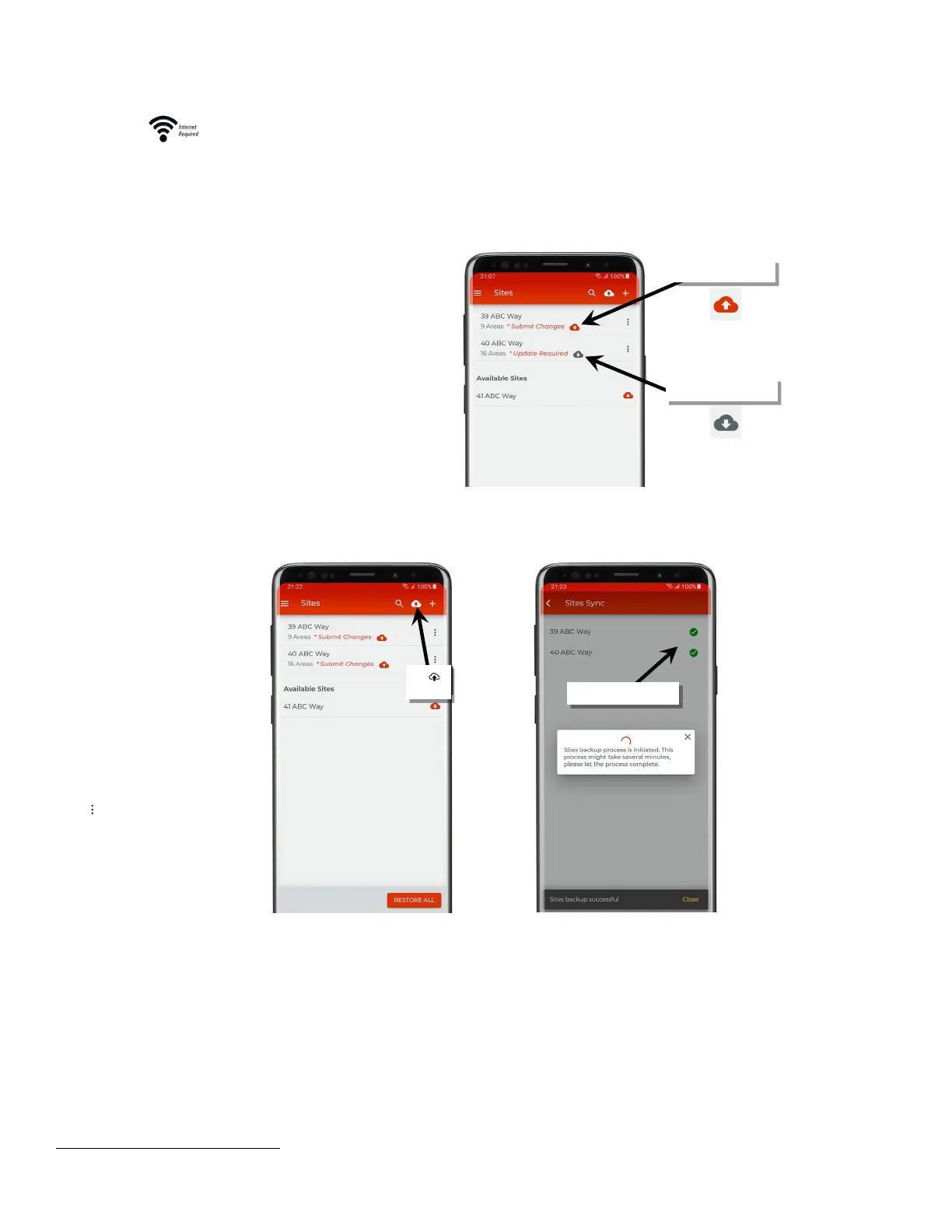
The manual sync can be processed in one of two ways.
1: For sites that are in ‘Submit Changes’ status or in ‘Update
Required’ status, use the icon next to the status indicator to
either send the changes to the cloud or to load the database
from the cloud right in the site list.
For any sites that have the ‘Merge Conflict’ message, see
“Merge Conflict Status” on page 150
for details on resolv
issue.
command will process for
any sites that are in the ‘Submit
Changes’ status.
2: Access the sync process from
the top of the site list
that are in ‘Submit Changes’
status will automatically begin
uploading the database to the
cloud.
n also be accessed
enu System more
’ Backup & Restore
Backup
95
It is not possible to store multiple backups for the same site. Only one database for the site will be stored on the cloud.
Tap



 To Next Page