User Manual: WaveLinx Lite (4.0)
72
Step 2: Site Administrator: Invite Co
-Commissioner(s)
The site administrator can invite up to four additional co-commissioners to work on the site. Invitations will be sent only to registered WaveLinx
Lite users. In addition to sharing the site, the site administrator can also share preconfigured templates to the co-commissioning team.
Before performing the steps below, ensure that each co-commissioner has a registered WaveLinx Lite user account and that the desired
templates have been created. An internet connection is required for the invitations to be emailed.
If an unregistered email address is entered in the invite process,
the
error message ‘Failed
to invite user’ will display.
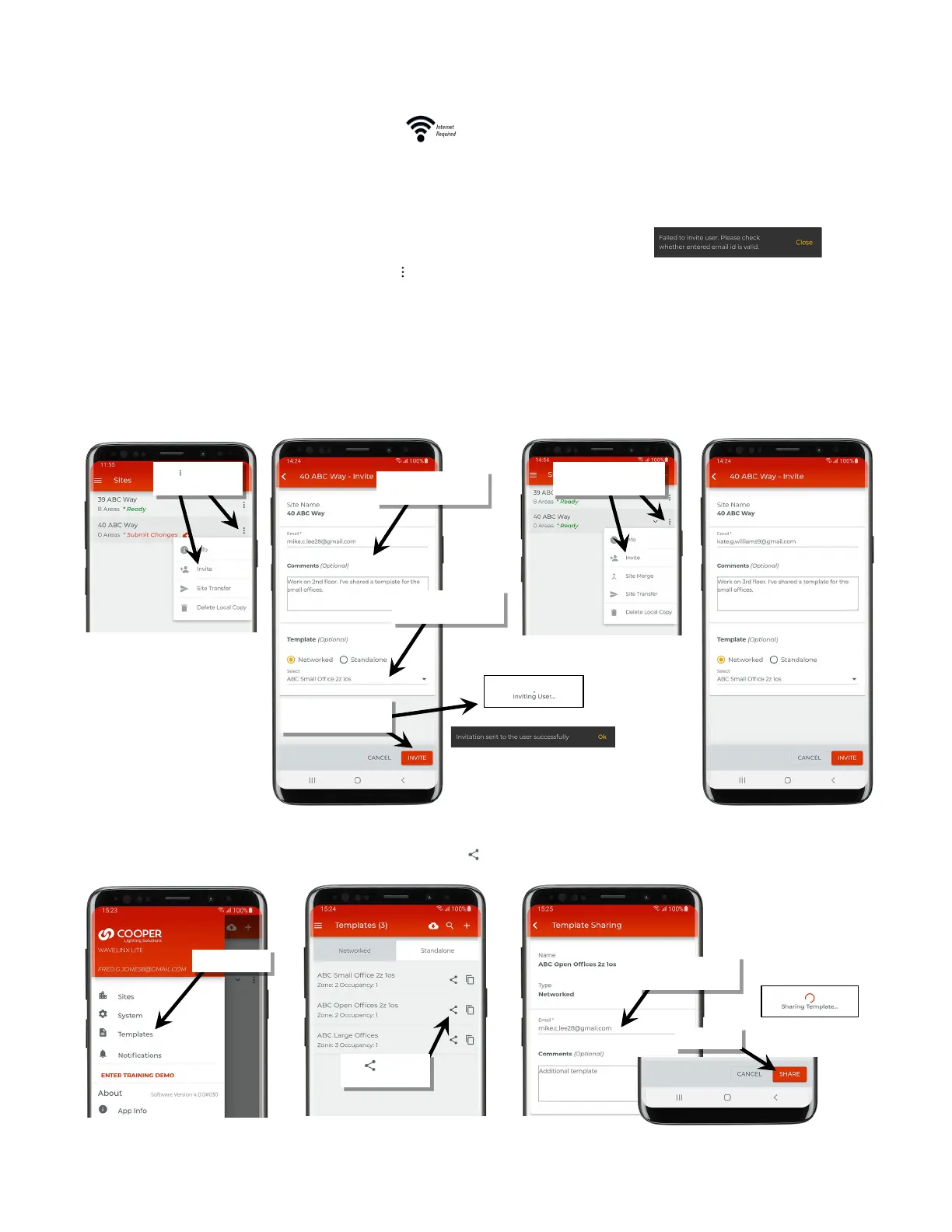
1: In the Sites list, locate the created site and then tap the ‘ ’ icon to list additional options.
2: Tap ‘Invite’ from the selection box and then enter the email address of a registered co-commissioner. Enter any notes that need to be
conveyed to the co-commissioner.
3: (Optional) If templates have been created that need to be used by the co-commissioner, select the first template, selecting between
‘Networked’ and ‘Standalone’ and then using the drop down to select the template. If more than one template needs to be shared, other
templates will be shared in a later step.
4: Next, tap ‘Invite’. The display may show messages indicating the invitation was sent before reloading the site list.
5: Repeat these steps to add additional co-commissioners.
6: (Optional) If additional templates need to be shared, from the menu, select ‘Templates’.
7: Locate the template that needs to be shared and tap the share icon ‘ ’.
8: Repeat for additional co-commissioners and templates.
‘Invite’
email and notes
Tap ‘Invite’ and then verify
the invite is sent
Repeat to invite additional
co-commissioners
template to share
Tap ‘ ’ next to the
email and notes



 To Next Page