User Manual: WaveLinx Lite (4.0)
31
Step 2: Register for WaveLinx Lite Mobile Application Access
Registration for an account is required before using the WaveLinx Lite Mobile Application. Once registered, the user will login to the mobile
application using the registered email address.
To register for a WaveLinx Lite account:
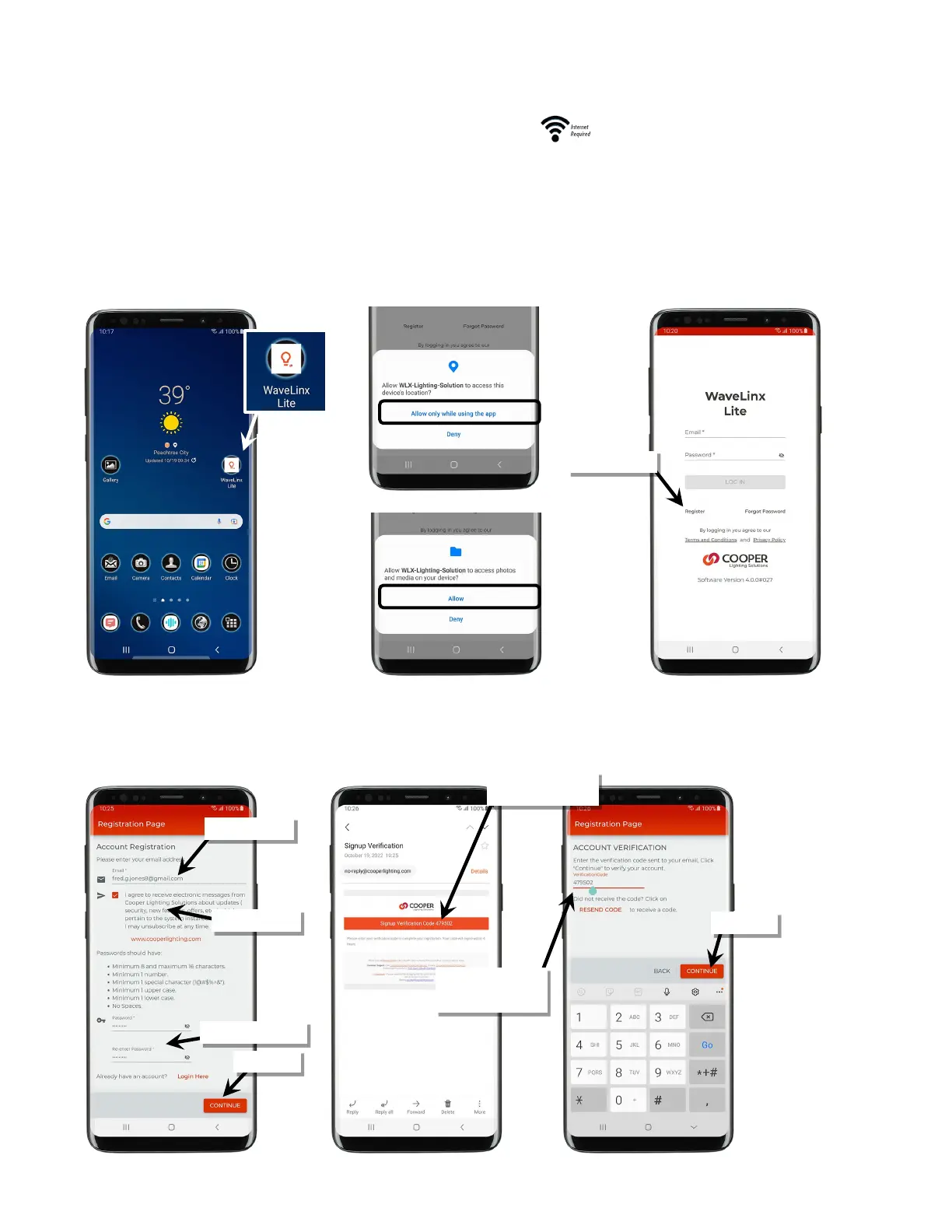
1: Ensure that the mobile device has internet access and then launch the WaveLinx Lite Mobile Application from the app icon.
2 When the application opens the first time, make sure to grant permission to allow access to location and media files to ensure that the app
functions properly.
3: When prompted to login, select the option to register.
4: Enter a valid email address and password, and then select preferences for any requested options. Tap ‘Continue’.
5: An email verification code will be sent to the provided email address. Enter the provided code, and then tap ‘Continue’.
Note: Check the email spam folder if the code is not received or tap ‘Resend Code’.
Locate verification code in
registered email account
Enter verification code or
tap ‘Resend Code’ if not
received



 To Next Page