User Manual: WaveLinx Lite (4.0)
24
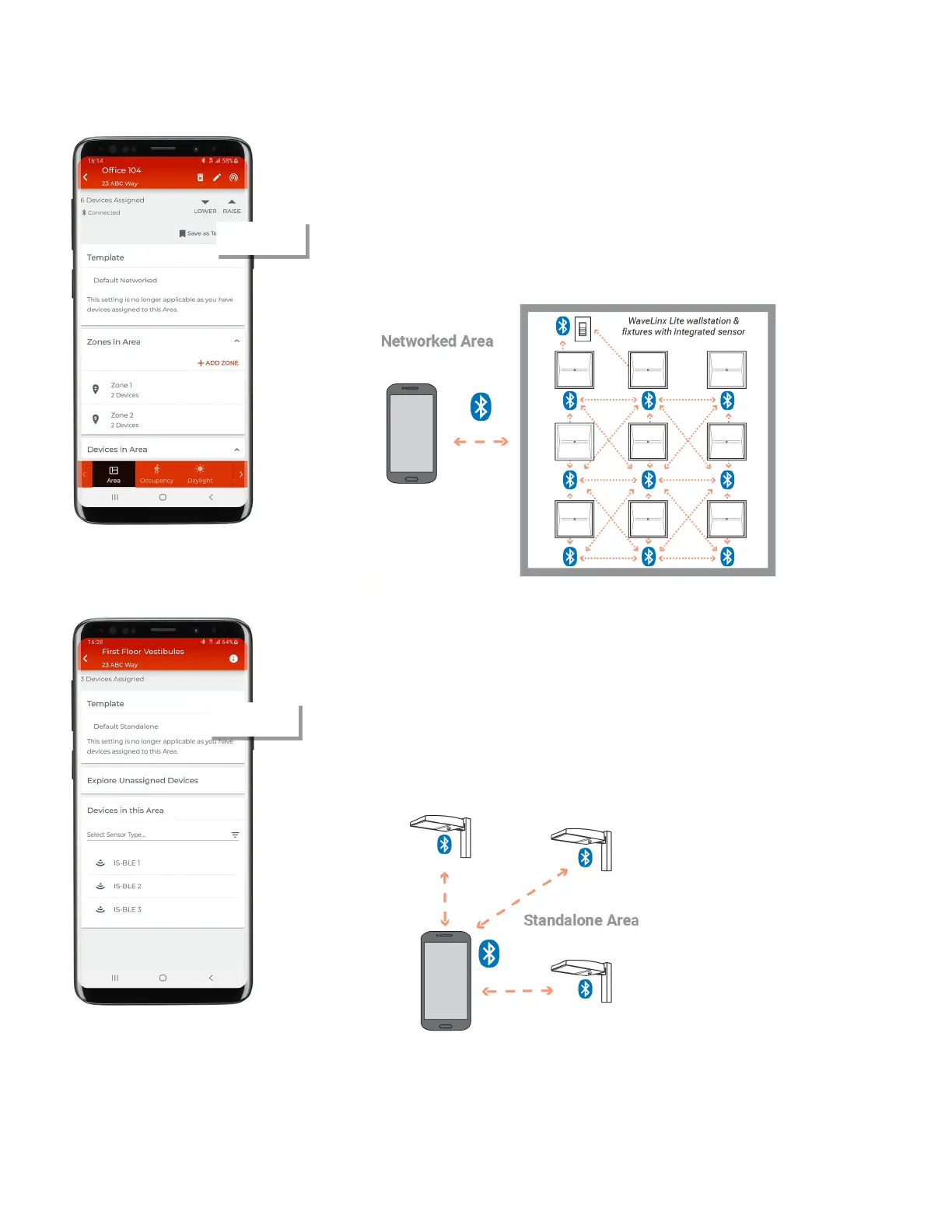
There are two distinct types of areas in the WaveLinx Lite system.
Networked Area: A networked area is a space in the facility where the devices in that space
nee
d to interact and communicate with each other such as in a room. For instance, if a
wallstation needs to control 9 light fixtures in a room, the wallstation and 9 light fixtures need
to be provisioned in the same area to allow this control. Up to 50 provisioned devices (40 best
practice) may be assigned to a networked area. Devices in a networked area will create a
unique Bluetooth mesh network among the provisioned devices
. Integrated, fixture mount, or
are organized in zones within the area while wallstations are organized
in the area.
Standalone Area: In some instances, devices that directly control lighting may need to
operate autonomously without interaction with other controls. These devices can be assigned
to a standalone area. Having the device provisioned in a standalone area allows the device to
continue to operate
independently but allows for adjustment of the device settings/behavior.
to the quantity of devices that may be provisioned in a standalone area.
Devices within a standalone area do not form a Bluetooth mesh network. When updating a
device’s settings, the
mobile application will communic
ate directly to the device, meaning the
mobile device running the WaveLinx Lite application must be within 60 feet of the desired
device.
Note that wallstations have no use case in a standalone area and cannot be assigned



 To Next Page